
Using the Feeds API to Retrieve Events
The Feeds API lets you programmatically retrieve events generated by a GreyNoise feed and process them in your own systems.
A typical integration follows this workflow:
- Fetch the next batch of events.
- Process the complete batch in your system.
- Acknowledge the batch using the cursor returned by the fetch request.
- Repeat on your preferred schedule.
GreyNoise creates a default consumer for every feed, so you can start retrieving events without creating one yourself. Additional consumers are optional and support advanced workflows that need to process the same feed independently.
Before you begin
You’ll need:
- Access to GreyNoise feeds
- Your feed ID (Once you create a feed, you can find the ID in the GreyNoise Visualizer under your feed name)
- A GreyNoise API key
You can create and configure the feed in the GreyNoise Visualizer before connecting it to your integration.
Understanding consumers
A consumer represents an independent position, or checkpoint, within a feed’s event history.
Each consumer remembers the last batch it successfully acknowledged. The next fetch for that consumer starts after its stored checkpoint.
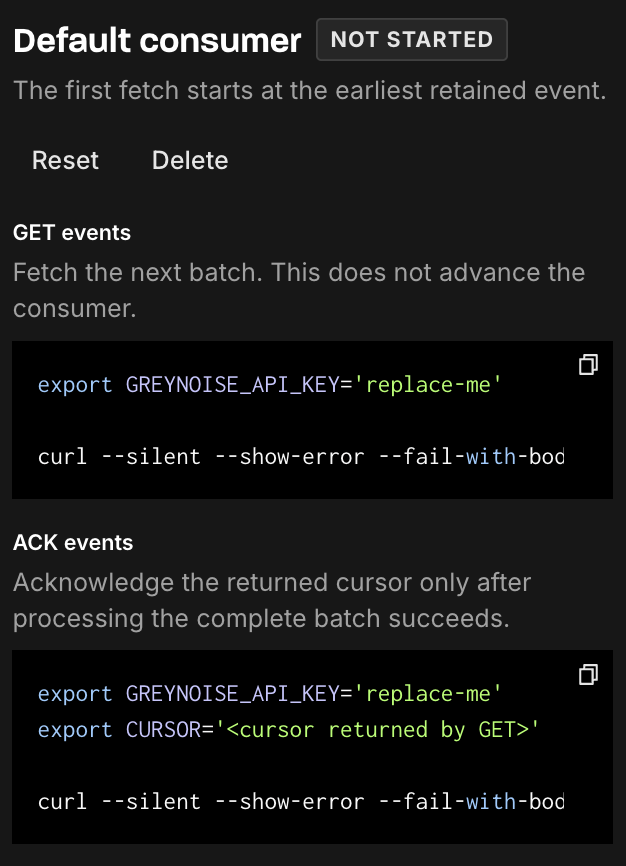
Every feed includes a consumer named default. For most integrations, this is the only consumer you’ll need.
When to create another consumer
Create an additional consumer when multiple systems need to process the same feed independently.
For example, you might have:
- A near-real-time process that fetches small batches frequently
- A daily job that retrieves larger batches
- Separate production and testing integrations
- Multiple downstream systems that must process every event
Each consumer maintains its own checkpoint. Fetching or acknowledging events for one consumer does not advance another consumer’s position in the feed.
Fetch the next feed-event batch
Use the fetch endpoint to retrieve the next available events for a feed.
GET /v3/feeds/{feed_id}/eventsYou can optionally provide:
consumer: The consumer whose next batch you want to retrieve. If omitted, GreyNoise uses thedefaultconsumer.limit: The maximum number of events to return, from 1 to 1,000. The default is 100.
The response includes:
- The available feed events
- A signed
cursoridentifying the end of the returned batch - A
has_morevalue indicating whether more events are currently available - The consumer used for the request
- Information about the feed’s retained event history
Fetching does not advance the consumer
Fetching a batch is read-only. It does not update the consumer’s stored checkpoint.
If you fetch again before acknowledging the batch, GreyNoise may return the same events. This allows your integration to retry processing without losing data.
Once you have successfully processed the complete batch, pass its cursor to the acknowledge endpoint.
Events received during processing
New events can arrive while your application is processing a batch. These events are not added to the batch you already fetched.
The cursor identifies the final event included in that specific response. Events arriving after it remain available for the next batch.
Retention gaps
Feed events are retained for a limited period. If a consumer’s stored checkpoint falls outside the available history, fetching resumes from the oldest event still retained.
When this occurs, the response sets:
{
  "retention": {
    "gap_detected": true
  }
}
Your integration should monitor this field so it can identify when events may have expired before they were processed.
Acknowledge a processed feed-event batch
After successfully processing every event in a fetched batch, acknowledge it to advance the consumer’s checkpoint.
POST /v3/feeds/{feed_id}/events/ackThe request includes:
cursor: The signed cursor returned by the fetch requestconsumer: The consumer that fetched the batch; defaults todefault
The consumer name must match the consumer used to fetch the batch.
When to acknowledge
Only acknowledge a batch after your system has successfully processed the complete batch.
Acknowledgement is the operation that advances the consumer’s position. GreyNoise cannot automatically determine when your downstream system has finished processing the events, so acknowledgement must be performed by your integration.
A recommended processing flow is:
Fetch batch
    ↓
Process every event
    ↓
Processing succeeded?
    ├── Yes → Acknowledge the returned cursor
    └── No  → Do not acknowledge; retry the batch
If processing fails, do not acknowledge the cursor. Because the checkpoint has not advanced, your application can fetch the batch again and retry.
Repeated or older acknowledgements
Acknowledging the same cursor more than once is safe. Acknowledging an older cursor also does not move the consumer backward.
The acknowledgement response includes an advanced field:
true: The consumer’s checkpoint moved forwardfalse: The request did not change the checkpoint
This behavior helps integrations safely retry acknowledgement requests when the outcome of an earlier request is unknown.
Create a feed-event consumer
Every feed includes a default consumer. You only need to create another consumer when an additional system or process needs its own independent checkpoint.
POST /v3/feeds/{feed_id}/consumersProvide a stable, unique consumer name, such as:
production-siemscheduled-lambdadaily-exportintegration-test
Consumer names must:
- Be between 1 and 128 characters
- Begin with an alphanumeric character
- Contain only letters, numbers, periods, underscores, or hyphens
A feed can support up to 25 durable consumers.
What happens when a consumer is created
A new consumer begins at the start of the feed’s currently retained history. It does not interfere with the default consumer or any other consumers attached to the feed.
After creating it, use the same consumer name when fetching and acknowledging batches:
Create “scheduled-lambda”
           ↓
Fetch with consumer=scheduled-lambda
           ↓
Process the returned events
           ↓
Acknowledge with consumer=scheduled-lambda
Consumer names should remain stable once an integration is deployed. Changing the consumer name means using a different checkpoint and may cause the integration to read previously retained events again.
Example integration workflow
The following example uses an additional consumer named scheduled-lambda.
1. Create the consumer
Create scheduled-lambda once during integration setup.
You can skip this step if you’re using the feed’s default consumer.
2. Fetch a batch
Request the next batch using:
consumer=scheduled-lambda
limit=100
Store the returned events and cursor in memory while processing the batch.
3. Process every event
Send the events to your destination, such as:
- A SIEM
- A data warehouse
- A detection pipeline
- An automation platform
- An internal application
4. Acknowledge the cursor
Once the complete batch has been processed successfully, send the returned cursor to the acknowledge endpoint using the same scheduled-lambda consumer name.
5. Continue until no more events are available
If has_more is true, another batch is immediately available. Fetch and process the next batch.
If has_more is false, wait until the next scheduled run.
Your integration does not need to retain a previously acknowledged cursor for its next fetch. GreyNoise stores the consumer’s current checkpoint on the server.
Recommended practices
- Start with the default consumer. Create additional consumers only when systems need independent checkpoints.
- Process the complete batch before acknowledging it. Partial processing followed by acknowledgement can cause unprocessed events to be skipped by that consumer.
- Use stable consumer names. Treat a consumer name as the persistent identity of an integration.
- Retry before acknowledging. If batch processing fails, leave the checkpoint unchanged and retry.
- Make event processing idempotent. The same event may be returned again if a request is repeated before acknowledgement.
- Monitor retention gaps. Alert when
retention.gap_detectedistrue. - Continue fetching while
has_moreis true. This allows an integration to catch up when more than one batch is waiting. - Keep consumer names consistent. Fetch and acknowledge requests for a batch must use the same consumer.
Updated 2 months ago