
SOAR Integration Overview: Google SecOps SOAR
Overview
The GreyNoise Integration for Google SecOps SOAR consists of:
- A set of Response Integration actions that can be added to workflows and run manually by analysts.
- A set of Playbooks that can be used as a starting point for automation tasks related to GreyNoise.
- A set of instructions for configuring Webhooks to receive GreyNose Alerts and Event Feeds
Installation and Setup
A PDF version of the user guide for setting up this integration can be found here.
Response Integration
Install From Content Hub
To install the GreyNoise Integration within Google SecOps SOAR, navigate to the Content Hub, select Response Integrations, search for GreyNoise then select Install from the Integration Information window.
The current version is 7.0.
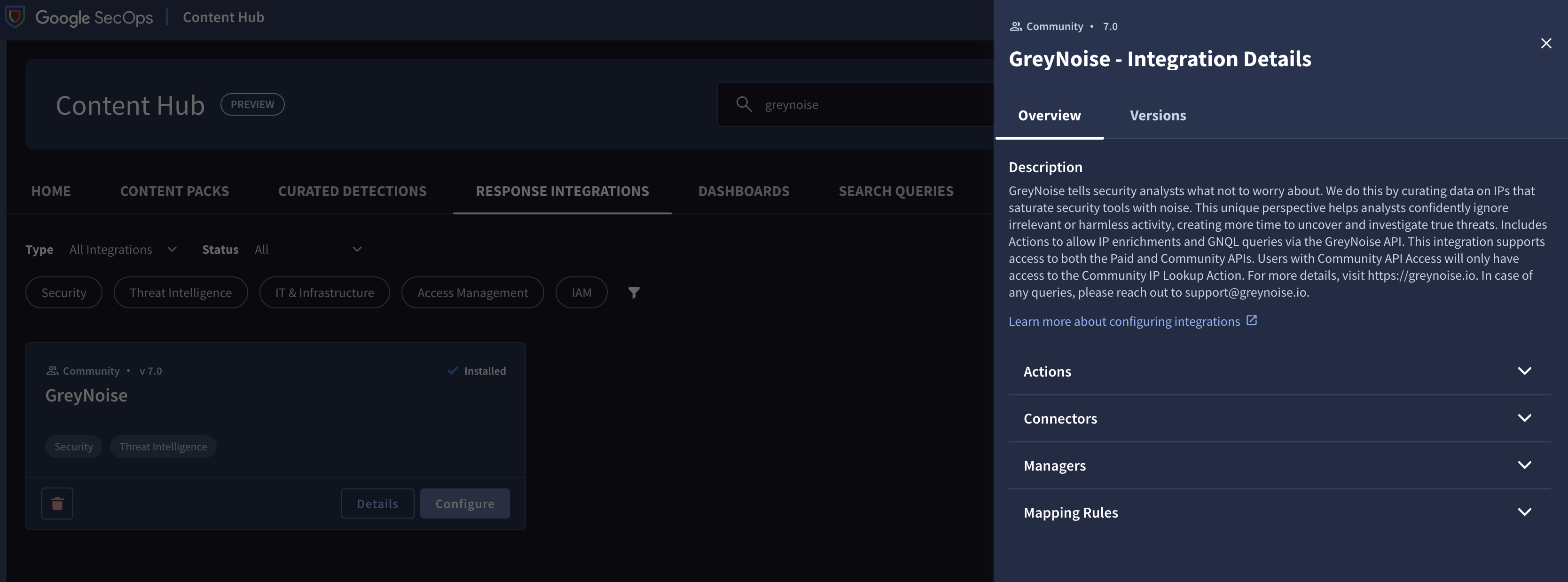
Installing the Response Integration from the Content Hub
Configure an Instance of the GreyNoise Integration
To begin using the GreyNoise integration, browse to Response -> Integration Setup -> Select the Environment -> Then click the + and choose GreyNoise to add it.
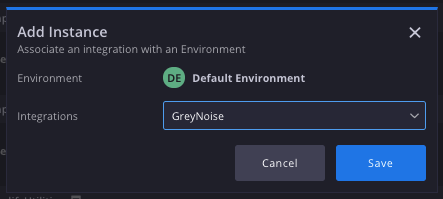
Adding a new Instance of GreyNoise to SecOps SOAR
Once the Integration Instance is added, select the Gear Icon to modify the integration parameter and enter a GreyNoise API Key. Use the Test button to confirm the integration setup is working.
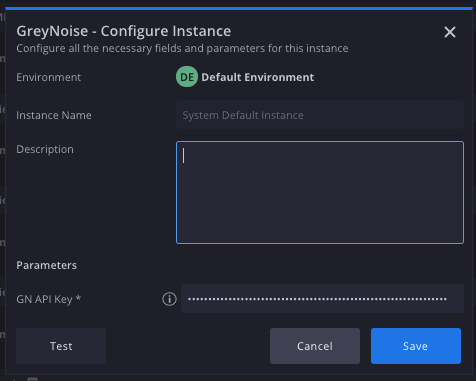
Adding the GreyNoise API key and testing
Available Response Actions
The following is a list of the Response Actions available:
- IP Lookup - Performs a lookup of an IP against GreyNoise and returns Internet Scanner and Business Service Intelligence data, based on entitlement levels.
- This action is supported for both Enterprise and Free users. For Free Users, rate limits will apply.
- IP Timeline Lookup - Performs a lookup of an IP against the GreyNoise Timeline endpoint to return time-based scanning behaviors from the Internet Scanner Intelligence dataset.
- Quick IP Lookup - Performs a lookup of an IP against GreyNoise and returns Internet Scanner and Business Service Intelligence data, and returns a simplified response indicating if an IP is known to GreyNoise, and what the Classification or Trust Level of the queried IP is.
- Execute GNQL Query - Performs a query of the GreyNoise Internet Scanner data set using the GreyNoise Query Language and returns the list of IPs with Metadata returned by the query.
- Get CVE Details - Performs a lookup of a CVE against the GreyNoise Vulnerability Intelligence data set to provide in-the-wild exploitation details.
- Ping - Checks the validity of an API key. This is used to test the provided integration configuration.
Performing an On-Demand IP Lookup
From a Case, using the Manual Action button, select GreyNoise from the installed integrations, then select which Lookup to perform.
Choose the Instance, Alert, and Entities settings, then Execute the Lookup:
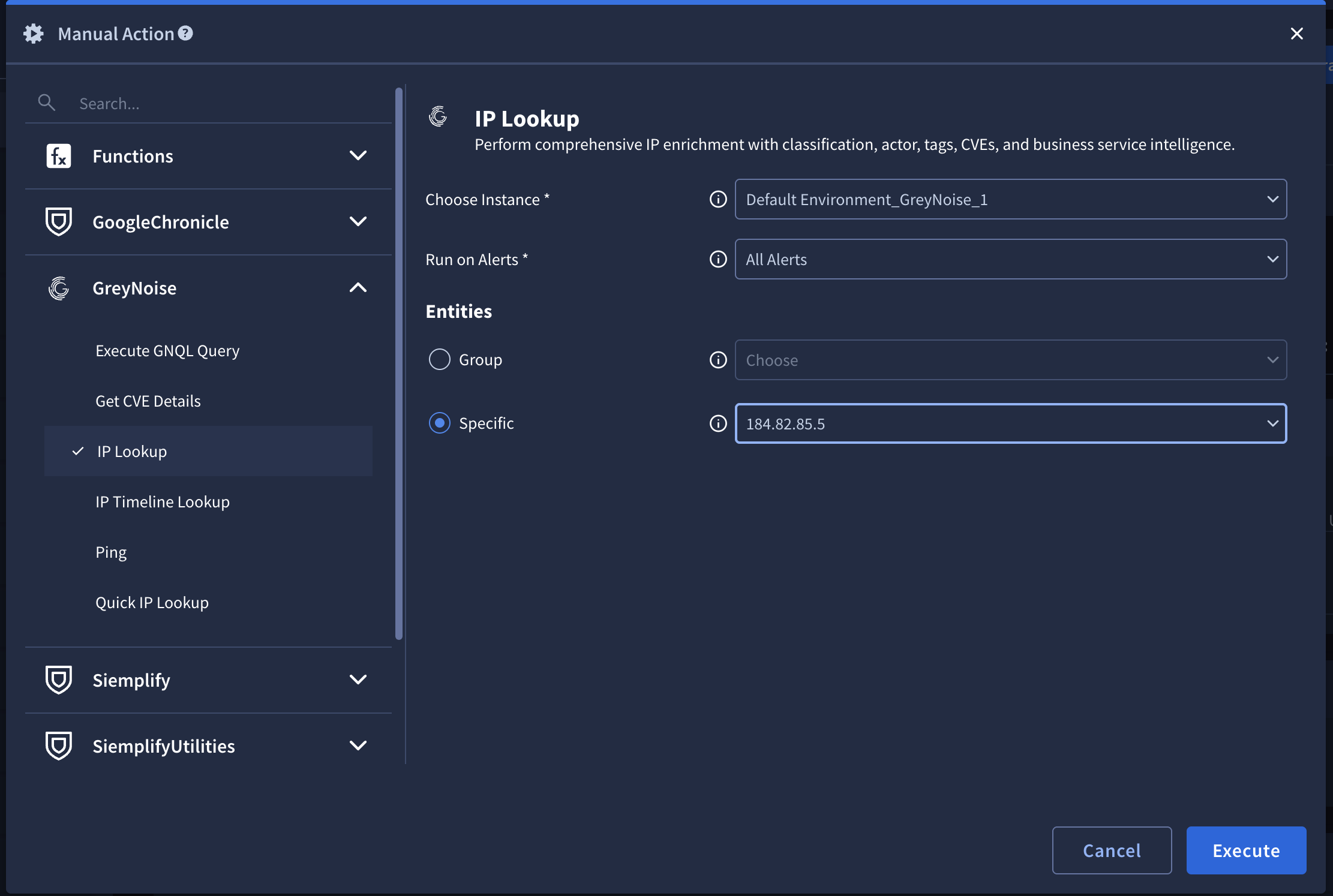
To see the results, check the Case Wall for details:
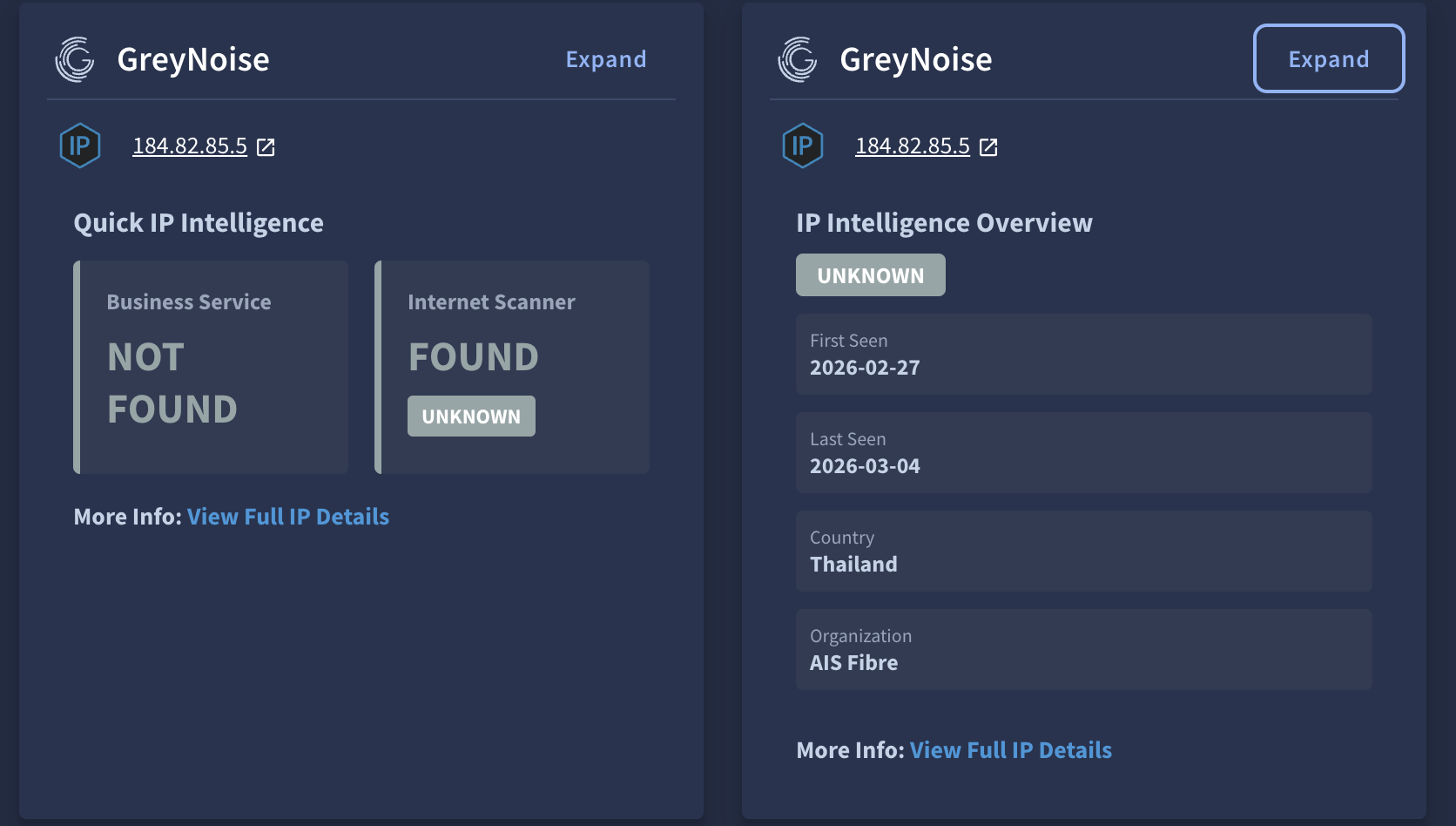
Insight for a Quick and IP Lookup
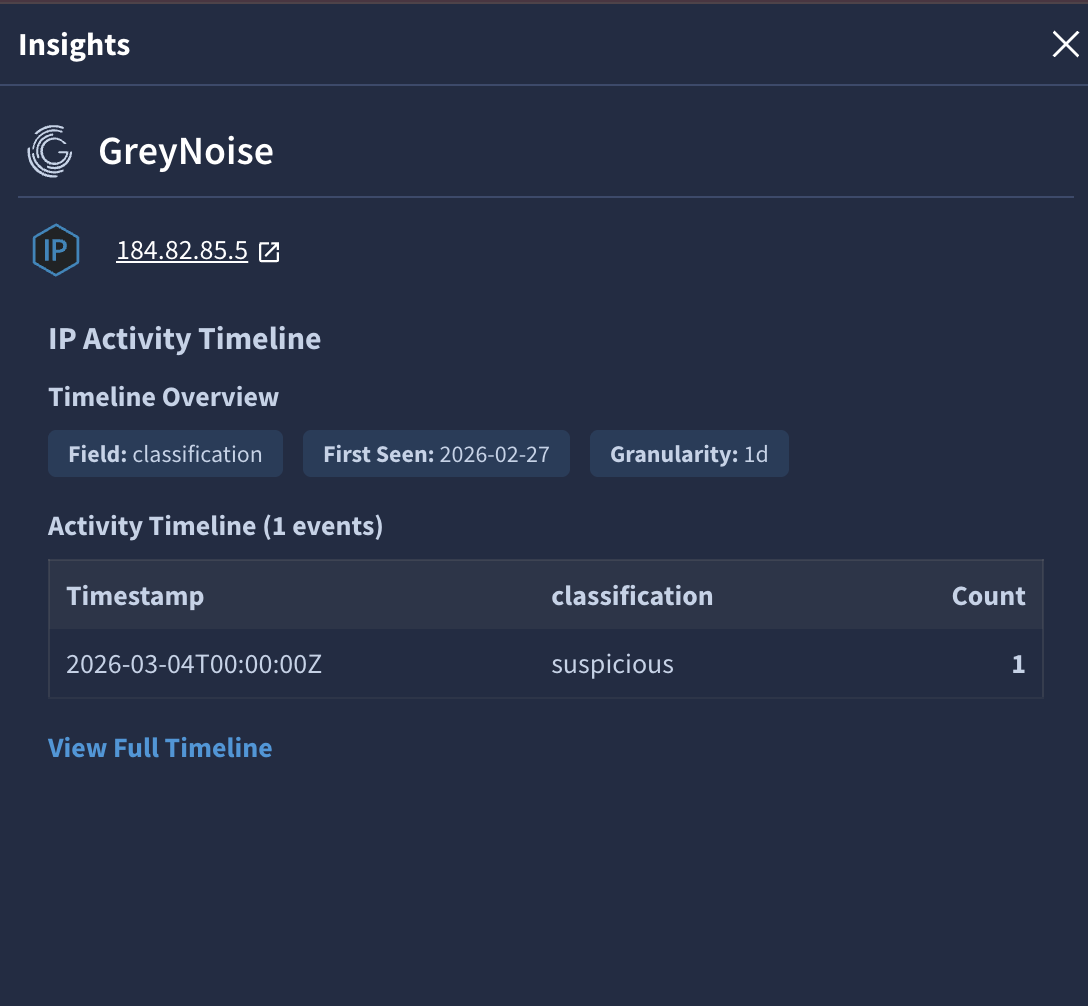
Insight for an IP Timeline Lookup
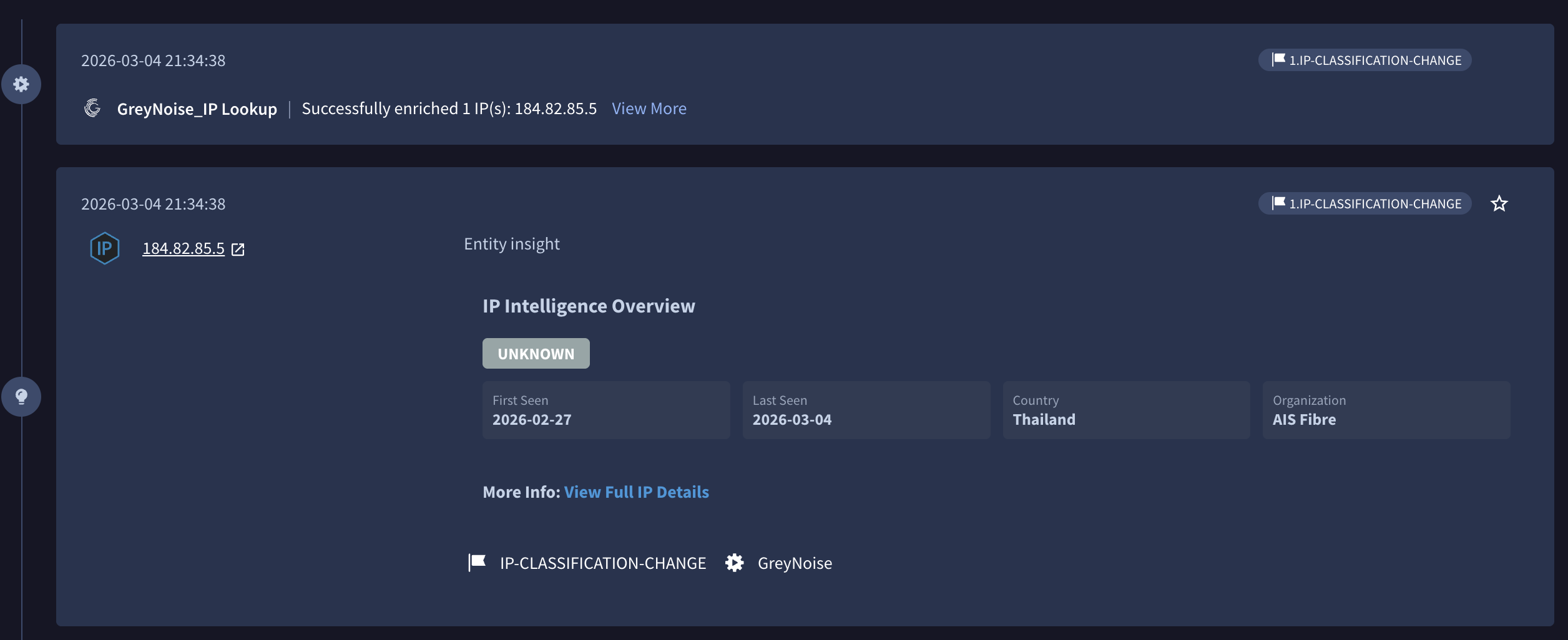
Navigate to the Playground War Room to see the results of the lookup:
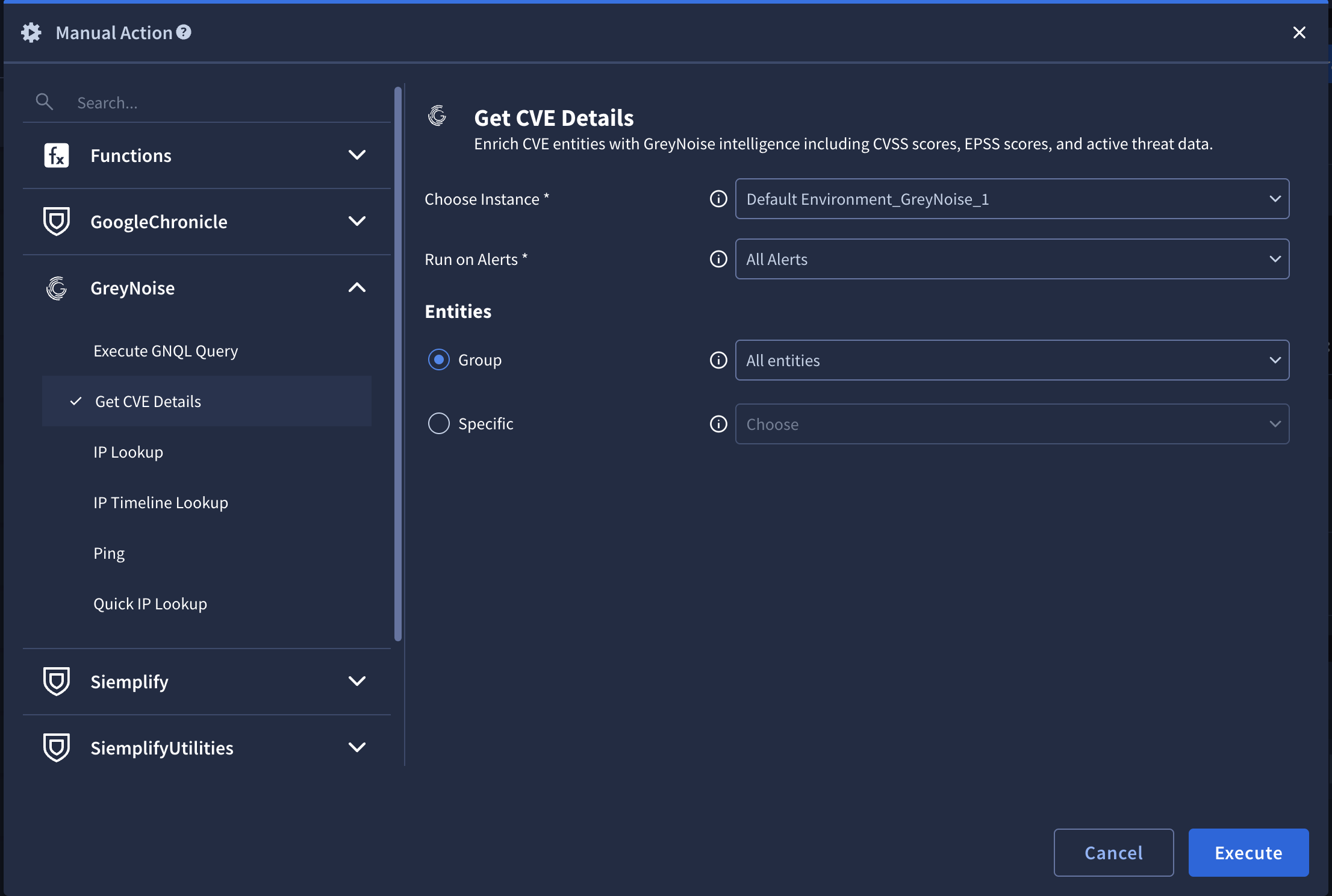
Performing an On-Demand CVE Lookup
From a Case, using the Manual Action button, select GreyNoise from the installed integrations, then select which Lookup to perform.
Choose the Instance, Alert, and Entities settings, then Execute the Lookup:
To see the results, check the Case Wall for details:
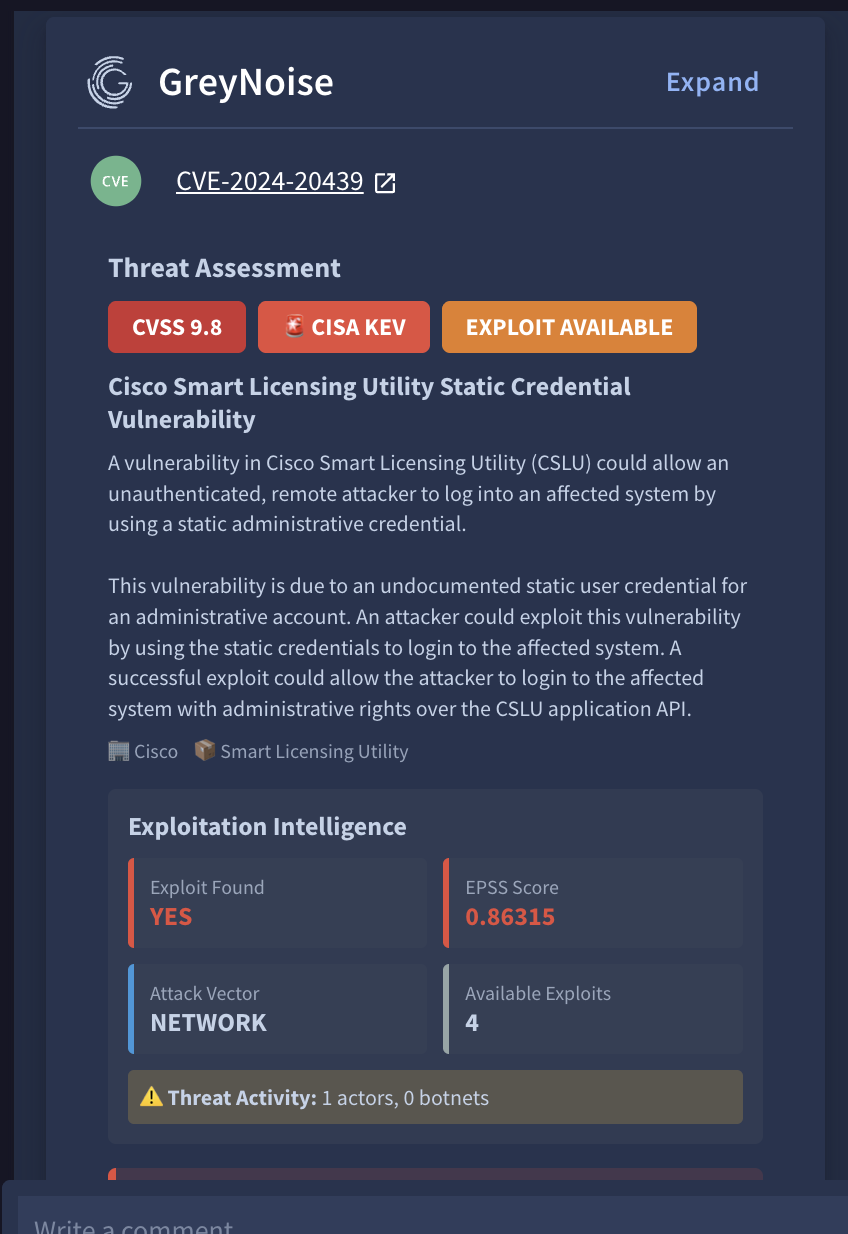
Insight for CVE Lookup
Playbooks
GreyNoise Actions can also be added to any playbook and used to provide context and modify a case, based on the desired workflow and the results of the lookup.
GreyNoise provides a set of sample playbooks to serve as a starting point.
The playbooks can be found by searching for greynoise in the Content Hub --> Playbooks and Blocks
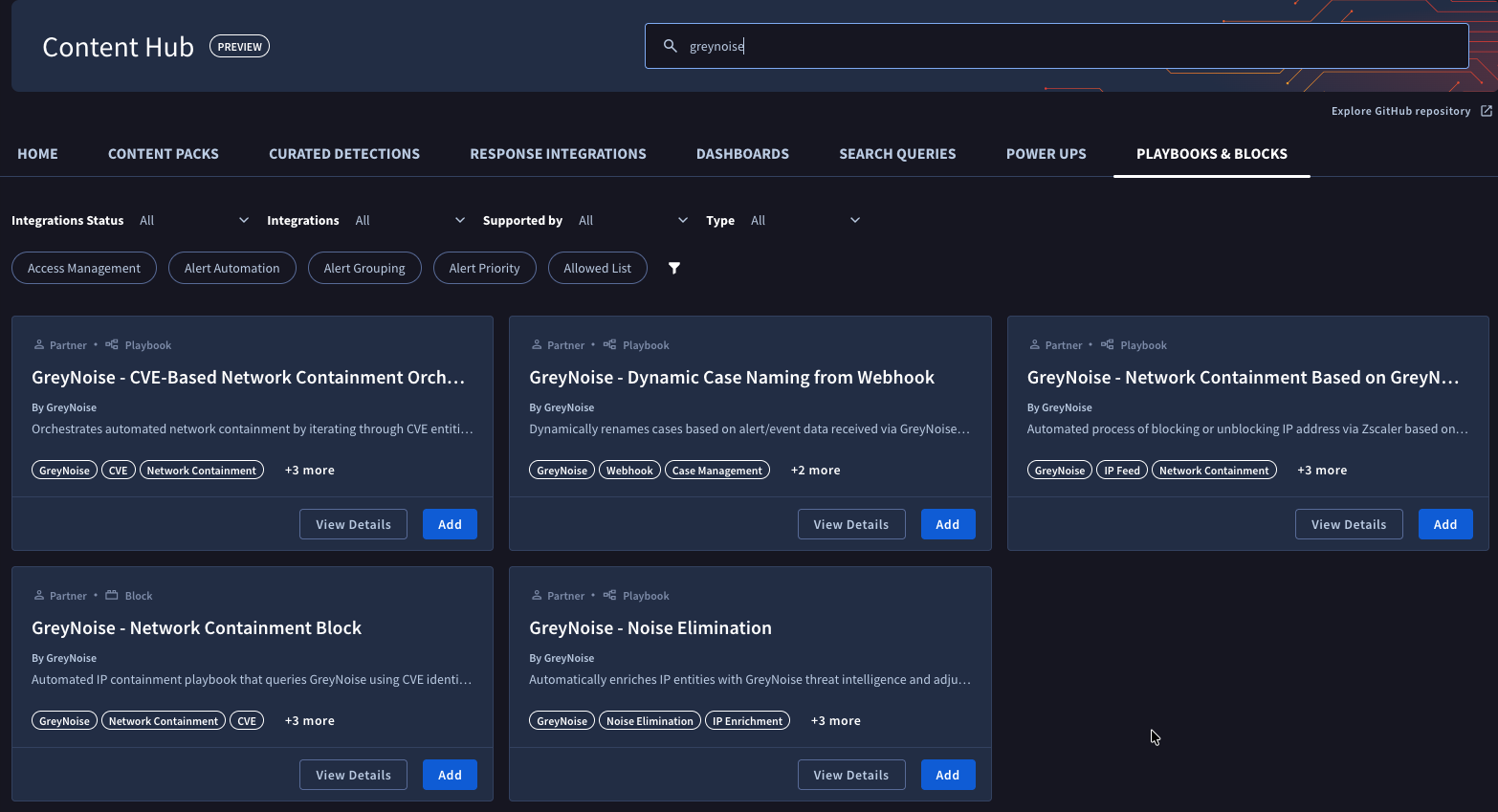
Installing Playbooks
Installing a playbook into any SecOps instance is straightforward:
Select the playbook to install from the available playbooks, and click the Add button.
Select the environment to install, then click Save.
Once the playbook is installed, view it in the Playbooks section, under Content Hub Playbooks, then enable it with the toggle.
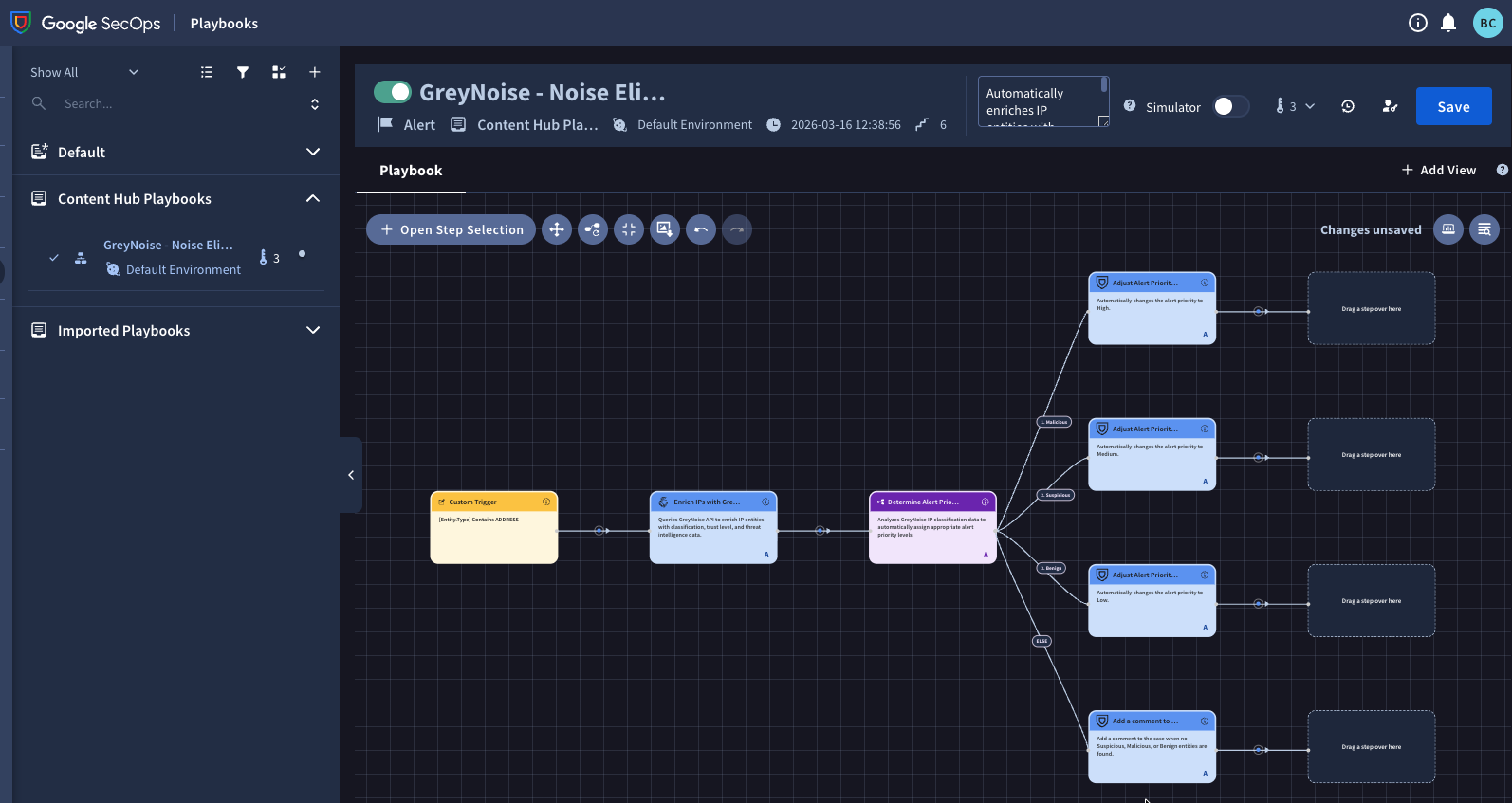
Important: Before using any playbook with an alert, review its default settings (triggers, action parameters, etc.) to ensure they align with your needs.
Prerequisites
Apart from GreyNoise the following additional integrations and Power Ups must be configured in your Google SecOps SOAR instance before using these playbooks:
Integrations (Install from Content Hub > Response Integrations)
- Zscaler - Required for network containment playbooks that block/unblock IP addresses
- Siemplify - Built-in tools for case management, entity creation, and workflow control
Installation Steps:
- Navigate to Content Hub > Response Integrations in your SecOps instance
- Search for the integration name (e.g. "Zscaler")
- Click Install and follow the configuration wizard
- Configure the integration instance with required credentials/settings
For detailed instructions: Install an Integration
Power Ups (Install from Content Hub > Power Ups)
- Functions - Built-in utility functions for data processing (JSON Path queries, string manipulation, etc.)
- Tools - A set of utility actions for data manipulation to power up playbook capabilities (Change Case Name, Attach Playbook, etc.)
Installation Steps:
- Navigate to Content Hub > Power Ups in your SecOps instance
- Search for "Functions" and "Tools"
- Click Install for each Power Up
- Configure the Power Ups instance (No credentials required)
Webhooks
The GreyNoise for Google SecOps SOAR Integration supports ingestion of Alerts and Feeds data via webhook delivery. Webhooks allow GreyNoise events to be delivered directly into Google SecOps SOAR for automated threat detection and response.
Webhook Types
To ingest Alerts and Feed data, you need to create 3 webhooks to support different schemas:
| Webhook Name | Purpose | Supported Schemas |
|---|---|---|
| GreyNoise Alert Webhook | Ingests all alert types | IP Alerts, CVE Alerts, TAG Alerts, GNQL Query Alerts |
| GreyNoise IP Change Webhook | Tracks IP classification changes | IP Classification Change Feed |
| GreyNoise CVE Change or Vendor/Tag Event Type Webhook | Tracks CVE activity and Vendor/Tag Event Type | CVE Activity Spike, CVE Status Change, Vendor CVE Spike, Tag Spike Feed |
Note: Configure the webhooks relevant to your use case based on your requirements.
Webhook Configuration
Step 1: Access Google SecOps SOAR
- Log in to the Google SecOps SOAR UI as an admin
- Navigate to SOAR Settings → Ingestion → Webhooks
Step 2: Add Incoming Webhook
- Click Add Incoming Webhook (+)
- Enter a Name for the webhook (e.g.,
GreyNoise Alert Webhook) - Choose the appropriate Environment where you want to ingest the alerts
- Click Save
Step 3: Generate Webhook URL
- After saving, the platform will generate a webhook URL
- ⚠️ Important: Copy the webhook URL immediately — it cannot be retrieved again once you leave the page
- You will need this URL for configuring your source in GreyNoise
Step 4: Map the Alert Fields
- In the Data Mapping section, click Upload JSON sample
- Upload a representative webhook payload from your alert source (see Supported Webhook Schemas below)
- Use the Expression Builder to map each field in SOAR to a JSON path or literal value
- After mapping, use the Run button in the Expression Builder to preview output
- Confirm proper mapping (green checkmark indicates success)
Notes:
- The static values will not be visible in the preview output. However, they will be saved and will be populated during the ingestion process.
- We have temporarily mapped Alert Priority to the classification field even though Priority is an enum; this mapping will not correctly determine priority due to webhook expression builder limitations. The current webhook mapping UI does not support nested if-else logic to map multiple classification values to priority levels (e.g., "malicious → CRITICAL", "benign → MEDIUM"), as discussed in the community forum.
Step 5: Enable the Webhook
- Once all necessary fields are mapped, click Save
- Click Enable to activate the webhook
Step 6: Setup on GreyNoise
Follow the instructions from GreyNoise to set up Alerts and Feeds with the webhook URL you generated.
Alerts Webhook
Goal
Enable ingestion of GreyNoise Alert data into Google SecOps SOAR using webhooks.
Field Mapping
| Field | Mapping Value | Value Type | Description |
|---|---|---|---|
| TicketID | timestamp | Dynamic | Unique identifier for the alert |
| SourceSystemName | GreyNoise | Static | Identifies the source system |
| Name | alert.name | Dynamic | Name of the alert |
| DeviceVendor | GreyNoise | Static | Vendor information |
| RuleGenerator | GreyNoise-Alert | Static | Static value for consistency |
| StartTime | timestamp | Dynamic | Time the alert was generated |
| Reason | alert.creator | Dynamic | Creator of the alert |
| DeviceProduct | GreyNoise-Alert | Static | Product information |
| EndTime | timestamp | Dynamic | Time the alert ended |
| Priority | data.classification | Dynamic | Classification of the alert |
| EventsList | data | first(1) | Dynamic | List of events. Note: Here we are only considering the first record so it can be easily accessible in the playbook. |
| EventProduct | GreyNoise | Static | Product information |
| EventName | alert.name | Dynamic | Name of the event |
Supported Webhook Schemas
1. IP Alert
{
    "alert": {
        "creator": "[email protected]",
        "id": "3d19d419-c375-43fd-8f1a-996dcd463af7",
        "name": "IP Alert",
        "type": "ip"
    },
    "alert_link": "https://viz.greynoise.io/account/alerts?alert=3d19d419-c375-43fd-8f1a-996dcd463af7",
    "data": [
        {
            "classification": "suspicious",
            "ip": "176.236.29.137"
        }
    ],
    "query_link": "https://api.greynoise.io/v2/experimental/gnql?query=ip%3A%20176.236.29.137",
    "timestamp": "2025-07-31T19:01:15Z",
    "viz_link": "https://viz.greynoise.io/query/ip%3A%20176.236.29.137"
}
2. CVE Alert
{
    "alert": {
        "creator": "[email protected]",
        "id": "78848d96-ee88-460b-841b-dd4d9c8ff613",
        "name": "CVE Alert",
        "type": "cve"
    },
    "alert_link": "https://viz.greynoise.io/account/alerts?alert=78848d96-ee88-460b-841b-dd4d9c8ff613",
    "data": [
        {
            "classification": "malicious",
            "ip": "220.247.174.202"
        }
    ],
    "query_link": "https://api.greynoise.io/v2/experimental/gnql?query=cve%3A%20CVE-2013-2134",
    "timestamp": "2025-07-31T19:01:13Z",
    "viz_link": "https://viz.greynoise.io/query/cve%3A%20CVE-2013-2134"
}
3. TAG Alert
{
    "alert": {
        "creator": "[email protected]",
        "id": "43b6990e-01b7-468c-afae-0015e3d77095",
        "name": "SIP REGISTER Scanner",
        "type": "tag"
    },
    "alert_link": "https://viz.greynoise.io/account/alerts?alert=43b6990e-01b7-468c-afae-0015e3d77095",
    "data": [
        {
            "classification": "malicious",
            "ip": "168.100.239.215"
        }
    ],
    "query_link": "https://api.greynoise.io/v2/experimental/gnql?query=tags%3A%20SIP%20REGISTER%20Scanner",
    "timestamp": "2025-08-06T21:01:25Z",
    "viz_link": "https://viz.greynoise.io/query/tags%3A%20SIP%20REGISTER%20Scanner"
}
4. GNQL Query Alert
{
    "alert": {
        "creator": "[email protected]",
        "id": "0ed61042-6859-4dd7-9ede-cd373d0d7df5",
        "name": "GNQL Alert",
        "type": "query"
    },
    "alert_link": "https://viz.greynoise.io/account/alerts?alert=0ed61042-6859-4dd7-9ede-cd373d0d7df5",
    "data": [
        {
            "classification": "malicious",
            "ip": "216.73.216.124"
        }
    ],
    "query_link": "https://api.greynoise.io/v2/experimental/gnql?query=last_seen%3A1d%20classification%3Amalicious%20bot%3Atrue",
    "timestamp": "2025-07-31T19:01:12Z",
    "viz_link": "https://viz.greynoise.io/query/last_seen%3A1d%20classification%3Amalicious%20bot%3Atrue"
}
Feeds Webhook
Goal
Enable ingestion of GreyNoise feed data (IPs and CVEs) into Google SecOps SOAR to track observable state changes over time and trigger appropriate playbooks based on updates.
Note: You need to create two separate webhooks:
- IP Classification Change Webhook
- CVE Change or Vendor/Tag Event Type Webhook (for CVE Activity Spike, CVE Status Change, Vendor CVE Spike and Tag Spike)
Webhook 1: CVE Status Change, CVE Activity Spike, Vendor CVE Spike and Tag Spike
Field Mapping
| Field | Mapping Value | Value Type | Description |
|---|---|---|---|
| TicketID | timestamp | Dynamic | Unique identifier for the CVE event |
| SourceSystemName | GreyNoise | Static | Identifies the source system |
| Name | event_type | Dynamic | Type of CVE event |
| DeviceVendor | GreyNoise | Static | Vendor information |
| RuleGenerator | GreyNoise-Feed | Static | Static value for consistency |
| StartTime | timestamp | Dynamic | Time the event was generated |
| DeviceProduct | GreyNoise-Feed | Static | Product information |
| EndTime | timestamp | Dynamic | Time the event ended |
| EventsList | first(1) | Dynamic | List of events |
| EventProduct | GreyNoise | Static | Product information |
| EventName | event_type | Dynamic | Name of the event |
Supported Schemas
CVE Status Change
{
    "cve": "CVE-2022-31718",
    "event_type": "cve-status-change",
    "metadata": {},
    "new_state": {
        "activity_seen": false,
        "benign_ip_count_10d": 0,
        "benign_ip_count_1d": 0,
        "benign_ip_count_30d": 0,
        "threat_ip_count_10d": 1,
        "threat_ip_count_1d": 1,
        "threat_ip_count_30d": 1
    },
    "old_state": {
        "activity_seen": true,
        "benign_ip_count_10d": 0,
        "benign_ip_count_1d": 0,
        "benign_ip_count_30d": 0,
        "threat_ip_count_10d": 0,
        "threat_ip_count_1d": 0,
        "threat_ip_count_30d": 0
    },
    "timestamp": "2025-08-11T10:30:16.972504375Z"
}
CVE Activity Spike
{
  "event_type": "cve-activity-spike",
  "cve": "CVE-2025-66478",
  "workspace_id": "289ff251-c358-4fba-ab43-4fe99956b98b",
  "timestamp": "2026-02-20T13:37:04.642722035Z",
  "observation_uuid": "a3f9c2e1-7b64-4a8d-9f2e-3c1b7d8e5f90",
  "observation_type": "CveSpike",
  "criterion": {
    "field": "cve",
    "value_filter": "",
    "interval": "hour",
    "lookback_intervals": 1,
    "analysis_intervals": 1,
    "pct_change_threshold": 50,
    "ip_count_threshold": 10,
    "workspace_id": "e4a5be2e-1be0-4105-a5e2-51e6a5525fa0"
  },
  "baseline_counts": {
    "total_ip_count": 18,
    "benign_ip_count": 0,
    "threat_ip_count": 18
  },
  "analysis_counts": {
    "total_ip_count": 29,
    "benign_ip_count": 0,
    "threat_ip_count": 29
  },
  "delta_total_ip_count": {
    "absolute": 11,
    "percentage": 61.11
  }
}
Vendor CVE Spike
{
  "analysis_counts": {
    "benign_ip_count": 90,
    "threat_ip_count": 90,
    "total_ip_count": 180
  },
  "baseline_counts": {
    "benign_ip_count": 40,
    "threat_ip_count": 40,
    "total_ip_count": 80
  },
  "criterion": {
    "analysis_intervals": 1,
    "field": "vendor",
    "interval": "hour",
    "ip_count_threshold": 10,
    "lookback_intervals": 24,
    "pct_change_threshold": 50,
    "value_filter": "acme",
    "workspace_id": "e4a5be2e-1be0-4105-a5e2-51e6a5525fa0"
  },
  "cve": "CVE-2024-3400",
  "delta_total_ip_count": {
    "absolute": 100,
    "percentage": 125
  },
  "event_type": "vendor-cve-spike",
  "observation_uuid": "a3f9c2e1-7b64-4a8d-9f2e-3c1b7d8e5f90",
  "timestamp": "2026-02-20T13:41:19.186515684Z",
  "vendor": "acme"
}
Tag Spike
{
  "analysis_counts": {
    "benign_ip_count": 160,
    "threat_ip_count": 90,
    "total_ip_count": 250
  },
  "baseline_counts": {
    "benign_ip_count": 80,
    "threat_ip_count": 40,
    "total_ip_count": 120
  },
  "criterion": {
    "analysis_intervals": 1,
    "field": "tag",
    "interval": "hour",
    "ip_count_threshold": 10,
    "lookback_intervals": 2,
    "pct_change_threshold": 50,
    "value_filter": "mirai",
    "workspace_id": "e4a5be2e-1be0-4105-a5e2-51e6a5525fa0"
  },
  "delta_total_ip_count": {
    "absolute": 130,
    "percentage": 108.33
  },
  "event_type": "tag-spike",
  "observation_uuid": "a3f9c2e1-7b64-4a8d-9f2e-3c1b7d8e5f90",
  "tag": "mirai",
  "timestamp": "2026-02-20T13:41:07.25004179Z"
}
Webhook 2: IP Classification Change
Field Mapping
| Field | Mapping Value | Value Type | Description |
|---|---|---|---|
| TicketID | timestamp | Dynamic | Unique identifier for the IP event |
| SourceSystemName | GreyNoise | Static | Identifies the source system |
| Name | event_type | Dynamic | Type of IP event |
| DeviceVendor | GreyNoise | Static | Vendor information |
| RuleGenerator | GreyNoise-Feed | Static | Static value for consistency |
| StartTime | timestamp | Dynamic | Time the event was generated |
| DeviceProduct | GreyNoise-Feed | Static | Product information |
| EndTime | timestamp | Dynamic | Time the event ended |
| Priority | new_state.classification | Dynamic | New classification state |
| EventsList | first(1) | Dynamic | List of events |
| EventProduct | GreyNoise | Static | Product information |
| EventName | event_type | Dynamic | Name of the event |
Supported Schema
{
    "event_type": "ip-classification-change",
    "ip": "86.57.2.53",
    "new_state": {"classification": "malicious"},
    "old_state": {"classification": "unknown"},
    "timestamp": "2025-08-11T10:42:39Z",
    "workspace_id": "e4a5be2e-1be0-4105-a5e2-51e6a5525fa0"
}
Limitations
- Currently we have temporarily mapped Alert Priority to the classification field for webhooks, even though Priority is an enum field and the direct mapping will not produce the expected results. The webhook expression builder in Google SecOps does not support nested if-else logic for mapping multiple classification values to priority levels (e.g., mapping "malicious → CRITICAL", "suspicious → HIGH", etc.), as discussed in the community. This limitation means priority determination must be handled via playbooks until more flexible mapping is supported in webhook.
Updated 7 months ago