
Splunk SIEM Use Case Guide 2
Detecting Allowed Inbound Traffic from Known Malicious Hosts
Detecting Allowed Inbound Traffic from Known Malicious Hosts
Overview
Modern enterprise networks are subjected to thousands of automated scans, exploitation attempts, and brute-force attacks daily. While edge security controls (Firewalls, WAFs, Proxies) block the vast majority of this traffic, perimeter gaps can arise from misconfigured rules, outdated ACLs, or overly permissive policies, such as Any-Any rules.
When these gaps happen, unauthorized traffic is allowed into the network. If left unmonitored, security teams have no way of knowing if a connection was established by a potential attacker.
The GreyNoise Solution
GreyNoise intelligence integrated into Splunk cross-references real-time inbound logs — specifically traffic marked as allowed — against GreyNoise Threat Intelligence. It isolates events in which known malicious actors have successfully bypassed perimeter defenses, giving security teams a clear, audited list of edge leaks to patch.
Prerequisites
Ensure your environment meets these prerequisites before beginning the setup:
Tools and Access
| Prerequisites | Details |
|---|---|
| Splunk | Splunk Enterprise or Splunk Cloud — 9.3.x, 9.4.x, 10.0.x, 10.2.x |
| GreyNoise App | GreyNoise App for Splunk installed from Splunkbase (App ID: 4113) |
| API Key | GreyNoise API key configured in the app under Configuration |
| Network Logs | Network perimeter telemetry logs (Firewalls, WAFs, Load Balancers, or Routers) indexed in Splunk |
| Log Fields | Logs must contain: src_ip, action (allowed/permitted/accepted), direction (inbound), or equivalent fields from your telemetry source |
Key SPL Command
The entire integration relies on one single command:
| Command | Purpose |
|---|---|
| gnmulti ip_field="src_ip" | Enriches every event with full GreyNoise intelligence for the source IP |
Implementation Steps
Step 1: Baseline Network Validation
Identify your organization's firewall logs and filter for traffic that was permitted from the outside.
Note: Substitute <your_network_index> and your specific field names based on your environment's logging schema.
index=<your_network_index> action="allowed" direction="inbound"
| table _time, src_ip, dest_ip, dest_port, action
Step 2: Apply GreyNoise Enrichment and Detection Filters
Pipe the source IP addresses through the native GreyNoise gnmulti command and apply classification filters.
Filter criteria:
We filter based on two specific criteria:
- classification="malicious"
OR
- classification="suspicious"
Impact: Flags IPs actively validated by GreyNoise as part of a malicious campaign, botnet, or exploit engine.
Note:
Replace <YOUR_INDEX_NAME> with the name of your index when you execute the query.
Here, the final output is prioritized based on source IP volume. If it's not required, then remove the final 2 lines.
``` FW/WAF logs ```
index=<YOUR_INDEX_NAME>
```Filter allowed inbound internet traffic (inbound/incoming as per logs) ```
action="allowed" direction="inbound"
``` Match source IP against GreyNoise ```
| gnmulti ip_field="src_ip"
``` surface malicious/suspicious matches, greynoise API response gives classification as key with its value as malicious/suspicious/benign in splunk this is reflected as greynoise_classification```
| where greynoise_classification="malicious" OR greynoise_classification="suspicious"
| stats count by src_ip
``` Prioritize events by source IP volume (threshold >= 10, then sorted) ```
| where count >= 10
| sort - count
Step 3: Automate as an SIEM Alert
After verifying the search results, convert the logic into a Scheduled Alert to ensure continuous monitoring and automated response.
Alert Configuration:
- Click Save As → Alert
- Title: UC2 - Inbound Threat Detection (GreyNoise Enriched)
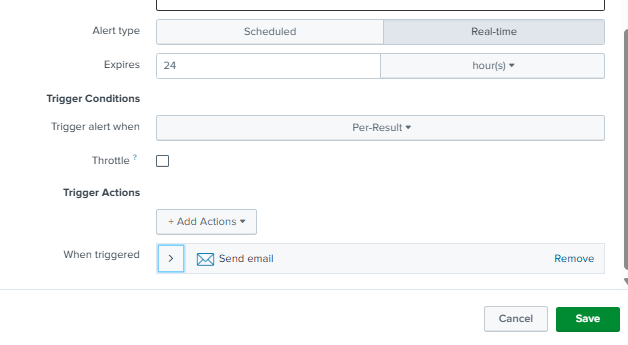
- Schedule: Every 15 mins
- Time Range: Every 20 mins
- Trigger Condition: For each result, if the count is greater than 10, trigger an alert for each.
- Actions: Add to Triggered Alerts
- Trigger Actions: Send email to the SOC queue, or execute a Webhook to push context into ticketing tools such as ServiceNow, Jira, or SOAR platforms.
- Click Save.
Understanding the Output
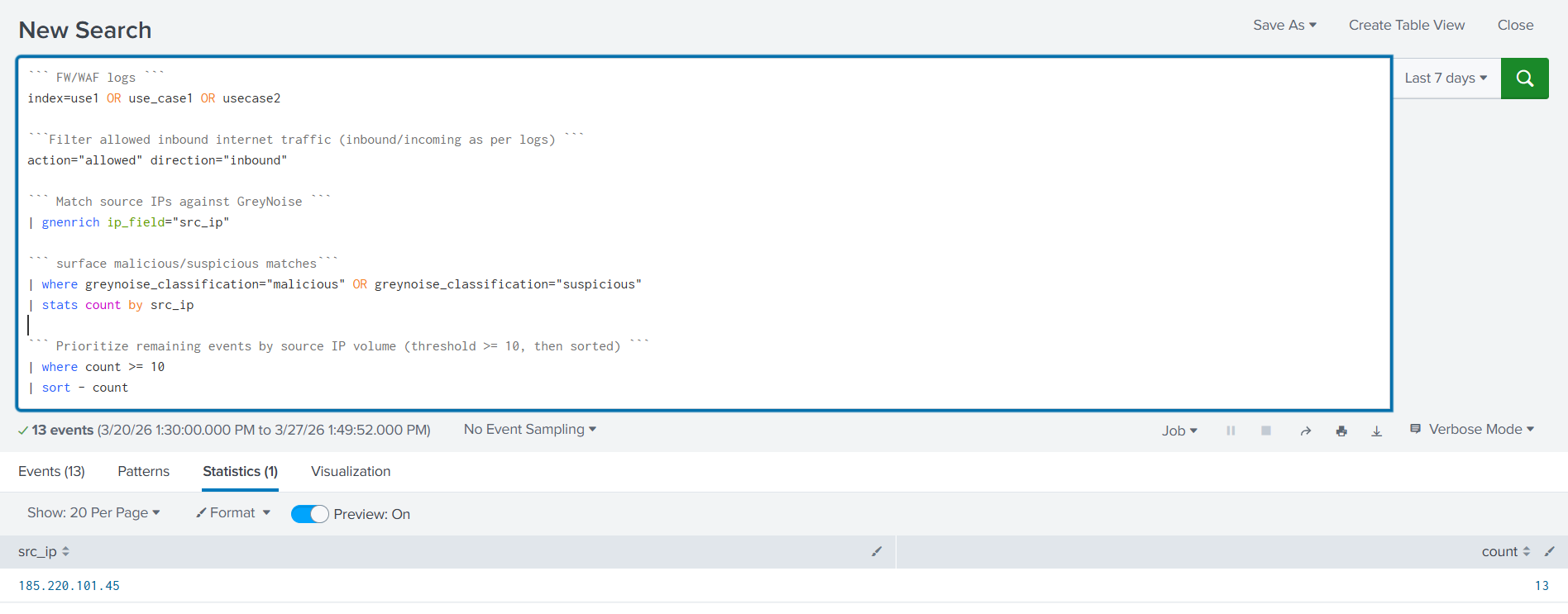
The SPL query enriches every inbound source IP through the gnmulti command, then applies progressive filters as follows:
- Targets allowed only inbound traffic — blocked connections were excluded because the controls already handled them.
- Passes all source IPs through GreyNoise enrichment via
gnmultiip_field="src_ip". - Keeps only IPs classified as malicious or suspicious.
- Retains only IPs crossing the volume threshold of >= 10 — eliminating low-frequency opportunistic noise.
- Sorts by count descending — most active threat IPs surface first.
Result: Out of 152 raw inbound allowed events, only 1 IP with 13 hits survived all filters — confirming that the vast majority of inbound traffic was either benign, below threshold, or already blocked. What remains is a single high-confidence threat IP requiring immediate analyst attention.
Results and Impact
Before vs After GreyNoise
| Before GreyNoise | After GreyNoise |
|---|---|
| 152 raw allowed inbound events | 1 confirmed threat IP with 13 hits |
| None — just IPs and counts | IP classified as malicious or suspicious inline |
| Analysts must manually look up every IP in external threat intel tools | Classification is inline — no external lookup needed |
| High — 152 events with no context to separate threat from legitimate | Low — 139 events filtered, only confirmed threat retained |
| Minutes to hours, depending on analyst workload | Immediate — single result, pre-ranked and pre-validated |
| Limited to what the analyst manually checks | All 152 events are enriched automatically in a single pass |
Benefits for the SOC Team
- Eliminates alert fatigue — 152 raw events reduced to a single confirmed threat IP, analysts focus only on what matters.
- Immediate prioritization — volume threshold and sort order ensure the most aggressive threat IP surfaces first, no manual triage needed.
- Confirmed threat context — GreyNoise classification removes ambiguity, giving analysts confidence before escalating.
- Pivot-ready output — clean
src_ipandcountfields give analysts a direct starting point to expand investigation across EDR, auth, and proxy logs. - Consistent coverage — query runs across all configured indexes, ensuring no blind spots across FW/WAF log sources.
Conclusion
GreyNoise not only adds intelligence to your alerts but also eliminates those that are not worthy of investigation in the first place. By incorporating a single gnmulti command within your existing Splunk search, your SOC team goes from looking at raw, noisy inbound events without context to seeing a clean, prioritized, enriched queue where every remaining result is genuinely worth their time.
The core value of this use case is to reduce the noise between your analysts and the threats that actually matter.
Updated 5 months ago