
Splunk SIEM Use Case Guide 3
Flag Authentication Attempts from Compromised Hosts
Flag Authentication Attempts from Compromised Hosts
Overview
Every organization's VPN and identity provider receives thousands of authentication attempts daily — the vast majority of which are automated credential stuffing, brute-force, and password spray attacks. Standard detection logic treats all of these uniformly: a failed login generates a low-priority alert, and a successful login is trusted and passed through.
This approach has a critical blind spot.
Some of these attempts originate from IPs that GreyNoise has confirmed are actively conducting mass scanning operations, running botnet infrastructure, or operating known command-and-control (C2) servers. When one of those IPs successfully authenticates to your Okta environment or Active Directory, it is not a routine login event — it is an immediate indicator of compromise, regardless of whether the credentials were technically valid.
The GreyNoise Solution
By integrating GreyNoise intelligence into your authentication log pipeline within Splunk, this use case cross-references every authentication event — both successful and failed — against GreyNoise's global threat dataset, surfacing two distinct high-value signals. A successful authentication from a GreyNoise-flagged IP is treated as a P1 — act immediately, confirming that a known threat actor has gained active access using valid credentials. A failed authentication from the same class of IP is treated as a P2 — investigate and monitor, indicating that your organization is being specifically targeted rather than caught in indiscriminate mass scanning.
Prerequisities
Ensure your environment meets these prerequisites before beginning the setup:
Tools and Access
| Prerequisites | Details |
|---|---|
| Splunk | Splunk Enterprise or Splunk Cloud — 9.3.x, 9.4.x, 10.0.x, 10.2.x |
| GreyNoise App | GreyNoise App for Splunk installed from Splunkbase (App ID: 4113) |
| API Key | GreyNoise API key configured in the app under Configuration |
| Splunk Add-on for Okta | Installed from Splunkbase (App ID: 3088) |
| Splunk Add-on for Microsoft Cloud Services | Installed from Splunkbase (App ID: 3110) — provides azure:aad:signin |
| Identity Index | An identity index created in Splunk |
| Log Fields | Logs must contain: src_ip, outcome (success/failure), and eventtype=authentication |
Key SPL Command
The entire integration relies on one single command:
| Command | Purpose |
|---|---|
| gnenrich ip_field="src_ip" | Enriches every event with full GreyNoise intelligence for the source IP |
Implementation Steps
Step 1: Verify Raw Events and Field Extraction
Before building any detection logic, confirm both log sources are indexed and that the key fields are extracted correctly. Okta and Azure AD use different field names for the same concepts — you need to know what fields you are working with before joining them.
Step 2: Enrich with GreyNoise Using gnenrich
This is where the GreyNoise app does its work. The gnenrich command calls the live GreyNoise API for every unique src_ip and adds context fields describing what that IP has been observed doing on the internet. Replace <YOUR_INDEX_NAME> with the name of your index when you execute the query.
index=<YOUR_INDEX_NAME>
```filter to authentication events — normalise fields across both sources ```
eventtype=authentication
```match source IPs against GreyNoise.```
| gnenrich ip_field="src_ip"
Step 3: Apply Filters and Assign Severity
Apply progressive filters to retain only real, non-spoofable threat IPs prioritized by source IP volume — highest attempt count first. Then assign a severity level based on the authentication outcome and GreyNoise classification. Replace <YOUR_INDEX_NAME> with the name of your index when you execute the query.
index=<YOUR_INDEX_NAME>
```filter to authentication events — normalize fields across both sources ```
eventtype=authentication
```match source IPs against GreyNoise by giving value of src_ip```
| gnenrich ip_field="src_ip"
```include not-spoofable flagged matches — real IPs seen scanning the internet, exclude known legit infra```
``` business_service_intelligence:found as greynoise_business_service_intelligence_found, classification as greynoise_classification, internet_scanner_intelligence:found as greynoise_internet_scanner_intelligence_found```
| where greynoise_classification != "benign"
| where greynoise_internet_scanner_intelligence_found=1 AND greynoise_spoofable=0 AND greynoise_business_service_intelligence_found=0
``` prioritize by source IP volume — highest attempt count first ```
| eval severity=case( gn_classification=="malicious" AND outcome=="success", "P1-HIGH", gn_classification=="suspicious" AND outcome=="success", "P2-HIGH", gn_classification=="unknown" AND outcome=="success", "P2-HIGH", gn_classification=="malicious" AND outcome=="failure", "P2-MEDIUM", gn_classification=="suspicious" AND outcome=="failure", "P2-LOW", gn_classification=="unknown" AND outcome=="failure", "P2-LOW", 1=1, "P3-INFO")
| stats count as attempts by src_ip severity greynoise_classification
| sort severity -attempts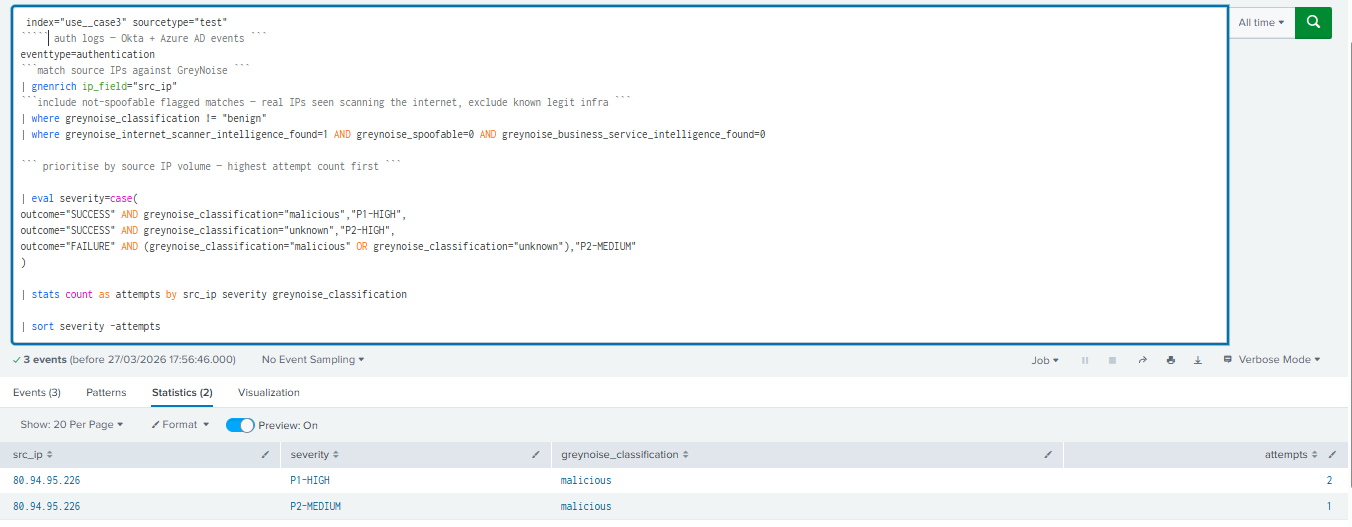
Not all flagged auth events carry the same risk. The severity assignment creates a clear triage order, so analysts know exactly what to work on first.
Severity reference:
| Severity | Condition |
|---|---|
| P1-HIGH | outcome=SUCCESS AND classification=malicious → Active account compromise from known threat infrastructure |
| P2-HIGH | outcome=SUCCESS AND classification=unknown → Successful auth from suspicious IP, needs immediate review |
| P2-MEDIUM | outcome=FAILURE AND classification=malicious or unknown → Active targeting of your org, not yet successful |
Step 4: Save as Scheduled Alert
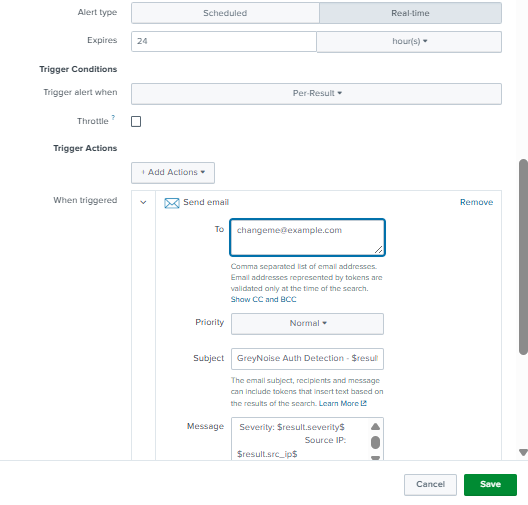
Once the search is verified end-to-end, save it as a recurring alert for continuous automated monitoring.
Alert Configuration:
-
Run the Step 3 query in Splunk Search.
-
Click Save As → Alert.
-
Title: GN-UC03 - Auth from Compromised Hosts
-
Alert type: Scheduled — Run every 15 minutes.
-
Trigger Conditions: Number of Results > 0.
-
Trigger for each Result. ( So that each result acts as a separate alert )
-
Configure Alert Actions with the following details:
-
Common options:
-
Send Email
-
Create Notable Event (Splunk ES)
-
Send to Webhook
-
Send to Slack
-
-
-
Configure Alert Message:
-
Alert Title: GreyNoise Auth Detection - $result.severity$
-
Alert Description: Severity: $result.severity$
Source IP: $result.src_ip$
Attempts: $result.attempts$
Classification: $result.greynoise_classification$
-
-
Click Save.
Understanding the Output
Every result surfaced by this query carries a severity verdict. The table below defines what each verdict requires from the analyst:
| Severity | What It Means |
|---|---|
| P1-HIGH | A known malicious IP has successfully authenticated. Treat it as an active compromise. Immediately revoke the session, reset credentials, and isolate the endpoint. |
| P2-HIGH | A suspicious, unknown IP address has been successfully authenticated. Investigate the account and session immediately. |
| P2-MEDIUM | A malicious or unknown IP is actively attempting to authenticate. Your organization is being specifically targeted. Review and consider blocking. |
Benefits for the SOC Team
| Benefit | Detail |
|---|---|
| Distinguishes Targeted vs Opportunistic | Separates mass spray attacks from IPs specifically probing your organization's identity infrastructure. |
| Catches Compromises Standard Logs Miss | A successful login from a C2 IP looks normal in raw auth logs. GreyNoise context makes it immediately visible. |
| Works Across Okta and Azure AD | Single query handles both identity providers simultaneously using coalesce field normalization. |
| Clear Severity Triage | P1-CRITICAL, P1-HIGH, P2-MEDIUM verdicts tell analysts exactly what to work on first — no interpretation required. |
| Earlier Intervention | Failed auth attempts from flagged IPs are surfaced before a successful compromise occurs. |
Updated 5 months ago