
Splunk SIEM Use Case Guide 4
Detect Outbound Connections to Threat Infrastructure
Detect Outbound Connections to Threat Infrastructure
Overview
Internal corporate assets should not initiate outbound connections to internet infrastructure known to be hostile. When they do, it signals something far more serious than a misconfigured firewall rule — it means a device inside your network is actively reaching out to the threat actor, not the other way around.
This pattern bypasses traditional perimeter defenses and is often a strong indicator of compromise — active C2 beaconing, data exfiltration, or botnet participation.
The GreyNoise Solution
By correlating internal egress and outbound logs with GreyNoise Mass-Scanning Intelligence within Splunk, this use case isolates high-fidelity anomalies. It surfaces internal hosts communicating with known command-and-control (C2) servers, active exploitation infrastructure, or botnet staging grounds.
The result is a high-fidelity, low-noise alert surface — not a list of suspicious IPs to manually research, but a confirmed list of internal assets that have made successful outbound connections to infrastructure GreyNoise has already validated as malicious.
The Core Signal: Any successful outbound connection from an internal host to GreyNoise-classified malicious infrastructure warrants immediate investigation of that internal host for indicators of compromise.
Prerequisities
Ensure your environment meets these prerequisites before beginning the setup:
Tools and Access
| Prerequisites | Details |
|---|---|
| Splunk | Splunk Enterprise or Splunk Cloud — 9.3.x, 9.4.x, 10.0.x, 10.2.x |
| GreyNoise App | GreyNoise App for Splunk installed from Splunkbase (App ID: 4113) |
| API Key | GreyNoise API key configured in the app under Configuration |
| Egress Traffic Logs | Network firewall logs (Palo Alto, Fortinet, Cisco), Web Proxy logs (Zscaler, BlueCoat), or EDR network telemetry |
| Log Fields | Logs must contain: src_ip (Internal), dest_ip (External), direction (outbound), and action (allowed/established) |
| Asset Categorization | Optional but recommended: a list of known internal IP ranges (RFC1918) to filter out false positives from internal routing |
Key SPL Command
The entire integration relies on one single command:
| Command | Purpose |
|---|---|
| gnmulti ip_field="dest_ip" | Enriches every event with full GreyNoise intelligence for the destination IP |
Implementation Steps
The full detection query is assembled in four progressive stages. Each stage is explained below before the complete query is presented.
Note: Replace <YOUR_INDEX_NAME> with the name of your index when you execute the query.
Step 1: Filter Inbound and Internal Traffic
Isolate outbound traffic only. Filter out internal-to-internal traffic and any blocked connections. The logic is to focus only on successful connections, leaving your network to public internet destinations.
index=<YOUR_INDEX_NAME> direction="outbound"Step 2: Retain Only Allowed or Established Connections
index=<YOUR_INDEX_NAME> direction="outbound"
action="allowed" OR action="established"
Step 3: Enrich Destination IPs against GreyNoise
index=<YOUR_INDEX_NAME> direction="outbound"
action="allowed" OR action="established"
| where greynoise_classification="malicious"
Full Detection Query
The complete standardized Splunk implementation combining all steps and detection logic:
```Search outbound network and EDR telemetry indexes```
index=<YOUR_INDEX_NAME>
``` Filter to outbound direction only — inbound excluded from this use case```
direction="outbound"
``` Only consider connections that were allowed/established```
action="allowed" OR action="established"
```Enrich destination IPs against GreyNoise threat intelligence — adds greynoise_classification and greynoise_name fields```
| gnmulti ip_field="dest_ip"
```Keep only destination IPs that GreyNoise flags as malicious — suspicious can be added if needed```
```greynoise API response gives classification as key with its value as malicious/suspicious/benign in splunk this is reflected as greynoise_classification```
| where greynoise_classification="malicious"
```Aggregate by internal source IP and the threat destination — count gives connection volume```
| stats
    count AS connection_count,
    values(dest_ip) AS threat_ips,
    by src_ip
``` Threshold filter — internal hosts with >= 3 connections to threat infra are prioritized```
| where connection_count >= 3
```Sort by connection volume descending — most active beaconing/exfil candidates surface first```
| sort - connection_count
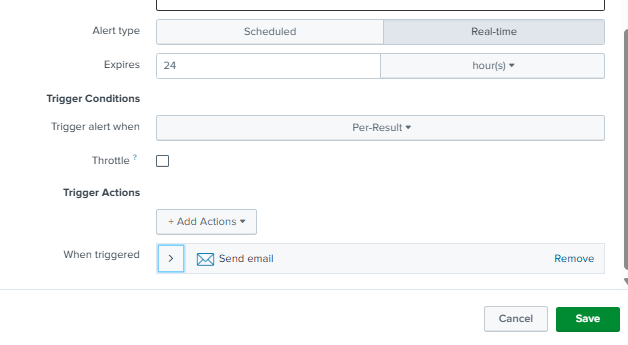
Step 4: Save as a Scheduled Alert
Once the search is verified end-to-end, save it as a recurring alert for continuous automated monitoring.
-
Run the detection query in Splunk Search.
-
Click Save As → Alert.
-
Title: UC4 - Outbound Connection to Threat Infrastructure
-
Alert type: Scheduled — Run Hourly.
-
Trigger Conditions: Number of Results > 0.
-
Actions: Add to Triggered Alerts and notify the SOC queue immediately.
-
Click Save.
Understanding the Output
The SPL query enriches every outbound destination IP through the gnmulti command, then applies progressive filters as follows:
-
Targets only outbound allowed or established connections.
-
Passes all destination IPs through GreyNoise enrichment via
gnmultiip_field="dest_ip". -
Keeps only destination IPs GreyNoise classifies as malicious.
-
Aggregates by internal source IP, capturing all threat destinations contacted and total connection count.
-
Retains only internal hosts with 3 or more connections to threat infrastructure — eliminating one-off accidental hits.
-
Sorts by connection count descending — most active beaconing or exfiltration candidates surface first.
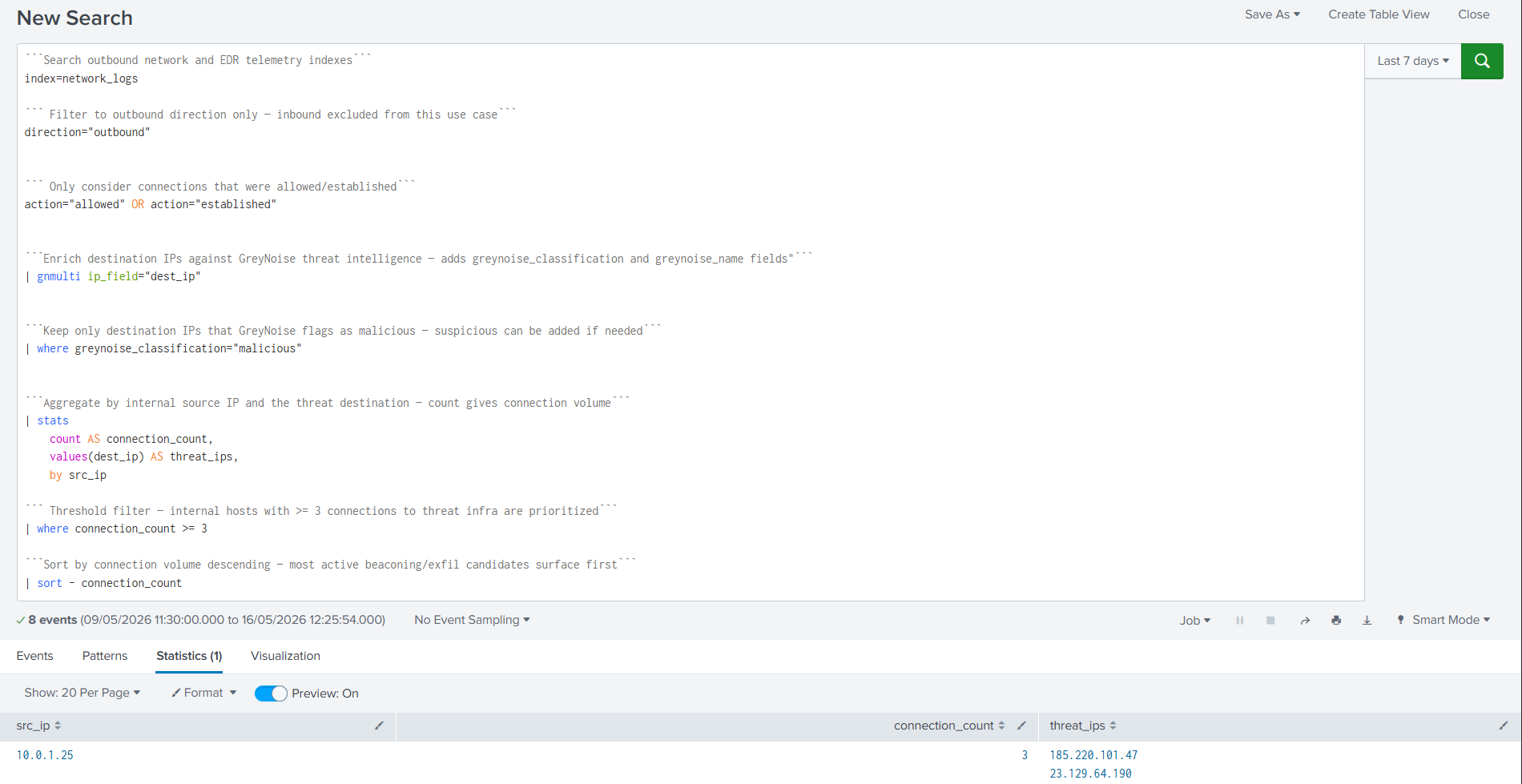
Result: Out of 205 raw outbound events, only 1 internal host (10.0.1.25) survived all filters — making 8 connections to 2 confirmed malicious destination IPs (185.220.101.47 and 23.129.64.190).
Query Output:
Results and Impact
Before vs After GreyNoise
| Before GreyNoise | After GreyNoise |
|---|---|
| 205 raw outbound events | 1 internal host with 8 confirmed malicious connections |
| None — just destination IPs with no threat context | Destinations classified as malicious inline |
| An analyst must manually investigate every outbound connection | Single host pre-identified with confirmed threat destinations |
| High - outbound traffic includes legitimate services and updates | Low — only confirmed malicious destinations retained |
| Minutes to hours, depending on analyst workload | Immediate — one result, pre-ranked and pre-validated |
| Limited to what the analyst manually checks | All 205 outbound events are enriched automatically in a single pass |
Benefits for the SOC Team
- Flips the perspective — instead of watching what comes in, this use case watches what your internal hosts are reaching out to, catching compromised hosts that may have already bypassed perimeter controls.
- Immediate compromise indicator — an internal host repeatedly connecting to confirmed malicious IPs is one of the strongest signals of active infection or C2 activity.
- Multi-destination visibility —
values(dest_ip)expose all malicious IPs contacted by the same internal host in a single row, revealing the full scope of outbound threat communication at a glance. - Reduces noise significantly — 205 raw events reduced to a single internal host worth investigating.
- Pivot-ready —
src_ipidentifies the exact internal host to isolate, andthreat_ipsprovides the malicious destinations to block at the perimeter.
Conclusion
Outbound connections to malicious infrastructure are one of the clearest post-compromise signals available — but only if you have the intelligence to recognize the destination. Standard egress monitoring cannot make that determination from raw logs alone.
GreyNoise not only adds intelligence to your alerts but also eliminates those that are not worthy of investigation in the first place. By incorporating a single gnmulti command within your existing Splunk outbound search, your SOC team goes from looking at 205 raw outbound events without context to a single internal host making repeated confirmed connections to malicious infrastructure — the clearest possible signal of an active compromise.
Updated 5 months ago