
Google Security Operations SIEM Use Case Guide 1
Reducing Alert Volume and Surfacing Targeted Threats
Reducing Alert Volume and Surfacing Targeted Threats
Overview
Every internet-facing organization is bombarded by automated scanners, bots, and opportunistic exploitation tools, generating thousands of firewall alerts per day that are not real threats. This leads to alert fatigue that overwhelms SOC analysts, causing them to ignore alerts and miss real targeted attacks that get buried in the noise.
The GreyNoise Solution
GreyNoise maintains a global sensor network that observes which IPs are conducting mass, indiscriminate internet scanning. By integrating GreyNoise threat indicators directly into Google SecOps, it can automatically identify and remove known mass-scanning traffic from your Google SecOps alerts. The residual traffic after filtering, traffic that is unknown to GreyNoise, carries a higher probability of being a genuine, targeted attack against your organization.
The core logic is simple:
"If an IP is hitting everyone on the internet, it is not targeting YOU. Filter it out."
Prerequisites
Ensure your environment meets these prerequisites before beginning the setup:
Tools and Access
| Prerequisites | Details |
|---|---|
| Google SecOps | A Google SecOps Instance with an Admin role user. |
| Google Cloud Platform | A Google Cloud Platform project, with deployed ingestion scripts for GreyNoise. Note: Access to a GCP project with sufficient permissions to enable APIs, create service accounts, IAM bindings, GCS buckets, Cloud Functions, Cloud Scheduler jobs, and Secret Manager secrets. |
| GreyNoise API Key | GreyNoise API key to configure during deploying ingestion script. |
| Firewall Logs | firewall logs/events from a third-party product |
| Log Fields | Logs must contain: principal.ip, and network.direction fields |
Implementation Steps
To achieve the use case, follow the steps below:
Step 1: Connectivity Verification of the GreyNoise Data Ingestion Script
Before building any detection logic, confirm that the GCP Cloud Function is deployed and actively ingesting indicators into Google SecOps. Navigate to Investigation > SIEM Search and run the following UDM filter to confirm ingested data is present:
graph.metadata.event_metadata.base_labels.log_types = "GREYNOISE"Expected Result: You should see GreyNoise IP entities appearing in the Results panel. If no results are returned, check the Cloud Function logs in GCP Cloud Logging for any errors before proceeding.
Step 2: Verify if Firewall Logs exist in the instance
Confirm that your firewall logs are present in Google SecOps SIEM. In the SIEM Search (UDM Search), filter for network connection events:
metadata.event_type = "NETWORK_CONNECTION"Expected Result: You should see the firewall/network events populated in the results panel before proceeding. Validate that the result set includes records with a populated principal.ip field. This field serves as the join key for GreyNoise correlation.
Step 3: Create Detection Rule
Create a YARA-L detection rule in Google SecOps that correlates inbound network events with GreyNoise IP indicators. This rule is the core mechanism for surfacing targeted threats while filtering noise.
Detection Rule:
// Use case 1: Reducing Alert Volume and Surfacing Targeted Threats
// Rule declaration: defines a YARA-L rule
rule greynoise_intelligence_inbound_traffic_unknown_to_greynoise {
  // Metadata section: non-functional fields used for documentation and triage
  meta:
    // Identifies who wrote or owns this rule
    author          = "GreyNoise Intelligence"
    // Human-readable name for display
    rule_name       = "GreyNoise Intelligence Inbound Traffic Unknown to Greynoise"
    // Explains what the rule is designed to detect
    description = "Detects inbound traffic from Source IPs not known to GreyNoise with 10+ occurrences."
    // Indicates the risk level if this rule fires
    severity        = "High"
    // Indicates the response urgency level for this alert
    priority        = "High"
  // Events section: defines the UDM field filters that must be satisfied
  events:
    // Capture inbound network traffic from your perimeter devices
    // Filter to only network connection events
    $network.metadata.event_type = "NETWORK_CONNECTION"
    // Filter to only inbound traffic
    $network.network.direction = "INBOUND"
    // Bind the source (principal) IP address to a placeholder variable for correlation
    $network.principal.ip = $correlation_ip
    // Exclude events where the source IP is empty or null
    $correlation_ip != ""
    // Join logic: Check if the Source IP exists in the GreyNoise dataset
    // Filter the GreyNoise enrichment records by their log type label
    $greynoise.graph.metadata.event_metadata.base_labels.log_types = "GREYNOISE"
    // Ensure the enrichment record comes from the GreyNoise Intelligence product
    $greynoise.graph.metadata.product_name = "GreyNoise Intelligence"
    // Confirm the GreyNoise entity being evaluated is an IP address type
    $greynoise.graph.metadata.entity_type = "IP_ADDRESS"
    // Join the GreyNoise entity IP to the same correlation variable used in network events
    $greynoise.graph.entity.ip = $correlation_ip
  // Match section: groups correlated events
  match:
    // Aggregate all events sharing the same $correlation_ip within a 15-minute window
    $correlation_ip over 15m
  // Outcome section: computes derived fields attached to the generated alert
  outcome:
    // Count the total number of distinct network connection events in the window
    $connection_count = count($network.metadata.id)
    // Count the number of unique destination IPs targeted by this source IP
    $unique_targets_hit = count_distinct($network.target.ip)
    // Count the number of unique destination ports targeted by this source IP
    $targeted_port_count = count_distinct($network.target.port)
  // Condition section: final boolean logic that should match
  condition:
    // Fire ONLY when: no GreyNoise record exists for the IP,
    // at least one matching network event exists,
    // and 10 or more network events were seen in the window
    !$greynoise and $network and #network >= 10
}
Create & Enable Detection Rule
-
From Google SecOps SIEM, navigate to Detection > Rules & Detections.
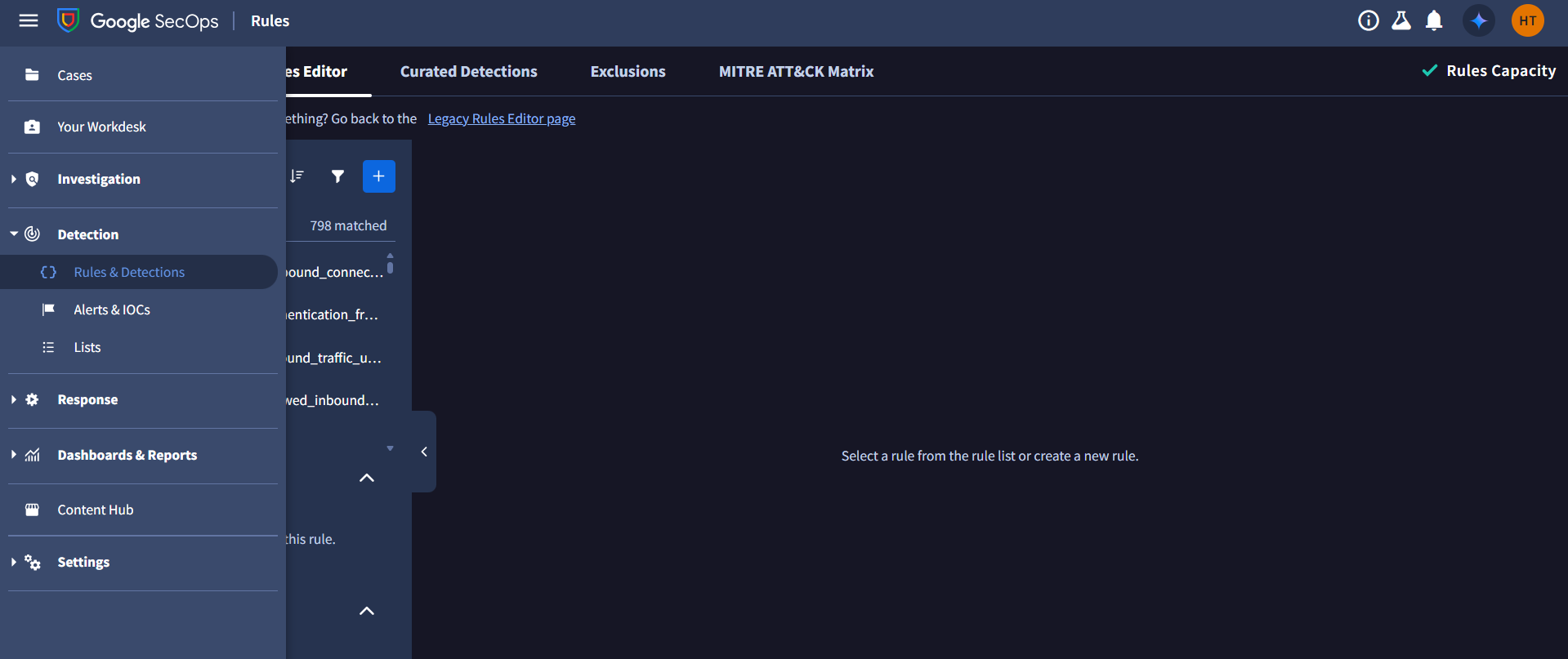
-
Go to the Rules Editor Tab, click on the + button.
-
Copy and paste the Detection Rule provided above in the editor.
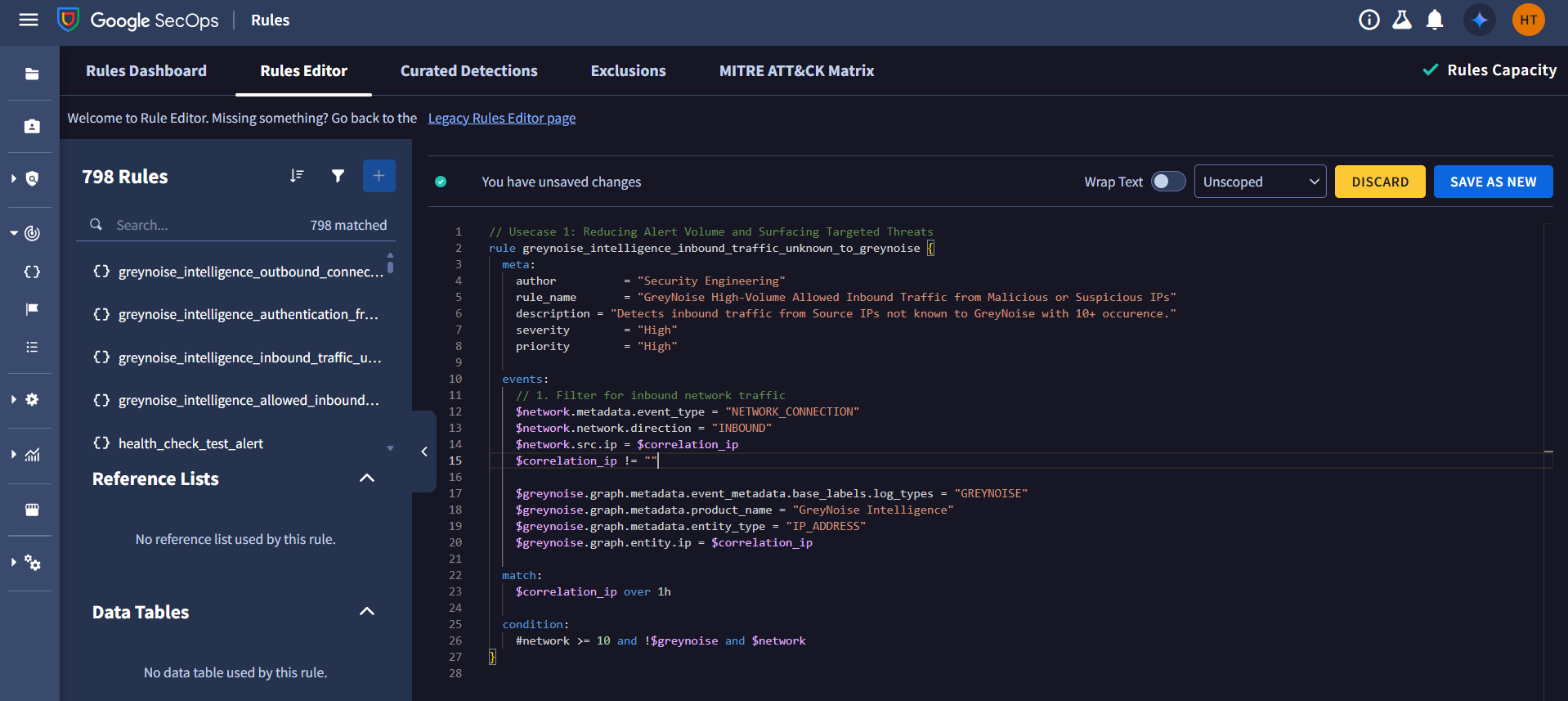
-
Click on SAVE NEW RULE.
-
To generate detections, Enable Detecting, and to generate alerts, Enable Alerting.
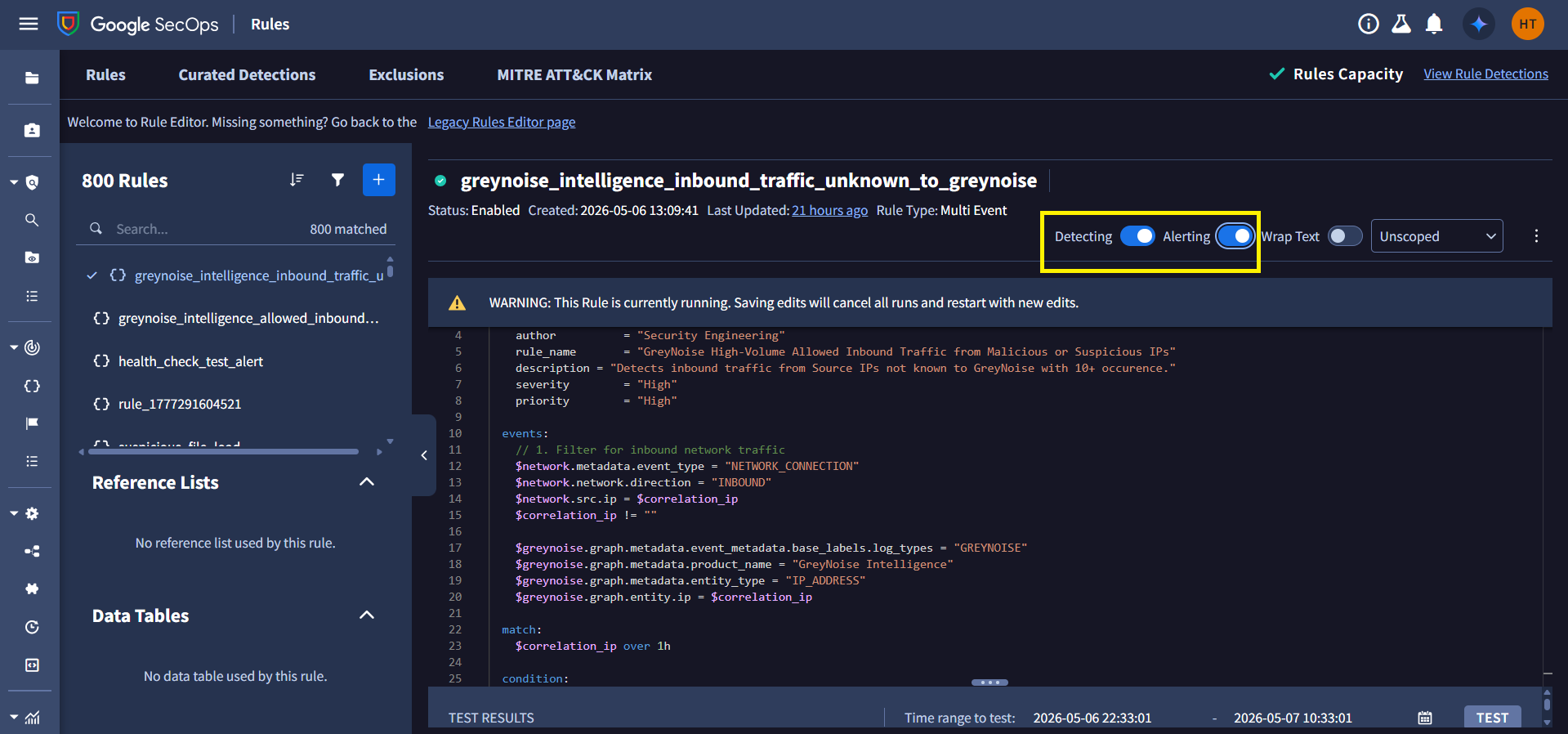
-
Click the Rules Dashboard tab to see all rules.
-
Search or browse for the rule you want to activate. Click on the 3 dots in the top right corner for the specific rule and toggle Live Rule as enabled to activate the Detection Rule.
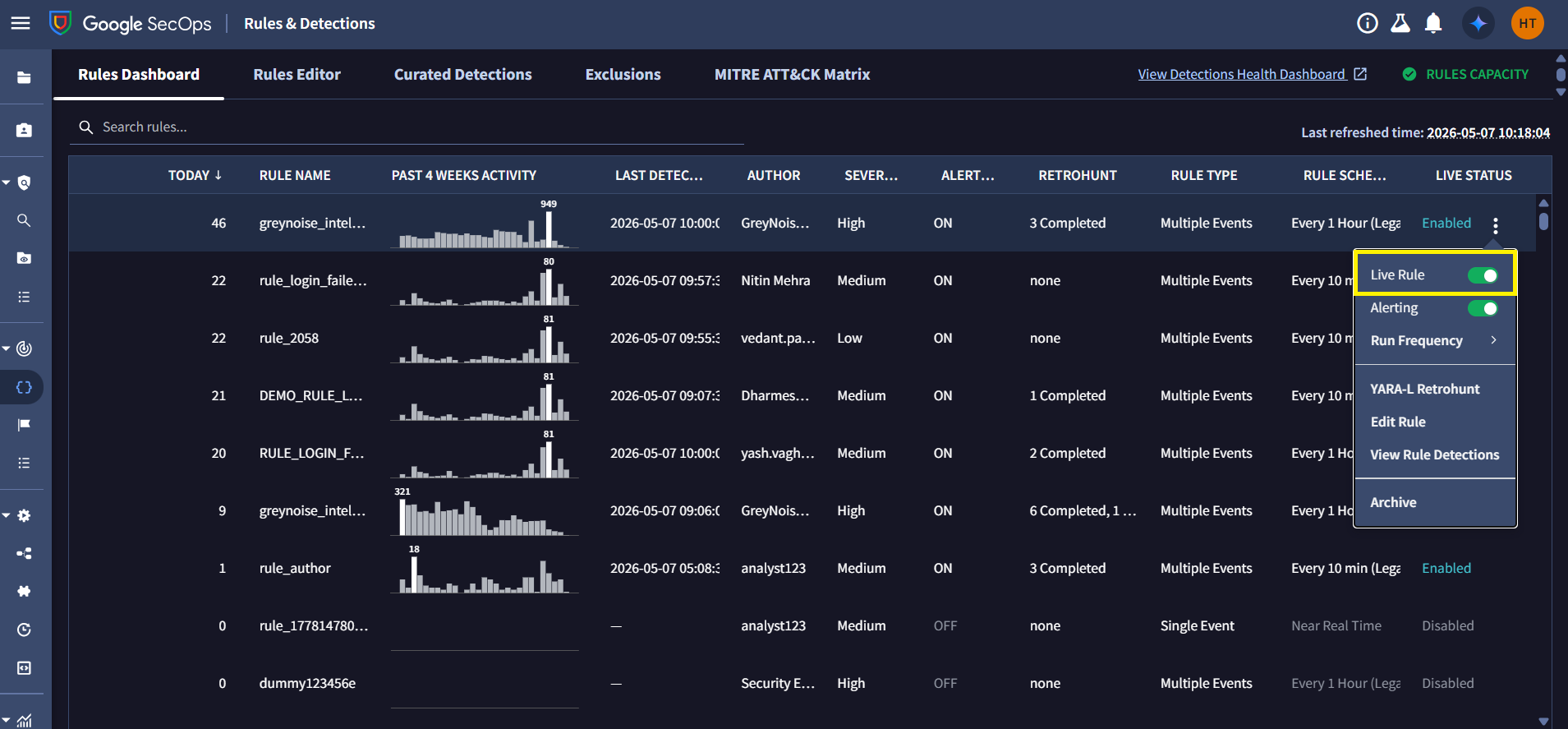
See Google SecOps: Detection Rules for more information.
Step 4: Trigger Retrohunt and View Alerts
Once the rule is live and alerting is enabled, it will immediately begin triggering alerts for matching events. To run the rule for a specific time range, we need to run YARA-L retrohunt by following these steps:
Steps to run YARA-L Retrohunt:
-
From Google SecOps SIEM, navigate to Detection > Rules & Detections.
-
Click the Rules Dashboard tab to see all rules.
-
Search or browse for the rule. Click the 3 dots in the top-right corner for the specific rule's row.
-
Click on the YARA-L Retrohunt.
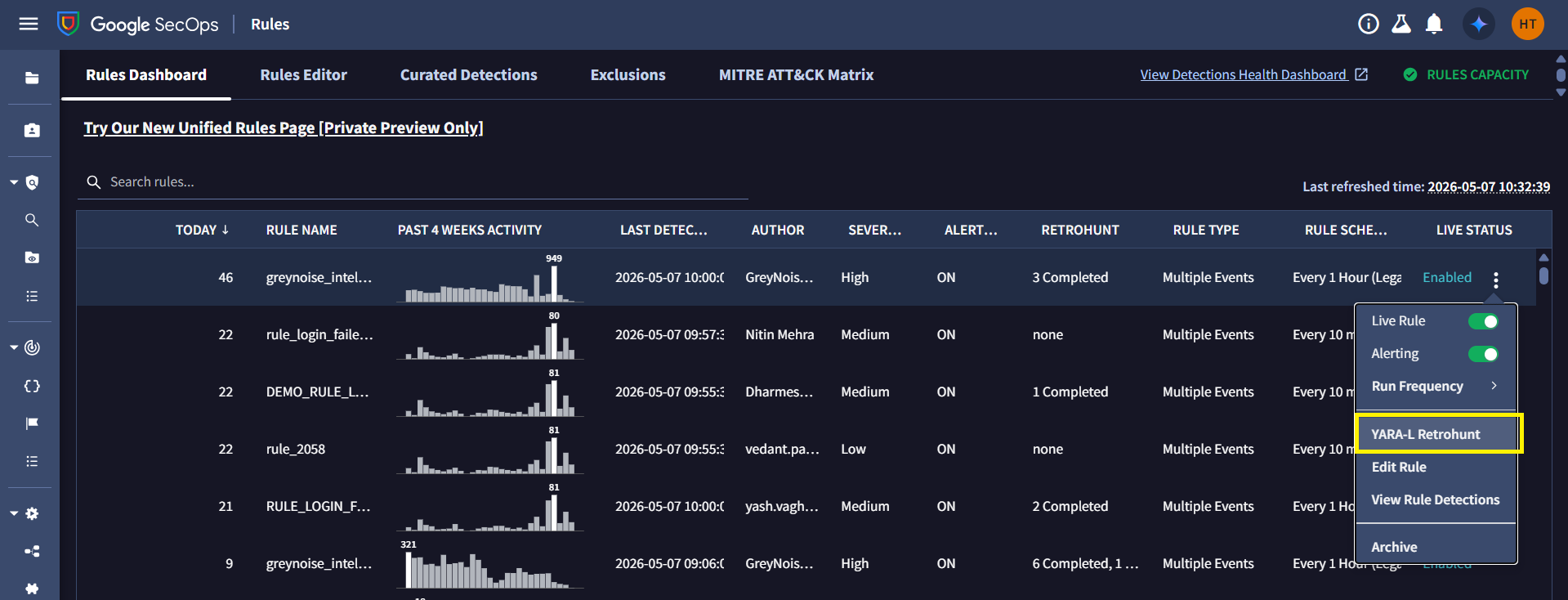
Note: You can change the Run Frequency as needed.
-
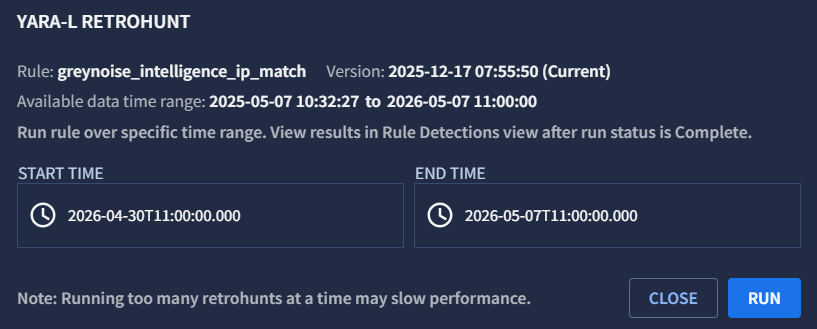
Select the time range.
-
Click on Run.
Wait approximately five minutes to verify if alerts have been generated. Even without running a YARA-L retrohunt, the rule will automatically trigger alerts for new incoming events as long as it is live and alerting is enabled.
Follow these steps to view alerts in Google SecOps:
Steps to view alerts
-
From Google SecOps SIEM, navigate to Detection > Rules & Detections.
-
Click the Rules Dashboard tab to see all rules.
-
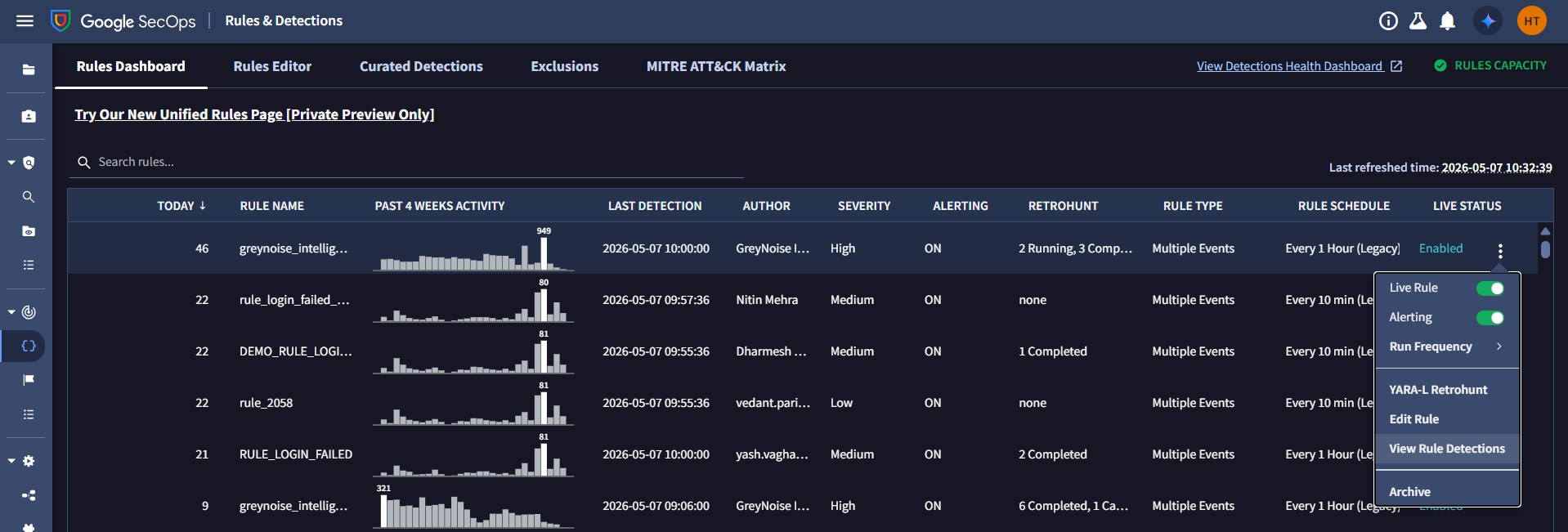
Search or browse for the rule. Click the 3 dots in the top-right corner for the specific rule's row.
-
Click on the View Rule Detections.
-
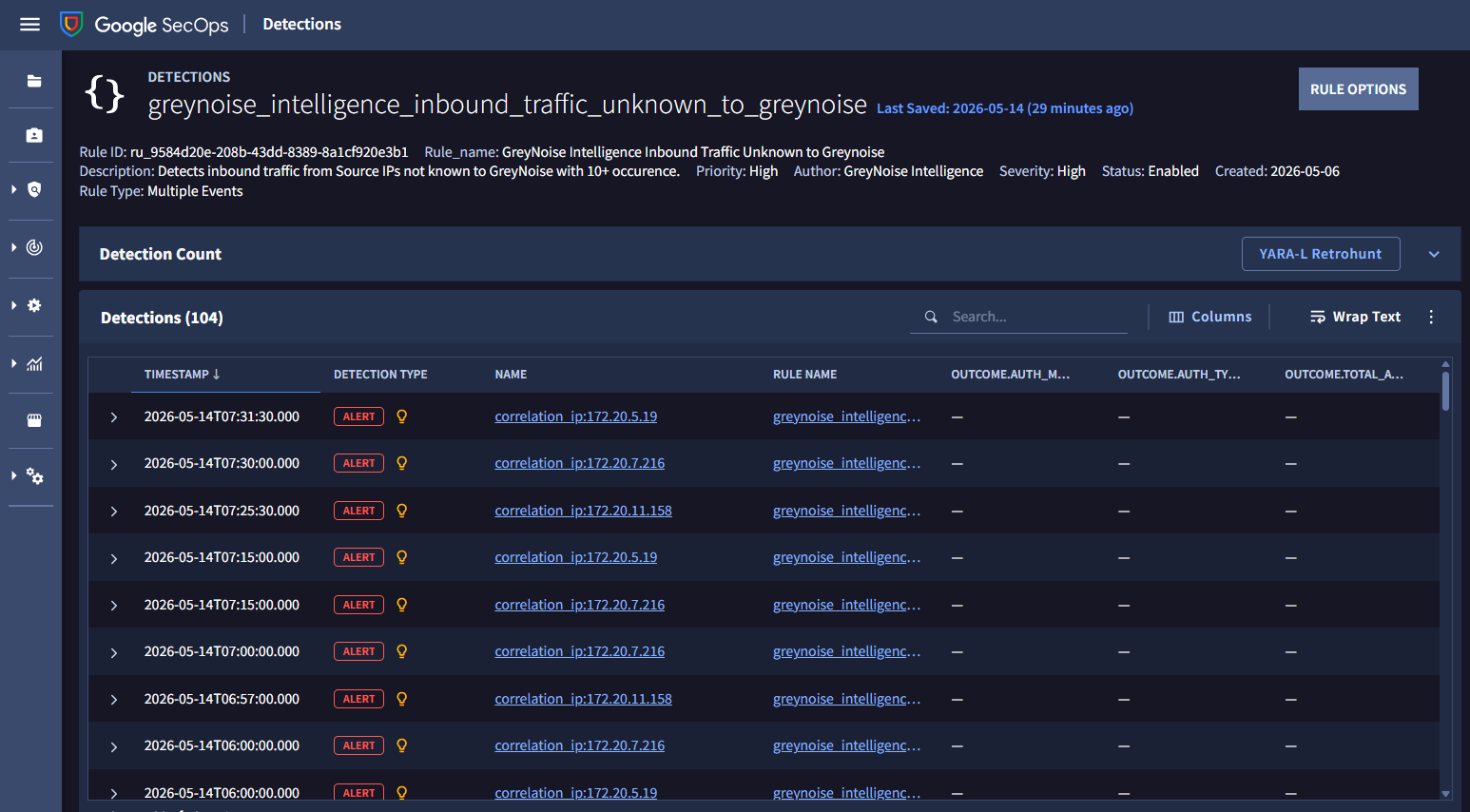
The list of Alerts will be visible in the Detections section, with the Detection Type column set to Alert.
-
To view the outcome variables of Alert, click on the Alert row, then on the Alert viewer tab, and click on Variables.
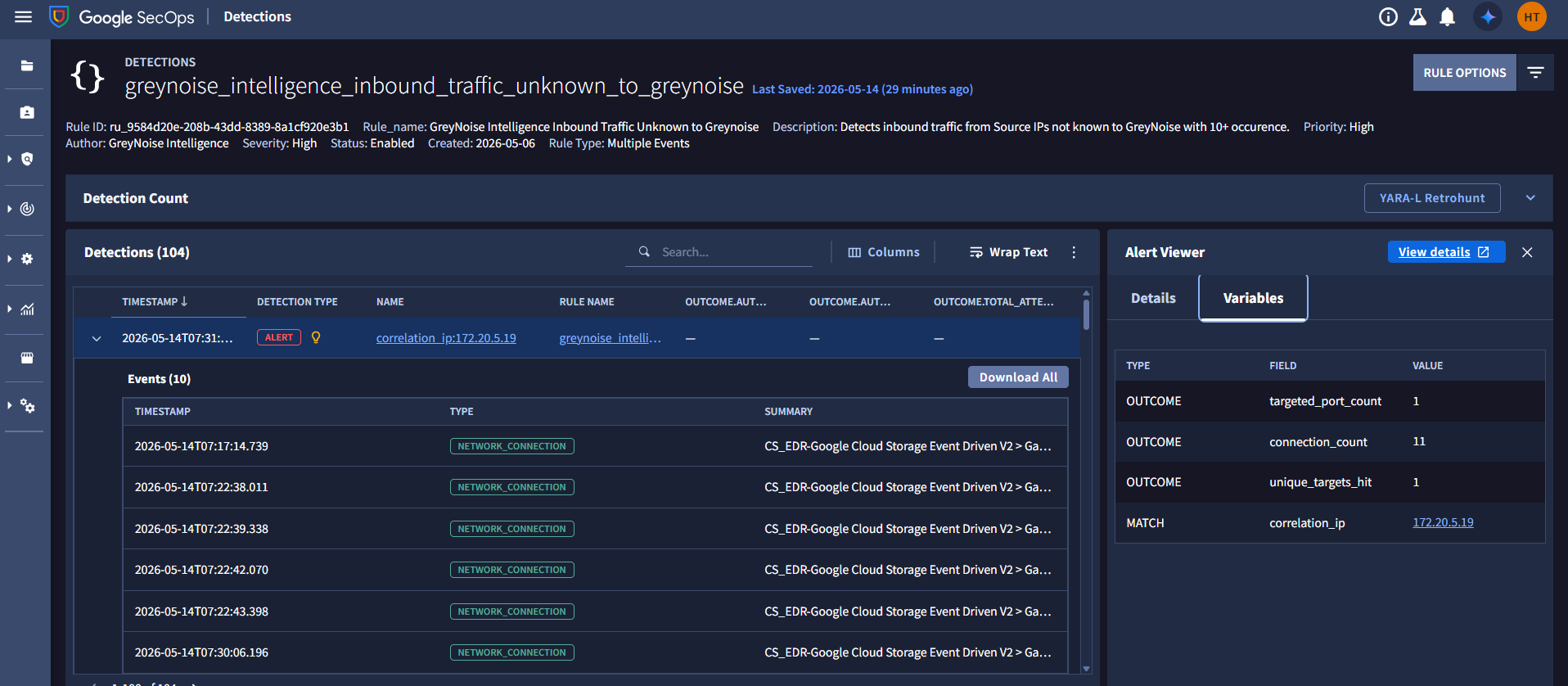
Understanding the Output
The YARA-L detection rule correlates inbound network connection events with GreyNoise intelligence data, then progressively filters activity to surface only the most relevant and potentially targeted threats:
- Targets only inbound network traffic by filtering on network.direction = "INBOUND".
- Correlates every inbound source IP against ingested GreyNoise intelligence indicators using the shared principal.ip value.
- Excludes all IPs already recognized by GreyNoise intelligence - removing known internet-wide scanners, mass reconnaissance platforms, and background internet noise.
- Retains only source IPs generating 10 or more events within a 15 minutes window - eliminating low-frequency opportunistic traffic and random connection attempts.
- Aggregates useful investigation context, including:
- Total connection count
- Number of unique targets contacted
- Number of distinct destination ports targeted
- Surfaces the highest-confidence candidates for analyst investigation: inbound IPs that repeatedly interact with the environment and are not recognized by GreyNoise intelligence.
Result: Out of 6955 raw events, 11 IPs survived. What remains is a focused set of inbound source IPs demonstrating repeated activity against your environment without matching known internet scanning behavior. These IPs represent higher-priority candidates for immediate triage and investigation, as they may indicate exploitation attempts or malicious activity that has not yet been classified as widespread internet noise.
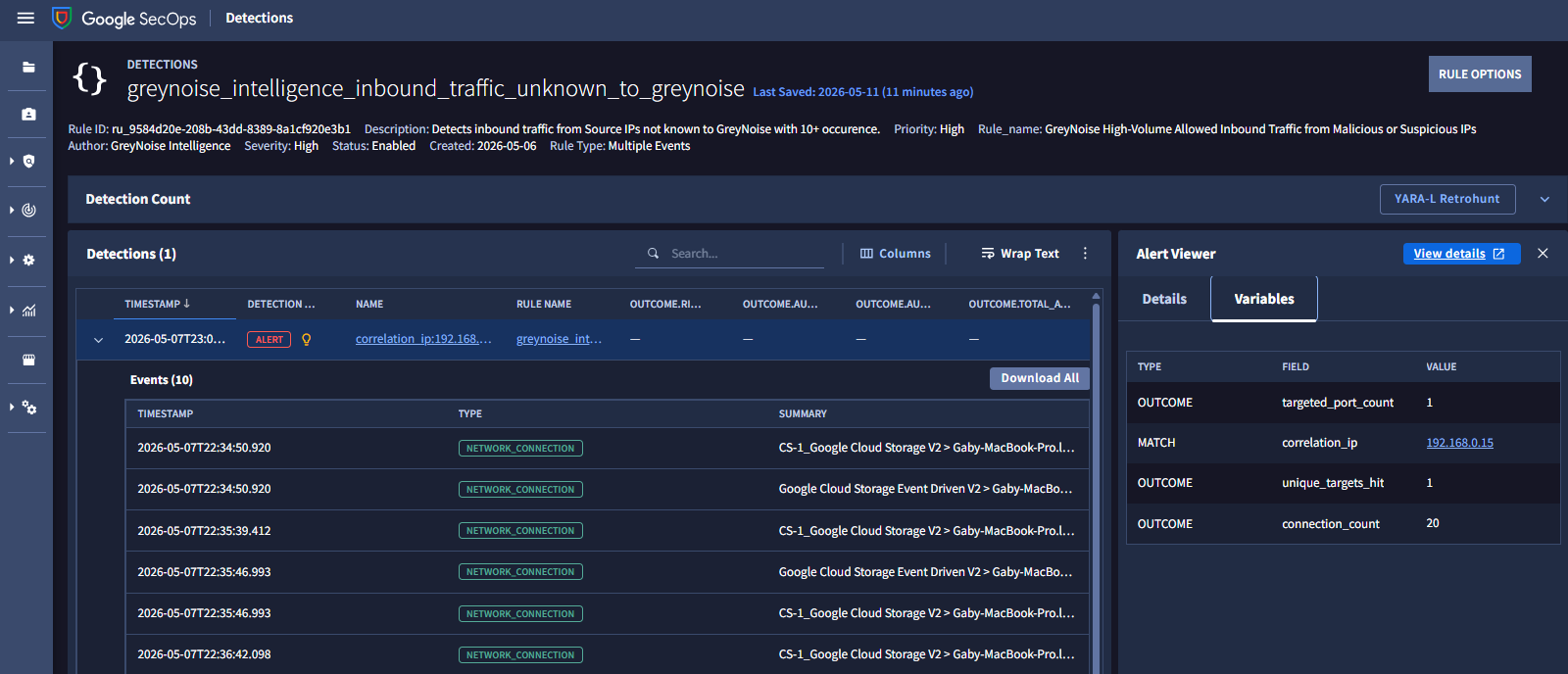
Alert Volume Reduction
| Filter / Logic | What It Removes | Impact on Alert Volume |
|---|---|---|
| network.direction = "INBOUND" | Internal traffic and standard outbound browsing activity | High: Keeps analysts laser-focused on external threats rather than internet noise. |
| !$greynoise | Known GreyNoise-classified internet scanners and background noise | Maximum: Eliminates known "internet background noise" that requires no action. |
| #network >= 10 | One-off probes and low-frequency internet noise | High: Retains only persistent or repeated activity patterns |
| match $correlation_ip over 15m | Short-lived or isolated connections | Medium: Highlights sustained reconnaissance behavior |
| The Net Result | 47 out of 50 events dropped. | 94% Reduction: Only 3 high-risk IPs require human investigation. |
Results and Impact
Before vs After GreyNoise
| Before GreyNoise Filtering | After GreyNoise Filtering |
|---|---|
| Large volumes of inbound perimeter alerts | Only high-confidence suspicious IPs remain |
| Analysts manually investigate known scanning IPs | Known internet noise is automatically excluded |
| High alert fatigue from mass scanning activity | Reduced analyst overload |
| 0% suppression of known noise | 94% suppression of known noise |
| Manual enrichment required for external IP reputation checks | GreyNoise context automatically incorporated |
| Targeted threats hidden within internet noise | Unknown and suspicious activity clearly surfaced |
Benefits for the SOC Team
-
Significant Reduction in Alert Volume: Known internet scanners, mass-crawling infrastructure, and opportunistic probing activity are filtered before reaching the analyst queue. Analysts are presented only with events that require meaningful investigation.
-
Automated Threat Intelligence Correlation: Source IPs are automatically evaluated against GreyNoise Intelligence datasets. Common internet background activity is resolved automatically without requiring manual validation.
-
Reduced Investigation Time: GreyNoise enrichment eliminates the need for repetitive external reputation lookups and manual enrichment, significantly reducing investigation overhead.
-
Improved Visibility into Targeted Threats: By removing internet background noise, previously hidden reconnaissance attempts and targeted attack patterns become easier to detect and prioritize.
-
Reduction in Alert Fatigue: As inbound traffic volume grows, GreyNoise filtering scales with the environment, ensuring the targeted Alerts remain focused for SOC and operationally manageable.
Conclusion
GreyNoise Intelligence enhances Google SecOps detections by filtering out internet noise before alerts reach analysts.
By integrating GreyNoise correlation directly into YARA-L detection rules, SOC teams move from investigating large volumes of low-value alerts to working from a smaller, prioritized queue of meaningful security events.
The core value of this use case is to reduce the noise between SOC analysts and the threats that actually matter.
Updated 5 months ago