
Microsoft Sentinel Use Case Guide 4
Detect Outbound Connections to Threat Infrastructure
Detect Outbound Connections to Threat Infrastructure
Overview
Internal corporate assets should not initiate outbound connections to internet infrastructure known to be hostile. When they do, it signals something far more serious than a misconfigured firewall rule - it means a device inside your network is actively reaching out to the threat actor, not the other way around.
This pattern bypasses traditional perimeter defenses and is often a strong indicator of compromise - active C2 beaconing, data exfiltration, or botnet participation.
The GreyNoise Solution
By correlating internal egress and outbound logs with GreyNoise malicious IP indicators within Microsoft Sentinel, this use case isolates high-fidelity anomalies. It surfaces internal hosts communicating with known command-and-control (C2) servers, active exploitation infrastructure, or botnet staging grounds.
The result is a high-fidelity, low-noise detection surface - not a list of suspicious IPs to manually research, but a confirmed list of internal assets that have made successful outbound connections to infrastructure GreyNoise has already validated as malicious.
The Core Signal: Any successful outbound connection from an internal host to GreyNoise-classified malicious infrastructure warrants immediate investigation of that internal host for indicators of compromise.
Prerequisites
Ensure your environment meets these prerequisites before beginning the setup:
Tools and Access
| Prerequisites | Details |
|---|---|
| Microsoft Sentinel | An active Microsoft Sentinel workspace in Azure. |
| GreyNoise Solution | GreyNoise Enterprise is installed from the Sentinel Content Hub. |
| GreyNoise Threat Intelligence | GreyNoise Threat Intelligence connector installed from the Sentinel Content Hub. |
| API Key | GreyNoise API key configured during connector deployment. |
| Classification Setting | Connector deployed with Classification parameter set to: malicious, unknown, benign, suspicious. |
| Asset Categorization | Optional but recommended: use ipv4_is_private() in the query to filter out false positives from internal (RFC1918) routing. |
| Firewall Logs | CommonSecurityLog (CEF-based logs from Palo Alto, Check Point, Fortinet, etc.) |
| Log Fields | Logs must contain: SourceIP, DestinationIP, CommunicationDirection, DeviceAction fields |
Table
The entire greynoise data is stored in this one table:
| Table | Purpose |
|---|---|
| ThreatIntelIndicators | Stores GreyNoise IP indicators ingested daily. |
Implementation Steps
The full detection query is assembled in four progressive stages. Each stage is explained below before the complete query is presented.
Step 1: Filter Inbound and Internal Traffic
Isolate outbound traffic. Filter out internal-to-internal traffic and any blocked connections. Focus only on successful connections, leaving your network to public internet destinations.
CommonSecurityLog
   | where CommunicationDirection == 1
Step 2: Retain Only Allowed or Established Connections
CommonSecurityLog
   | where CommunicationDirection == 1
   | where DeviceAction in~ ("allow", "allowed", "established", "permit", "accept")
Step 3: Enrich Destination IPs against GreyNoise
All GreyNoise fields are contained in the Data column as an STIX 2.1 JSON blob. The destination IP is matched against the NetworkIP extracted from parse_json(Data).pattern.
// Create a variable storing GreyNoise threat IPs
let GreyNoiseMaliciousIPs = ThreatIntelIndicators
   | extend d = parse_json(Data)
// Filter to only include records where the 'name' field contains "GreyNoise"
   | where tostring(d.name) has "GreyNoise"
   | extend ThreatType = tostring(d.indicator_types[0])
// Keep only indicators classified as "malicious"
   | where ThreatType == "malicious"
   | where isnotempty(ObservableValue)
   | project ObservableValue, ThreatType;
// Query outbound traffic allowed to external destinations
CommonSecurityLog
// Filter to only outbound traffic (CommunicationDirection == 1 means outbound)
   | where CommunicationDirection == 1
// Keep only connections that were allowed/established by the firewall
   | where DeviceAction in~ ("allow", "allowed", "established", "permit", "accept")
// Exclude connections to private IP ranges (focus on external destinations)
   | where not(ipv4_is_private(DestinationIP))
// Ensure both source and destination IPs are populated
   | where isnotempty(SourceIP) and isnotempty(DestinationIP)
// Join with malicious IPs to find internal hosts connecting to known malicious external destinations
   | join kind=inner GreyNoiseMaliciousIPs on $left.DestinationIP == $right.ObservableValue
Full Detection Query
The complete standardized Microsoft Sentinel implementation combines all steps and detection logic.
You can choose the desired query from the options below that matches your Sentinel setup:
// Create a variable storing GreyNoise threat IPs
let GreyNoiseMaliciousIPs = ThreatIntelIndicators
   | extend d = parse_json(Data)
// Filter to only include records where the 'name' field contains "GreyNoise"
   | where tostring(d.name) has "GreyNoise"
   | extend ThreatType = tostring(d.indicator_types[0])
// Keep only indicators classified as "malicious"
   | where ThreatType == "malicious"
   | where isnotempty(ObservableValue)
   | project ObservableValue, ThreatType;
// Query outbound traffic allowed to external destinations
CommonSecurityLog
// Filter to only outbound traffic (CommunicationDirection == 1 means outbound)
   | where CommunicationDirection == 1
// Keep only connections that were allowed/established by the firewall
   | where DeviceAction in~ ("allow", "allowed", "established", "permit", "accept")
// Exclude connections to private IP ranges (focus on external destinations)
   | where not(ipv4_is_private(DestinationIP))
// Ensure both source and destination IPs are populated
   | where isnotempty(SourceIP) and isnotempty(DestinationIP)
// Join with malicious IPs to find internal hosts connecting to known malicious external destinations
   | join kind=inner GreyNoiseMaliciousIPs on $left.DestinationIP == $right.ObservableValue
// Count connections per source IP and collect unique malicious destinations
   | summarize
    ConnectionCount = count(),
    ThreatDestinations = make_set(DestinationIP)
    by SourceIP
// Filter to only keep source IPs with 3 or more connections to malicious destinations
   | where ConnectionCount >= 3
// Sort by connection count in descending order (most active compromised hosts first)
   | sort by ConnectionCount desc
Step 4: Automate as a Sentinel Analytics Rule
Once the query is verified end-to-end, save it as a recurring Sentinel Analytics Rule for continuous automated monitoring:
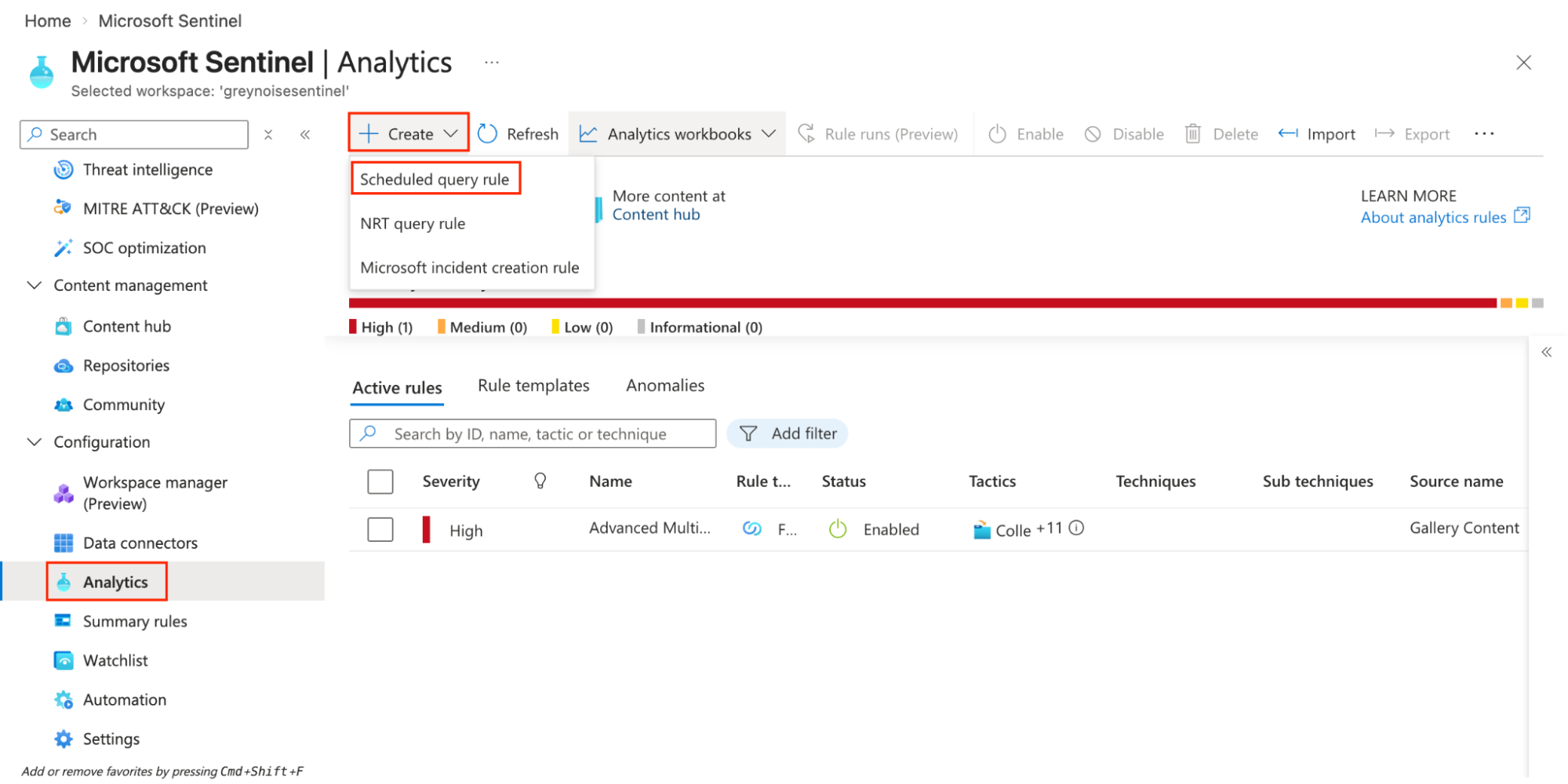
- Navigate to Microsoft Sentinel Workspace → Analytics → Create → Scheduled query rule.
-
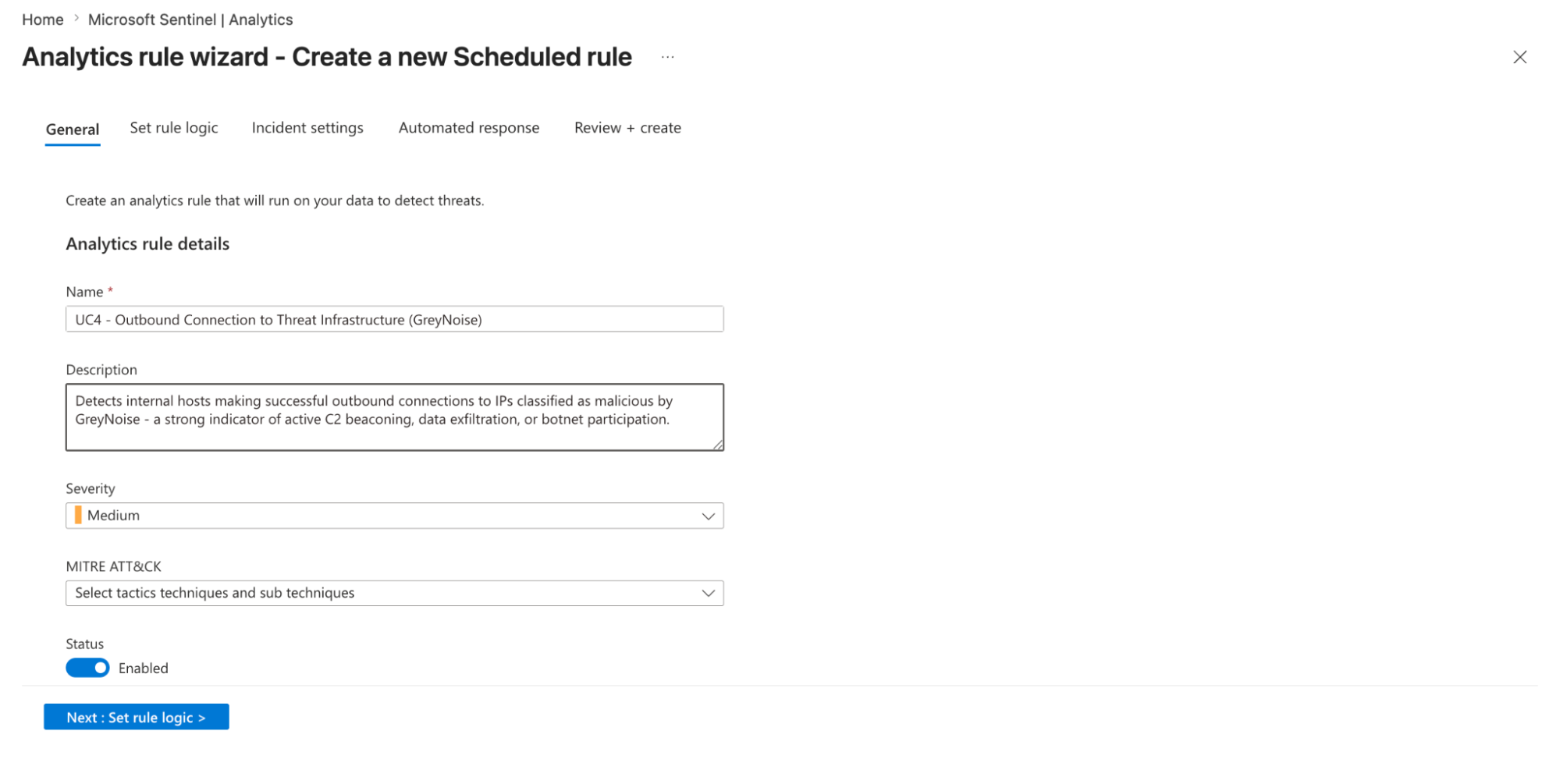
Title: UC4 - Outbound Connection to Threat Infrastructure (GreyNoise).
-
Description: Detects internal hosts making successful outbound connections to IPs classified as malicious by GreyNoise - a strong indicator of active C2 beaconing, data exfiltration, or botnet participation.
-
Severity: Select desired severity.
-
MITRE ATT&CK: Select tactics, techniques, and sub-techniques.
-
Tactics: Command and Control
-
Technique: T1071 - Application Layer Protocol
-
Sub-Technique: Depends on protocol
-
-
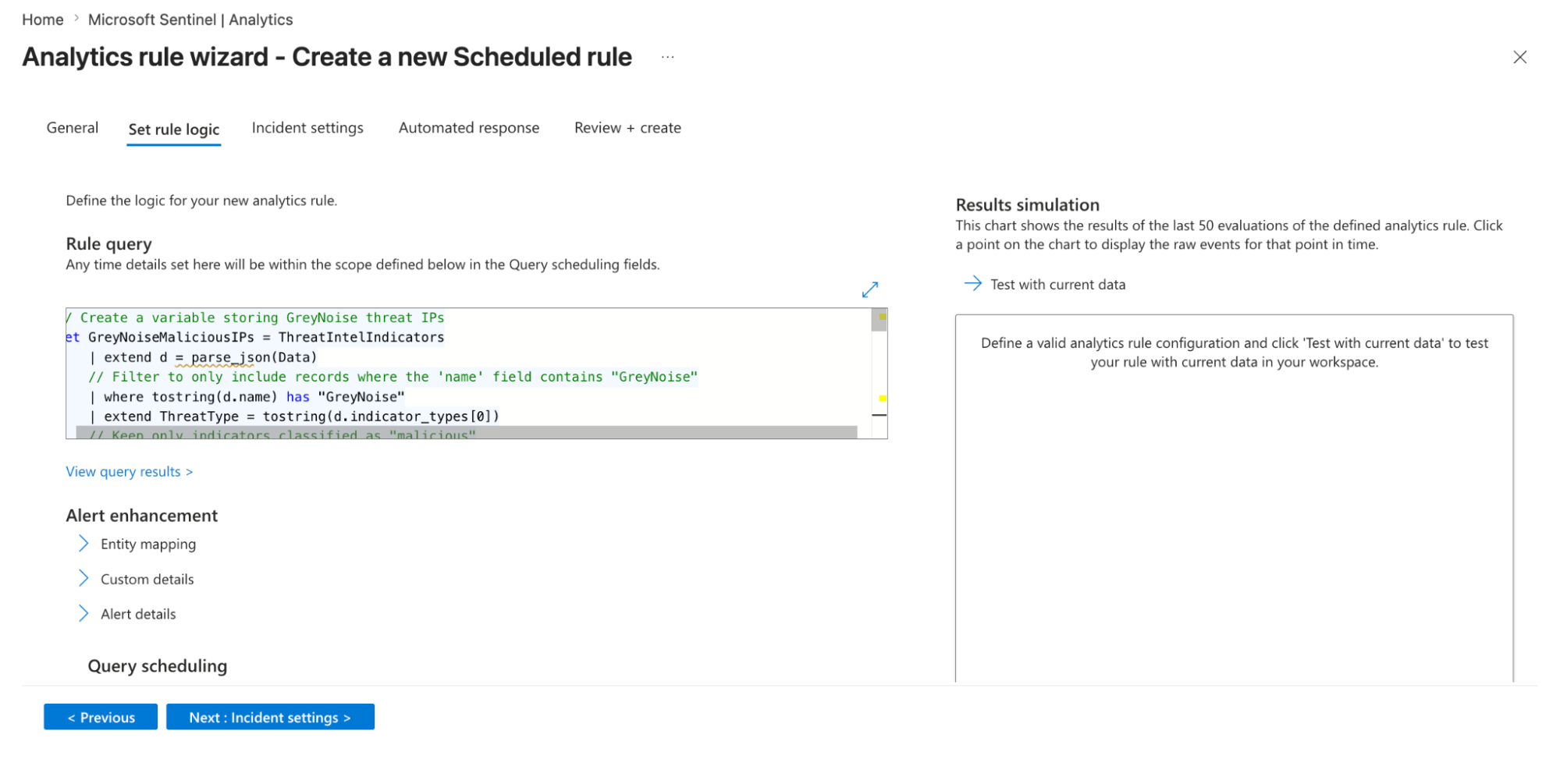
Click on Next: Set rule logic option.
-
Rule query: Provide the query created in step 3.
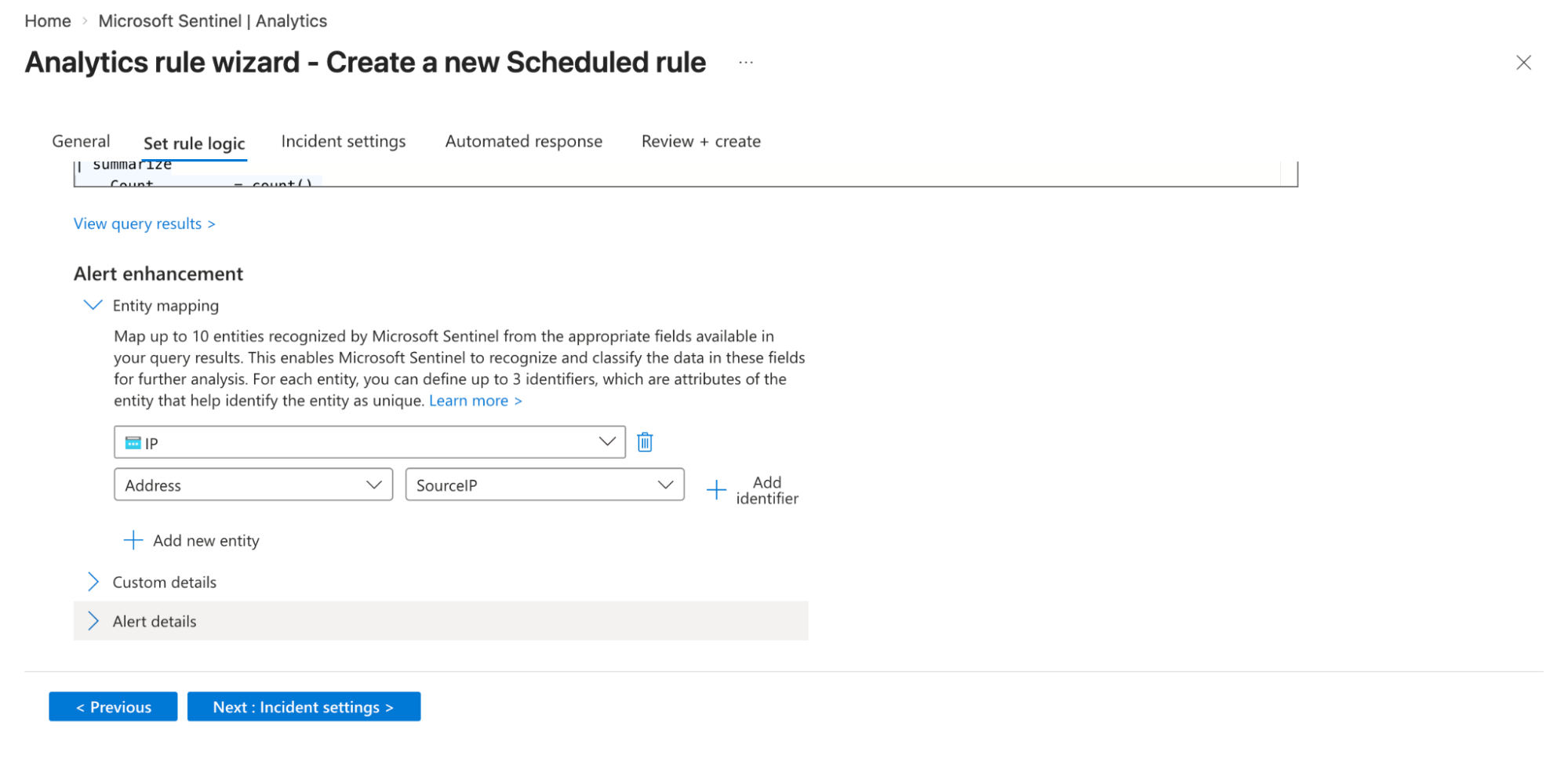
- Entity Mapping:
- Map relevant fields from your query results to Sentinel entities (for example, map
SourceIPto the IP entity type). This allows Sentinel to enrich alerts with context and helps in investigation and correlation within incidents.
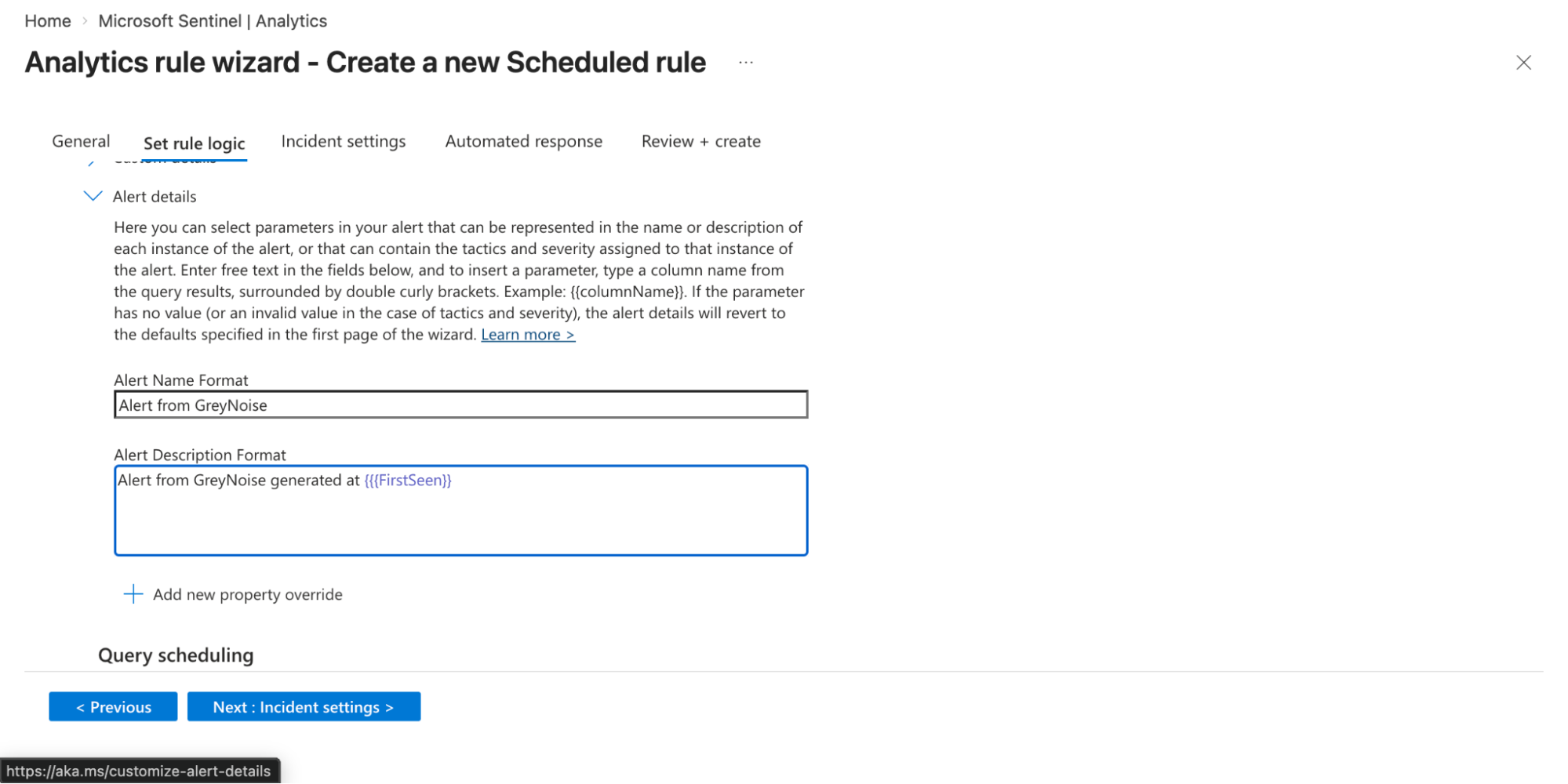
- Alert details:
- Provide a meaningful alert name in the Alert Name Format text box.
- Enter the description in the Alert Description Format text box. You can also dynamically customize these using query fields (e.g., include IP addresses or usernames) so each alert provides better context during investigation.
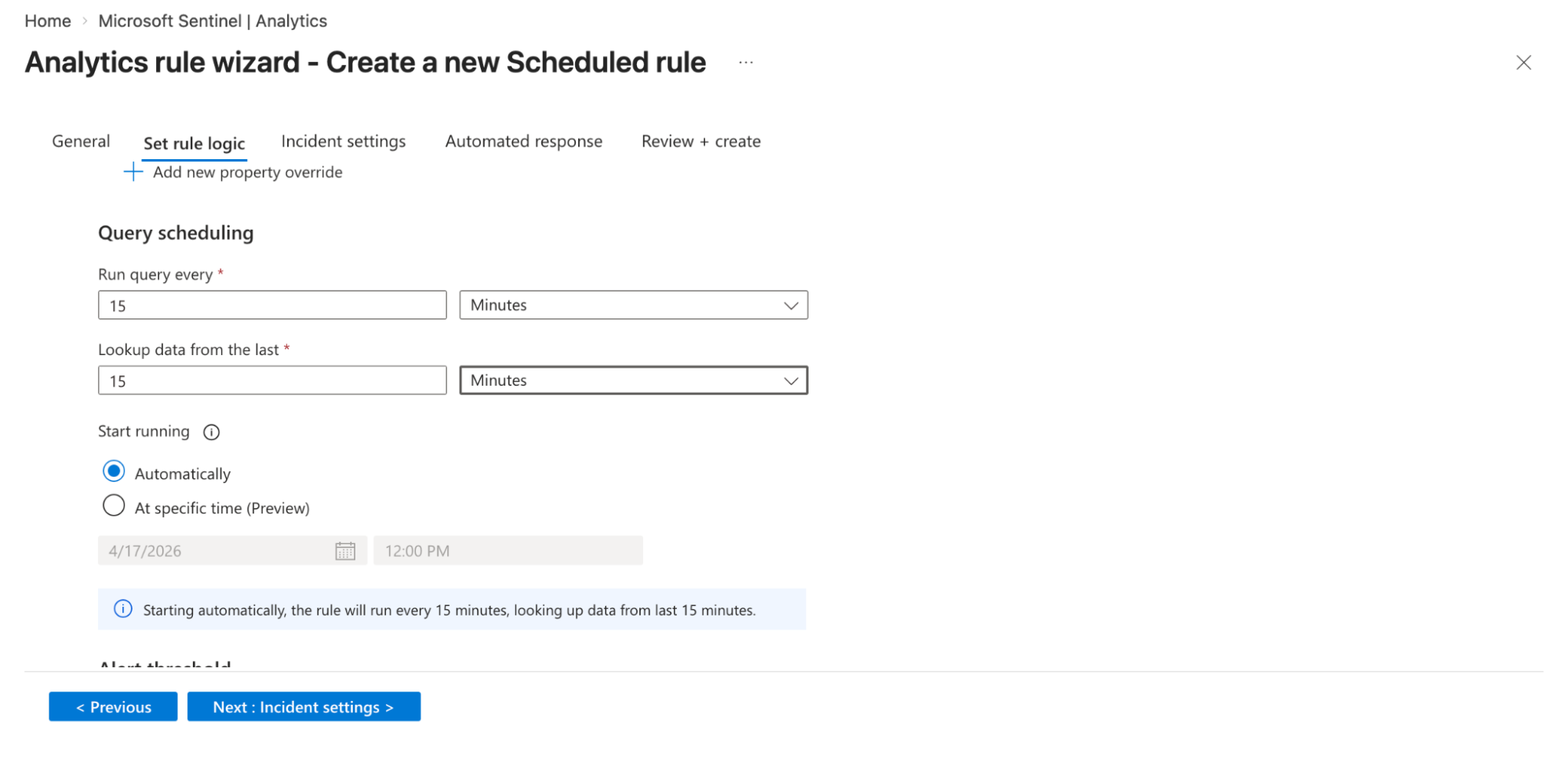
- Query scheduling
- Set how frequently the rule runs in the Run query every text box.
- Enter the amount of historical data it analyzes in the Lookup data text box. The lookback period should be at least as long as the run interval to avoid missing events.
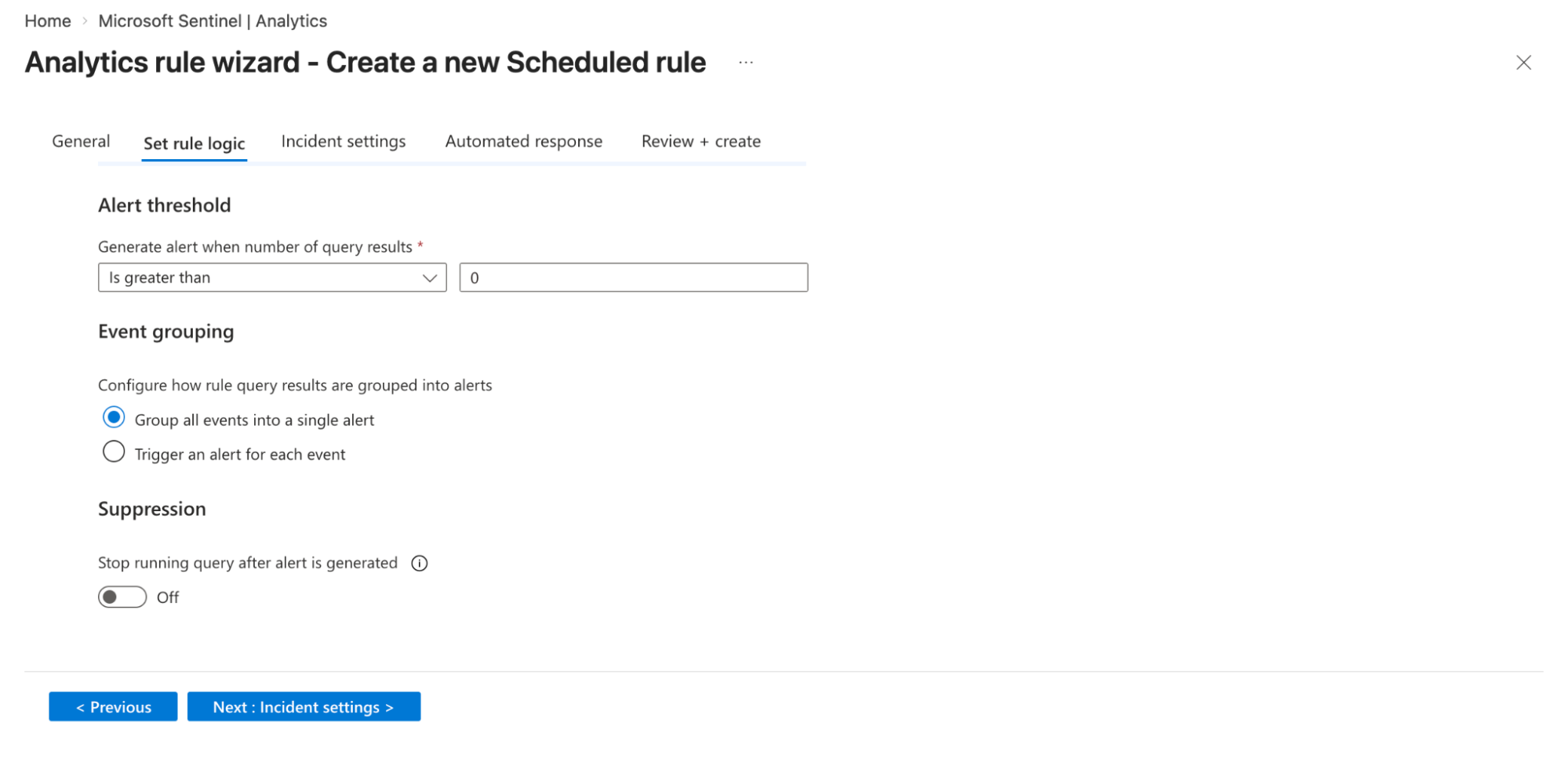
- Alert threshold
- Define when an alert should be generated based on query results in the Generate alerts when number of query results option. (e.g., trigger an alert when results are greater than a defined number). This helps control noise and adjust detection sensitivity.
- Decide how alerts are generated from query results:
- Group all events into a single alert: Creates one alert summarizing all matching events.
- Trigger an alert for each event: Generates a separate alert for each event for granular visibility.
- You can enable suppression to stop the rule from running after an alert is triggered.
-
Click on Next: Incident settings option.
-
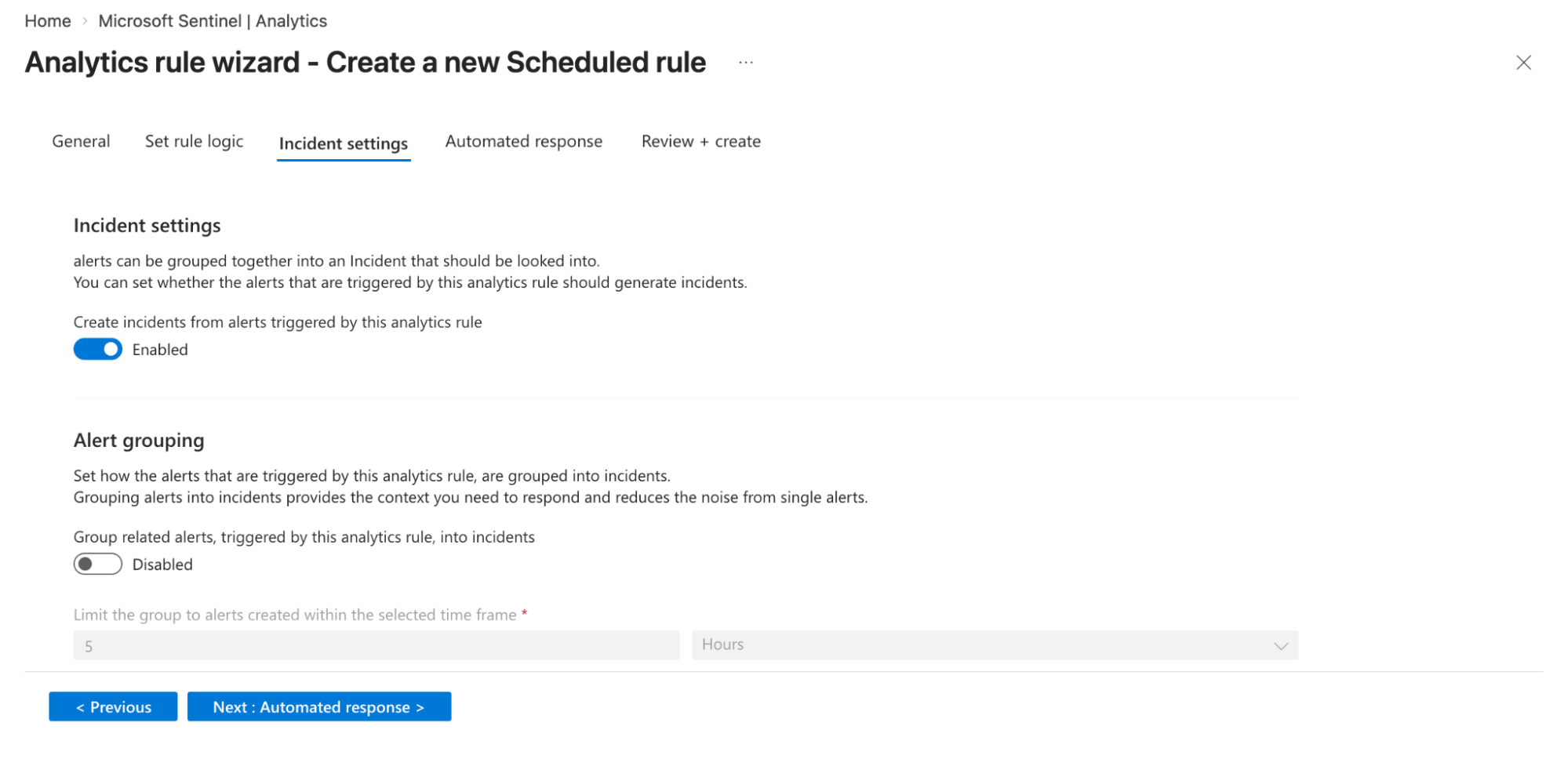
Incident Settings
- Configure the rule to automatically create incidents from generated alerts. This ensures alerts are grouped into incidents for SOC investigation workflows.
- Automation rules
- Attach automation rules or playbooks (Logic Apps) to trigger actions such as blocking IPs, sending notifications, or enriching alerts. You can define conditions, triggers, and execution order for these automated responses.
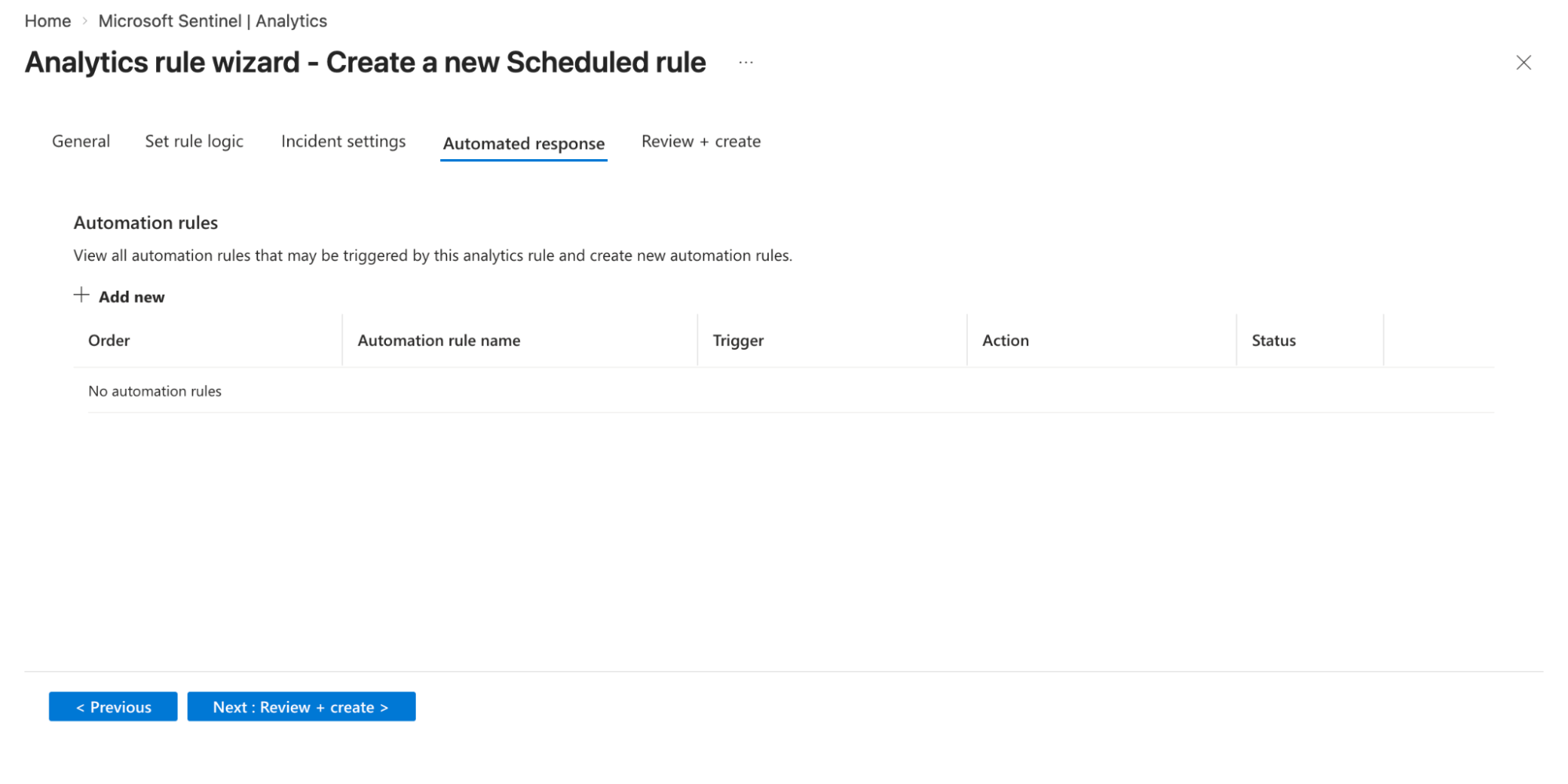
- Click on the Save option.
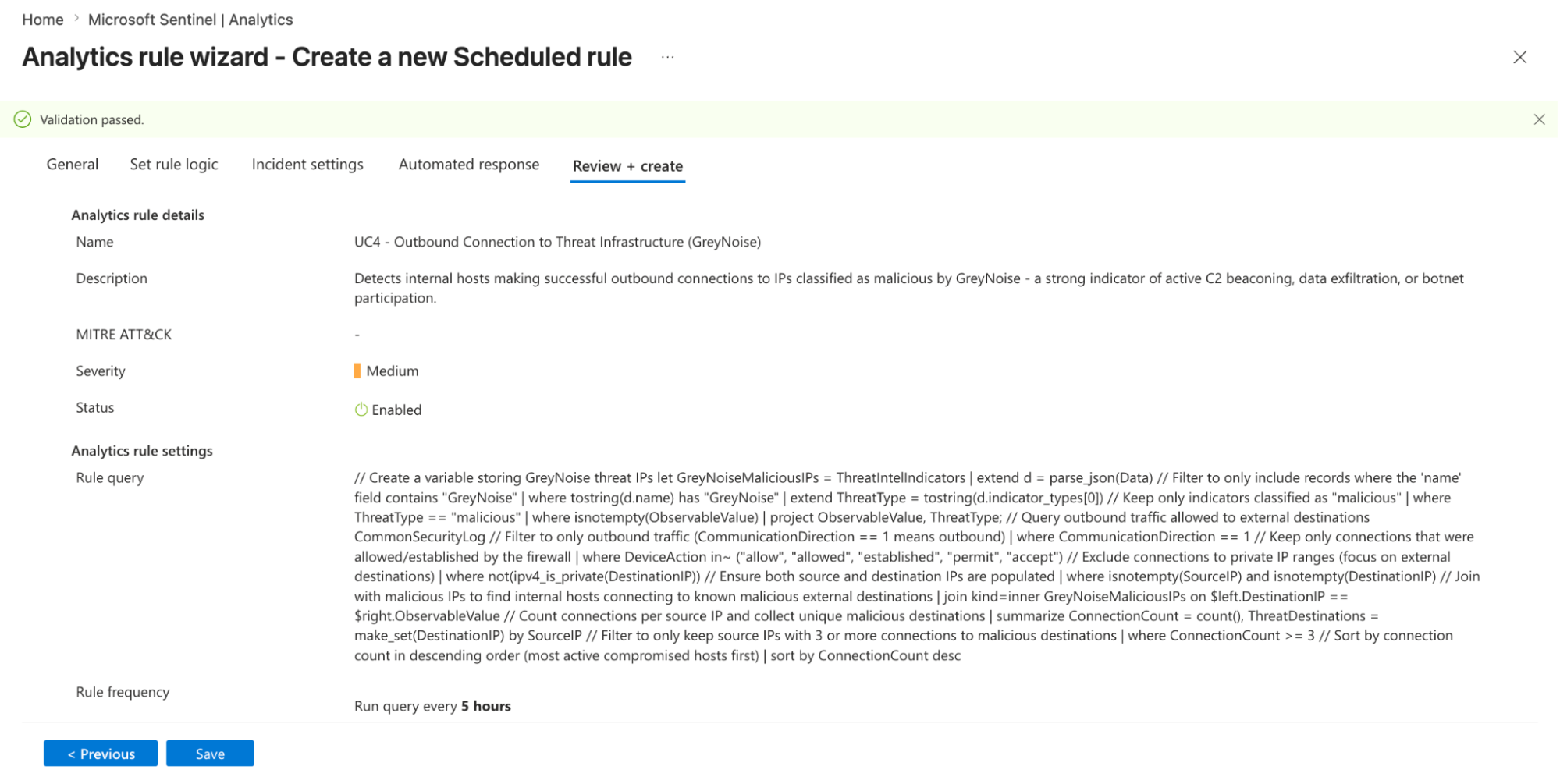
Note: You can adjust the Schedule and Lookup durations as needed.
Understanding the Output
The KQL query joins every outbound destination IP against the GreyNoise ThreatIntelIndicators table, then applies progressive filters as follows:
-
Targets only outbound allowed or established connections.
-
Excludes RFC 1918 internal destination IPs using ipv4_is_private() - internal routing does not represent threat infrastructure communication.
-
Joins all destination IPs against GreyNoise malicious indicators via an inner join on the ThreatIntelIndicators table.
-
Keeps only destination IPs GreyNoise classifies as malicious.
-
Aggregates by internal source IP, capturing all threat destinations contacted and total connection count.
-
Retains only internal hosts with 3 or more connections to threat infrastructure - eliminating one-off accidental hits.
-
Sorts by distinct threat destination count first - multi-destination hosts indicate wider compromise scope.
Result: Out of hundreds of raw outbound events, only internal hosts making confirmed connections to malicious destination IPs survive all filters - the clearest possible signal of an active compromise or ongoing C2 beaconing session.
Query Output:
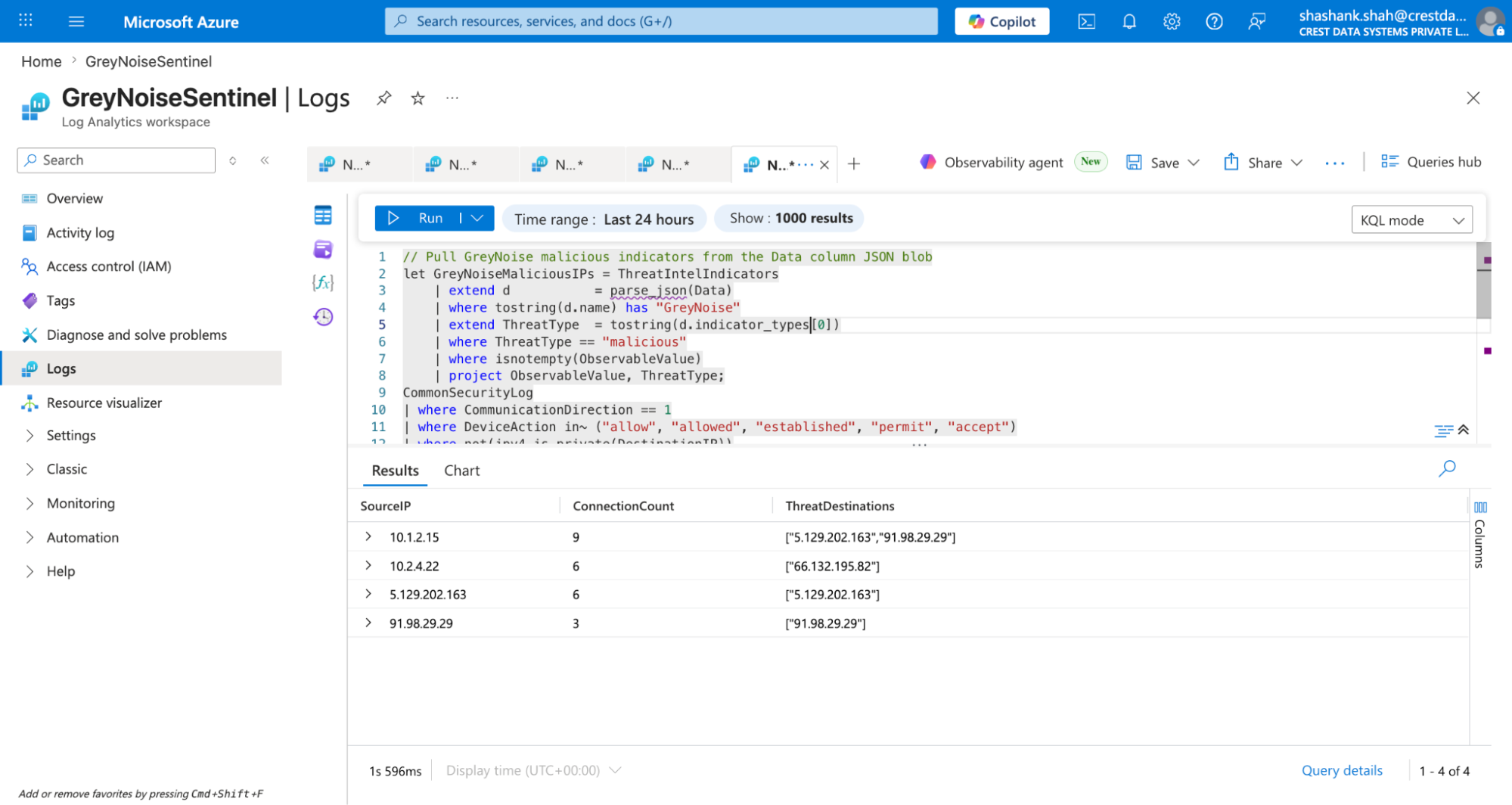 Results and Impact
Results and ImpactBefore vs After GreyNoise
| Before GreyNoise | After GreyNoise |
|---|---|
| Hundreds of raw outbound events | A small set of internal hosts with confirmed malicious connections |
| No context - just destination IPs with no threat classification | Destinations classified as malicious inline |
| An analyst must manually investigate every outbound connection | Single host pre-identified with confirmed threat destinations |
| High alert fatigue - outbound traffic includes legitimate services and updates | Low noise - only confirmed malicious destinations retained |
| Minutes to hours, depending on analyst workload | Immediate - one result, pre-ranked and pre-validated |
| Limited to what the analyst manually checks | All outbound events are enriched automatically in a single query pass |
Benefits for the SOC Team
-
Flips the perspective - instead of watching what comes in, this use case watches what your internal hosts are reaching out to, catching compromised hosts that may have already bypassed perimeter controls.
-
Immediate compromise indicator - an internal host connecting to confirmed malicious IPs is one of the strongest signals of active infection or C2 activity.
-
Multi-destination visibility - ThreatDestinations (make_set) exposes all malicious IPs contacted by the same internal host in a single row, revealing the full scope of outbound threat communication at a glance.
-
Reduces noise significantly - hundreds of raw outbound events reduced to a small number of internal hosts worth investigating, with connection count and threat destinations pre-compiled.
-
Pivot-ready - SourceIP identifies the exact internal host to isolate, and ThreatDestinations provides the malicious destinations to block at the perimeter.
Conclusion
Outbound connections to malicious infrastructure are one of the clearest post-compromise signals available - but only if you have the intelligence to recognize the destination. Standard egress monitoring cannot make that determination from raw logs alone.
GreyNoise not only adds intelligence to your alerts but also eliminates those that are not worthy of investigation in the first place. By incorporating a single ThreatIntelIndicators join within your existing Sentinel outbound egress query, your SOC team goes from looking at hundreds of raw outbound events without context to a small number of internal hosts making confirmed connections to malicious infrastructure - the clearest possible signal of an active compromise.
Updated 4 months ago