
Elasticsearch Use Case Guide 2
Detecting Allowed Inbound Traffic from Known Malicious Hosts
Detecting Allowed Inbound Traffic from Known Malicious Hosts
Overview
Modern enterprise networks are subjected to thousands of automated scans, exploitation attempts, and brute-force attacks daily. While edge security controls - Firewalls, WAFs, Proxies - block the vast majority of this traffic, perimeter gaps can occur due to misconfigured rules, outdated ACLs, or overly permissive policies such as Any-Any rules.
When these gaps happen, unauthorized traffic is allowed into the network. If left unmonitored, security teams have no way of knowing if a connection was established by a harmless scanner or a known malware command-and-control (C2) node.
The GreyNoise Solution
GreyNoise threat indicators integrated into Elastic cross-reference real-time inbound logs - specifically traffic marked as allowed - against GreyNoise's malicious and suspicious IP classifications. It isolates events in which known malicious actors have successfully bypassed perimeter defenses, giving security teams a clear, audited list of edge leaks to patch.
Prerequisites
Ensure your environment meets these prerequisites before beginning the setup:
Tools and Access
| Prerequisites | Details |
|---|---|
| Elasticsearch / Elastic Stack | An Elastic Stack deployment with required permissions. |
| GreyNoise API Key | GreyNoise API key to configure GreyNoise integration. |
| GreyNoise Integration | A successfully installed GreyNoise integration, with GreyNoise threat intelligence data being collected. |
Network Inbound Telemetry
- Access to network perimeter telemetry logs, such as Firewalls, WAFs, Load Balancers, or Routers.
- Source IP: The external initiating IP address.
- Action Taken: Field indicating traffic was allowed, permitted, or accepted.
- Directionality: Field or context indicating the traffic was inbound or outside-to-inside.
Implementation Steps
To achieve the use case, follow the steps below:
Step 1: Verification of the GreyNoise Data Ingestion
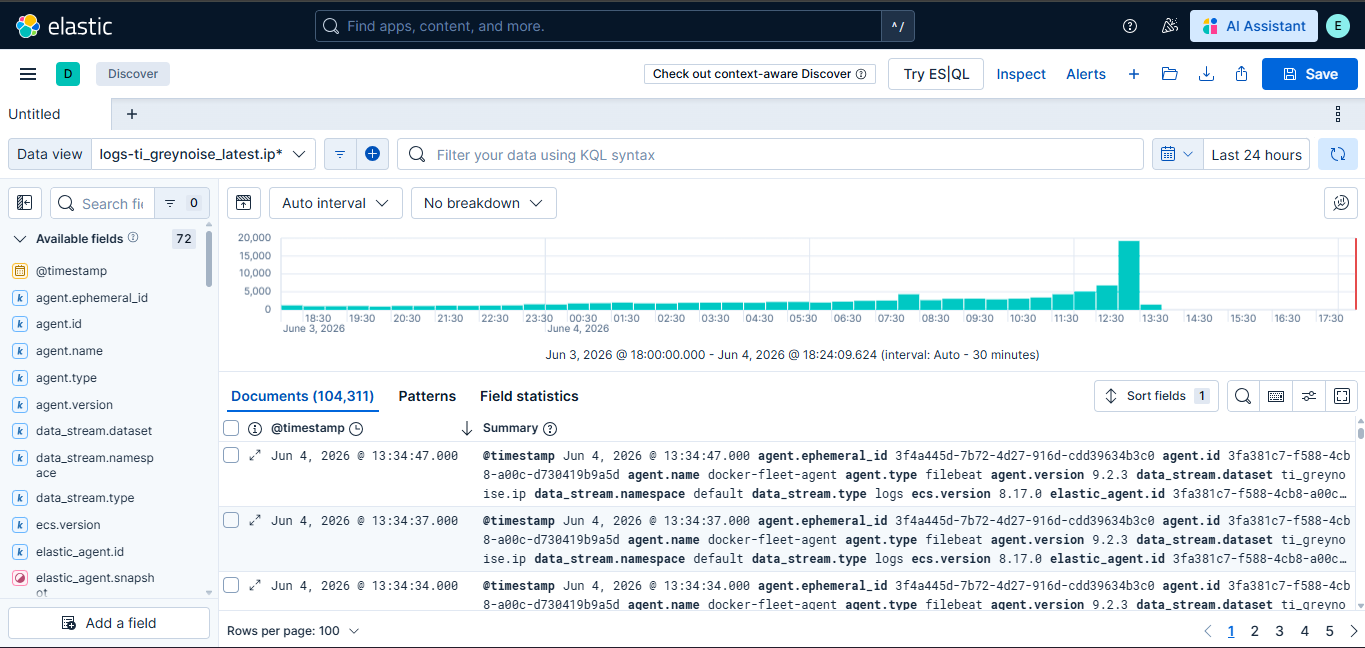
To verify successful GreyNoise data ingestion in Elasticsearch, check the logs-ti_greynoise_latest.ip* data stream in Kibana Discover.
Expected Result: You should see documents containing GreyNoise threat intelligence and enrichment data.
Step 2: Verify if network Logs exists in the instance
Confirm that your network logs are present in Elasticsearch. In Kibana Discover, under your relevant data view, run the following KQL query:
event.category: "network"Expected Result: You should see firewall or network events populated in the results panel before proceeding. Validate that the returned events contain populated source.ip fields, as these IP fields are used for GreyNoise enrichment and correlation. Also, verify that fields such as network.direction, event.module, event.category, event.outcome, and event.type are present in the result set.
Step 3: Create Detection Rule
Create an Elastic Security detection rule in Elasticsearch that correlates inbound network events with GreyNoise threat intelligence indicators. The rule should detect allowed inbound firewall connections originating from IPs classified by GreyNoise as malicious or suspicious
Steps to create a detection rule:
-
Navigate to Security > Rules > Detection Rules and click Create New Rule.
-
Select Indicator Match as the rule type and make the following changes.
-
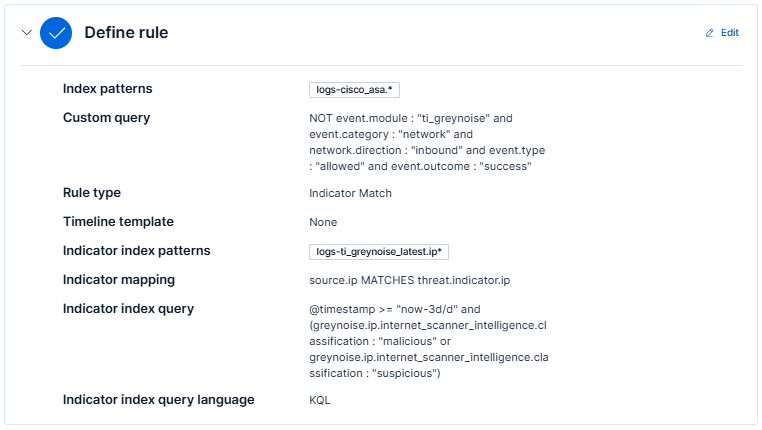
In the Define Rule section:
-
Index Pattern: Add the index pattern relevant to the data you want to monitor. For best results, use perimeter or network traffic data, such as firewall, IDS/IPS, VPN, proxy, or network flow logs (for example,
logs-panw.*,logs-cisco_asa.*, orlogs-suricata.*). Keep the pattern as specific as possible for better performance. -
Custom Query: The following KQL query filters successful inbound network connection events while excluding GreyNoise integration logs. It identifies inbound traffic that was allowed through perimeter controls and is eligible for GreyNoise threat intelligence correlation.
NOT event.module : "ti_greynoise" and event.category : "network" and network.direction : "inbound" and event.type : "allowed" and event.outcome : "success" -
Indicator index patterns: Use
logs-ti_greynoise_latest.ip*. -
Indicator index query: The following KQL query filters GreyNoise threat intelligence indicators collected within the last 3 days and retains only IPs classified as malicious or suspicious. These indicators are used to correlate against inbound network traffic events during detection.
@timestamp >= "now-3d/d" and (greynoise.ip.internet_scanner_intelligence.classification : "malicious" or greynoise.ip.internet_scanner_intelligence.classification : "suspicious") -
Indicator Mapping:
- Field: Map to the field in your Elastic environment containing IPs, e.g.,
source.ip. - Indicator Index Field:
threat.indicator.ip
- Field: Map to the field in your Elastic environment containing IPs, e.g.,
-
Required fields (Optional): Add
threat.indicator.ip. -
Related integrations (Optional): Add GreyNoise.
-
-
In the About Rule section:
-
Name: e.g
UC2 - Inbound Threat Detection (GreyNoise Enriched)
-
Description: e.g
Detects inbound traffic that was permitted by perimeter controls from IPs classified as malicious or unknown by GreyNoise - indicating a potential perimeter gap or misconfiguration.
-
Default Severity: e.g.,
critical. -
Default risk score: 100
-
Tags: Add
GreyNoise(used for filter Alerts generated by this rule by rule transforms),Cloud SecurityandThreat Intelligence. -
Max alerts per run: Default is 100; configurable up to 1000.
-
Indicator prefix override: Set to
greynoise.ipto enrich alerts with GreyNoise data.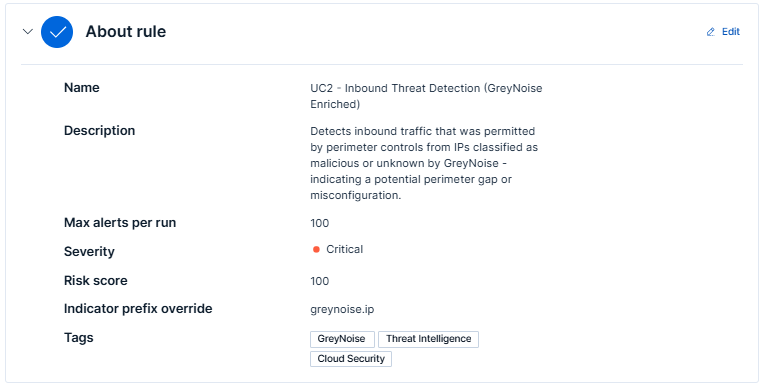
-
-
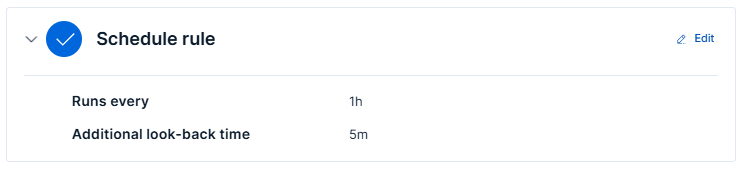
In the Schedule Rules section:
-
Set Runs Every - Defines how frequently the rule runs.
-
Additional Lookback Time - Specifies how far back to check for matches.
-
-
Under the Rule Actions section, configure automated response actions to execute whenever the detection rule generates an alert. (Optional)
-
Click on Create & enable rule.
Steps to view alerts
-
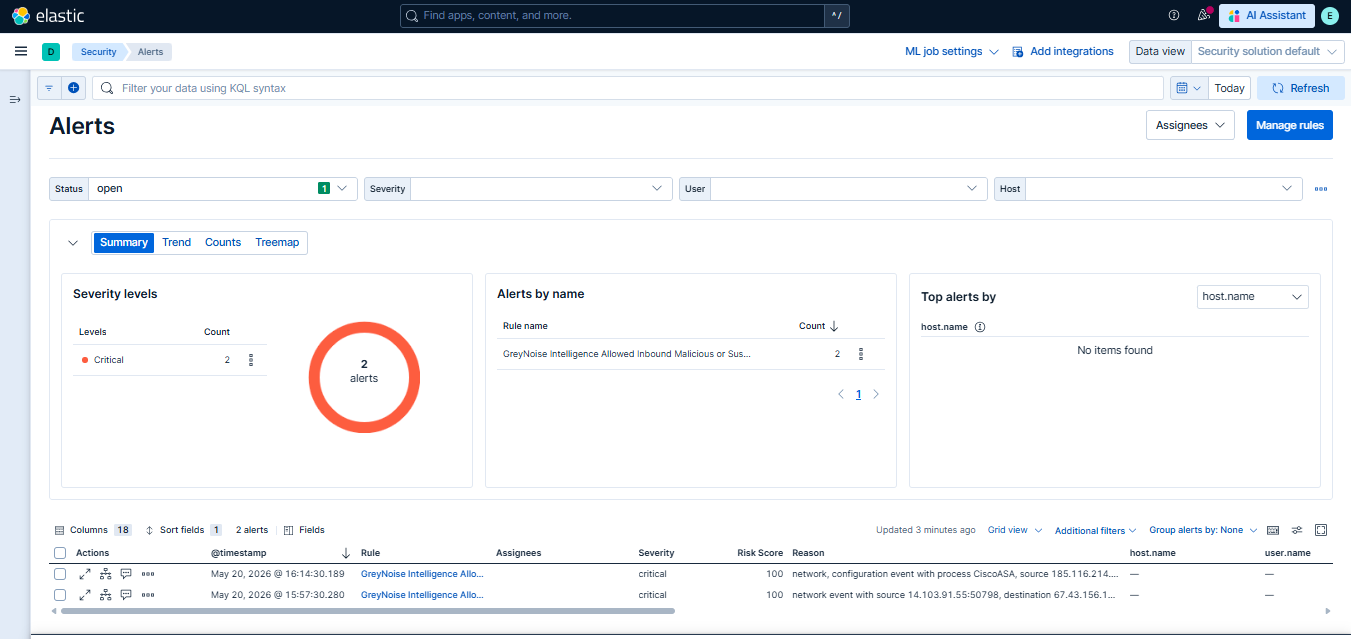
Once the rule is saved and enabled, alerts will appear in the Security > Alerts section when matches are detected.
-
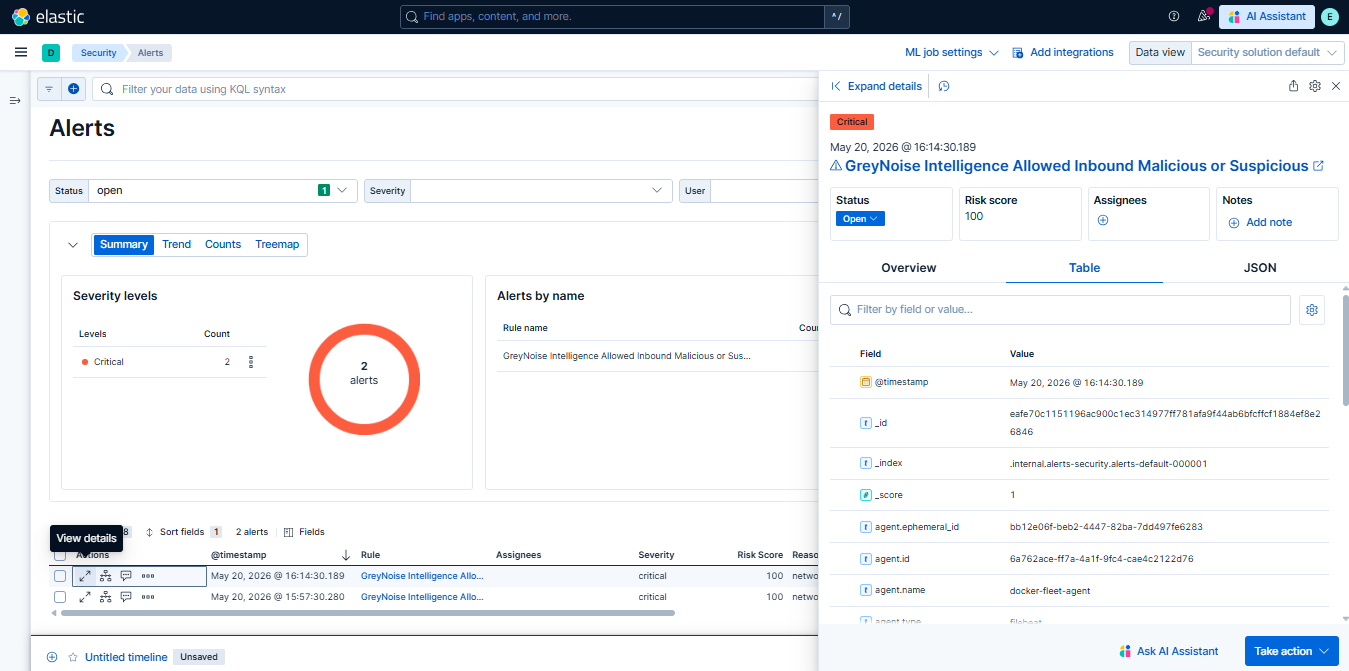
To view the details of the Alert, click on the

icon, then on the Alert viewer tab, and click on Table.
Understanding the Output
The Elastic Security detection rule correlates allowed inbound network traffic with GreyNoise threat intelligence and progressively filters events to surface high-confidence malicious or suspicious source IP activity:
- Targets only inbound traffic that was successfully allowed through perimeter controls.
- Correlates source.ip values against GreyNoise intelligence enrichment data.
- Retains only events where greynoise.classification is marked as malicious or suspicious.
- Outcome context including:
- Target IPs, hostnames, and ports contacted internally
- Source host context
- GreyNoise actor, organization, and classification details
- ASN and geographic origin of the source IP
- Surfaces the highest-confidence threat IPs first for analyst investigation and perimeter validation.
Result: Out of 39 raw inbound allowed events, only 2 events survived all filters. What remains is a highly focused set of external IPs, classified by GreyNoise as malicious or suspicious, that successfully established inbound connections to the environment. These events indicate potential perimeter control gaps, misconfigured firewall policies, or active exploitation attempts requiring immediate analyst review and remediation.
Results and Impact
Before vs After GreyNoise
| Before GreyNoise | After GreyNoise |
|---|---|
| 39 raw allowed inbound events | 2 confirmed threat IPs |
| None - just IPs and counts | IP classified as malicious or suspicious inline |
| Analysts must manually look up every IP in external threat intel tools | Classification is inline - no external lookup needed |
| High - 39 events with no context to separate threat from legitimate | Low - 37 events filtered, only confirmed threat retained |
| Minutes to hours, depending on analyst workload | Immediate - single result, and pre-validated |
| Limited to what the analyst manually checks | All 39 events are correlated to GreyNoise indicators in a single pass |
Benefits for the SOC Team
- Eliminates alert fatigue — 39 raw events reduced to a single confirmed threat IP, analysts focus only on what matters.
- Immediate prioritization — The most aggressive threat IP surfaces first, no manual triage needed.
- Confirmed threat context — GreyNoise classification removes ambiguity, giving analysts confidence before escalating.
- Pivot-ready output — clean source IP, target IP fields give analysts a direct starting point to expand investigation across EDR, auth, and proxy logs.
- Consistent coverage — query runs across all configured indexes, ensuring no blind spots across FW/WAF log sources.
Conclusion
GreyNoise integration with Elasticsearch not only enriches security detections with actionable threat intelligence but also significantly reduces alert fatigue by filtering out known internet-wide scanning and background noise activity. By incorporating GreyNoise intelligence directly into Elastic Security detection logic, SOC analysts can move from investigating large volumes of noisy inbound connection events to focusing on a smaller, prioritized set of high-confidence malicious or suspicious threats.
The result is improved analyst efficiency, faster investigation and triage, better visibility into potential perimeter security gaps, and increased confidence in identifying activity that may represent genuine targeted attacks against the environment.
The core value of this use case is reducing the noise between SOC analysts and the threats that actually matter.
Updated 4 months ago