
Splunk SIEM Use Case Guide 1
Reducing Alert Volume and Surfacing Targeted Threats
Reducing Alert Volume and Surfacing Targeted Threats
Overview
Every internet-facing organization is bombarded by automated scanners, bots, and opportunistic exploitation tools, generating thousands of firewall alerts per day that are not real threats. This leads to alert fatigue, overwhelming SOC analysts, and causing them to ignore alerts and miss real targeted attacks that get buried in the noise.
The GreyNoise Solution
GreyNoise maintains a global sensor network that observes which IPs are conducting mass, indiscriminate internet scanning. By integrating GreyNoise intelligence directly into Splunk, it can automatically identify and remove known mass-scanning traffic from your Splunk alert queue. The residual traffic after filtering that is unknown to GreyNoise is more likely to be a genuine, targeted attack against your organization.
The core logic is simple:
"If an IP is hitting everyone on the internet, it is not targeting YOU. Filter it out."
Prerequisites
Ensure your environment meets these prerequisites before beginning the setup:
Tools and Access
| Prerequisites | Details |
|---|---|
| Splunk | Splunk Enterprise or Splunk Cloud — 9.3.x, 9.4.x, 10.0.x, 10.2.x |
| GreyNoise App | GreyNoise App for Splunk installed from Splunkbase (App ID: 4113) |
| API Key | GreyNoise API key configured in the app under Configuration |
| Firewall Logs | Palo Alto (pan: traffic) or equivalent firewall logs indexed in Splunk |
| Log Fields | Logs must contain: src_ip, direction, src_zone fields or equivalent from other firewall logs |
Key SPL Command
The entire integration relies on one single command:
| Command | Purpose |
|---|---|
| gnmulti ip_field="src_ip" | Enriches every event with full GreyNoise intelligence for the source IP |
Implementation Steps
Step 1: Connectivity Verification of GreyNoise App
Open Splunk Search and run the test below to confirm the API key is active, and the gnmulti command is responding:
| makeresults
| eval src_ip="199.45.154.129"
| gnmulti ip_field="src_ip"
| table src_ip, greynoise_internet_scanner_intelligence_classification, greynoise_internet_scanner_intelligence_found, greynoise_error
Expected result: greynoise_classification should return a value — malicious, benign, or unknown. If greynoise_error appears, check the API key in the GreyNoise App configuration.
Step 2: Verify Your Firewall Logs are Indexed
Confirm your logs are in Splunk and the required fields are populated. Replace <YOUR_INDEX_NAME> with the name of your index when you execute the query.
index=<YOUR_INDEX_NAME>
| head 5
| table _time, src_ip, dst_ip, dst_port, app, direction, src_zone, src_country, src_org
Expected result: You should see src_ip, direction, and src_zone populated in the results before proceeding. If greynoise_error appears, check the API key in the GreyNoise App configuration before continuing.
Step 3: Run the Full Detection Search
This is the full production-ready detection search. It pulls inbound firewall logs, enriches each source IP with GreyNoise intelligence, and surfaces only the events that require analyst attention.
You can choose the desired query from the options below that matches your Splunk setup:
- Standard Index — Use this query if your firewall logs are stored in the standard Splunk index. Replace <YOUR_INDEX_NAME> with the name of your index when you execute this query.
``` FW/WAF logs ```
index=<YOUR_INDEX_NAME>
```Filter inbound internet traffic (inbound/incoming as per logs) ```
direction="inbound"
``` Match source IP value given in field src_ip against GreyNoise ```
| gnmulti ip_field="src_ip"
``` Exclude known scanning, internet_scanner_intelligence:found as greynoise_internet_scanner_intelligence_found ```
| where greynoise_internet_scanner_intelligence_found=0
| stats count by src_ip
``` Prioritize remaining events by source IP volume (threshold >= 10, then sorted) ```
| where count >= 10
| sort - count- Data Model — Use the query below if your firewall logs are in a data model. Replace <YOUR_DATA_MODEL_NAME> with the name of your data model when you execute this query.
| tstats summariesonly=t count FROM datamodel=<YOUR_DATA_MODEL_NAME>
    WHERE <YOUR_DATA_MODEL_NAME>.direction="inbound"
    BY <YOUR_DATA_MODEL_NAME>.src_ip
| rename <YOUR_DATA_MODEL_NAME>.src_ip AS src_ip
| gnmulti ip_field="src_ip"
| where greynoise_internet_scanner_intelligence_found=0
| stats count by src_ip
| where count >= 10
| sort - count
Step 4: Save as a Scheduled Alert
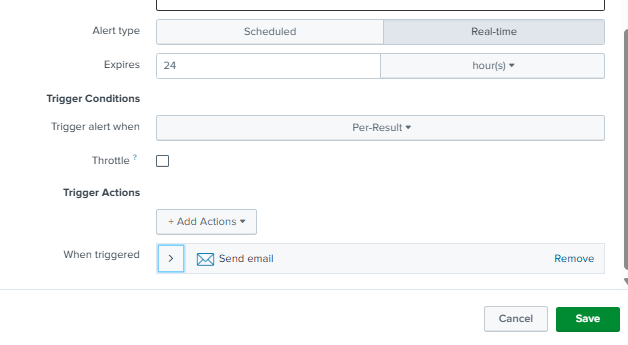
Once the search is verified end-to-end, save it as a recurring alert to run automatically:
-
Click Save As → Alert
-
Title: UC1 - Inbound Threat Detection (GreyNoise Enriched)
-
Schedule: Every 15 mins
-
Time Range: Every 20 mins
-
Trigger Condition: For each result, if the count is greater than 10, trigger an alert for each.
-
Trigger Actions: Send Email to the SOC queue, or execute a Webhook to push context into ticketing tools such as ServiceNow, Jira, or SOAR platforms.
-
Click Save.
Note: You can change the Schedule and Time Range duration as per your needs.
Understanding the Output
The SPL query enriches every inbound source IP through the gnmulti command, then applies progressive filters as follows:
- Targets only inbound direction traffic across indexes.
- Excludes all IPs GreyNoise recognizes as known internet scanners via greynoise_internet_scanner_intelligence_found=0 — Shodan, Censys, mass crawlers are dropped.
- Retains only IPs with 10 or more hits — eliminating low-frequency opportunistic noise.
- Sorts by count descending — most active IPs surface first.
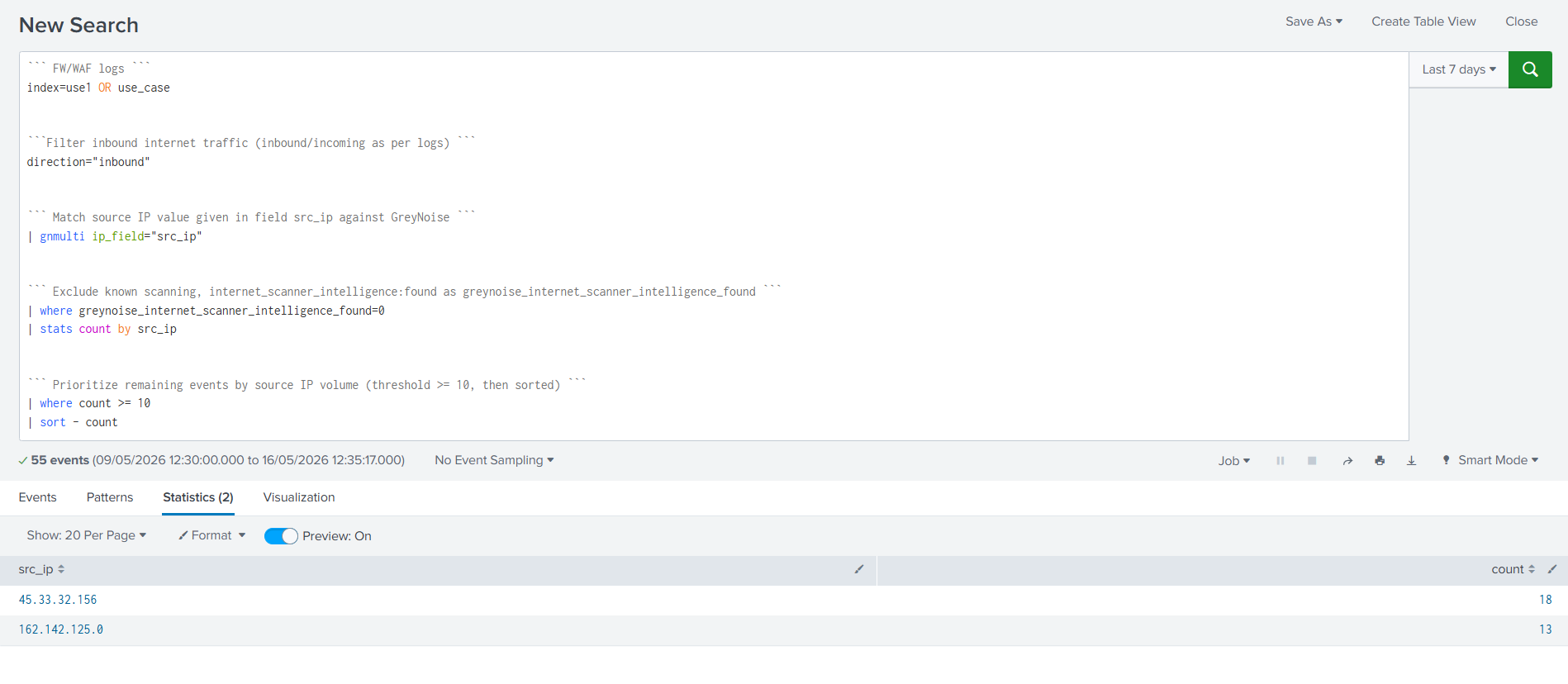
Result: What remains is a tightly focused list of inbound IPs that are unrecognized by GreyNoise's scanner intelligence yet repeatedly hitting your environment. Out of 55 raw events, only 2 IPs survived — 45.33.32.156 (18 hits) and 162.142.125.0 (13 hits) — making them the highest priority candidates for immediate investigation.
Alert Volume Reduction
| Filter / Logic | What it Removes | Impact on Alert Volume |
|---|---|---|
| direction="inbound" | Internal noise & standard outbound browsing traffic. | High: Keeps analysts laser-focused on external threats rather than internal noise. |
| found=0 (GreyNoise) | Mass internet scanners (Shodan, Censys, and known security researchers). | Maximum: Eliminates known "internet background noise" that requires no action. |
| where count >= 10 | One-off port scans and opportunistic "drive-by" pings. | High: Drops low-frequency anomalies; retains only persistent, targeted activity. |
| The Net Result | 53 out of 55 events dropped. | 96% Reduction: Only 2 high-risk IPs require human investigation. |
Results and Impact
Before vs After GreyNoise
| Before GreyNoise | After GreyNoise |
|---|---|
| 55 inbound events | 55 inbound events |
| Analysts must manually check all 55 events across threat intel feeds. | Analysts ignore known internet noise automatically. |
| 0% (All events treated as potentially suspicious). | 96.3% of events were suppressed as known noise or low-frequency. |
| 55 noise-heavy events (High alert fatigue). | 2 high-fidelity alerts (True anomalies). |
| Hours wasted chasing known scanners (Shodan, Censys, etc.). | Minutes. Immediate pivot to internal logging for the 2 suspect IPs. |
Benefits for the SOC Team
-
Significant Reduction in Event Volume: Known internet scanners, confirmed malicious actors, internal traffic, and single-event probes are automatically filtered before they reach the queue. Analysts are presented only with events that genuinely require human evaluation, preventing critical alerts from being buried.
-
Automated Triage and Investigation: Source IPs are automatically evaluated using threat intelligence. Routine classifications—such as benign cloud services, known proxy nodes, internal traffic, or low-priority scans—are resolved automatically. Only true anomalies are escalated to analysts.
-
Elimination of Manual Enrichment Time: Contextual data, actor tagging, CVE associations, and network data are attached to events instantly at query time. This removes the need for manual lookups and external pivot searches, saving hours of investigative time per shift.
-
Immediate Identification of Targeted Threats: By stripping away the background noise of the internet, the system automatically elevates stealthy, targeted reconnaissance that has no prior reputation. True anomalies are instantly spotlighted rather than being lost in a sea of routine internet traffic.
-
Structural Eradication of Alert Fatigue: The reduction in noise scales with the environment. As inbound traffic grows, the enrichment layer absorbs the volume. The analyst queue remains lean and focused, reducing analyst burnout and the risk of missing a real breach due to volume overload.
Conclusion
GreyNoise not only adds intelligence to your alerts but also eliminates those that are not worthy of investigation in the first place. By incorporating a single gnmulti command within the current Splunk firewall search, your SOC team goes from looking at raw, noisy events without context to seeing a clean, prioritized, enriched queue where every remaining alert is genuinely worth their time.
The core value of this use case is to reduce the noise between your analysts and the threats that actually matter.
Updated 5 months ago