
Elasticsearch Use Case Guide 3
Flag Authentication Attempts from Compromised Hosts
Flag Authentication Attempts from Compromised Hosts
Overview
Every organization's identity provider and VPN gateway receives thousands of authentication attempts daily - the vast majority of which are automated credential stuffing, brute-force, and password spray attacks. Standard detection logic treats all of these uniformly: a failed login generates a low-priority alert, and a successful login is trusted and passed through.
This approach has a critical blind spot.
Some of these attempts originate from IPs that GreyNoise has confirmed are actively conducting mass scanning operations, running botnet infrastructure, or operating known command-and-control (C2) servers. When one of those IPs successfully authenticates to your environment, it is not a routine login event - it is an immediate indicator of compromise, regardless of whether the credentials were technically valid.
The GreyNoise Solution
By integrating GreyNoise threat intelligence into authentication logs within Elasticsearch, this use case correlates both successful and failed authentication events against GreyNoise's global threat intelligence dataset, surfacing two high-value security signals.
A successful authentication from a GreyNoise malicious or suspicious IP should be treated as a high-severity incident requiring immediate investigation, as it may indicate compromised credentials or unauthorized access from known malicious infrastructure.
A failed authentication from the same class of IPs should be treated as a medium-severity event for investigation and monitoring, as it may indicate targeted credential stuffing, brute-force, or password spraying activity against the organization.
Prerequisites
Ensure your environment meets these prerequisites before beginning the setup:
Tools and Access
| Prerequisites | Details |
|---|---|
| Elasticsearch / Elastic Stack | An Elastic Stack deployment with required permissions. |
| GreyNoise API Key | GreyNoise API key to configure GreyNoise integration. |
| GreyNoise Integration | A successfully installed GreyNoise integration, with GreyNoise threat intelligence data being collected. |
Authentication Telemetry
- Access to authentication-related telemetry logs, such as Identity Providers (IdP), VPN gateways, Active Directory authentication logs, SSO platforms, cloud authentication services, or remote access systems.
- Authentication Event Type: Field indicating the event is authentication-related.
- Source IP: The external initiating IP address associated with the authentication attempt.
- Authentication Result: Field indicating whether the authentication attempt succeeded or failed.
Implementation Steps
To achieve this use case, two separate Elastic Security detection rules will be created — one to detect successful authentication attempts originating from GreyNoise malicious or suspicious IPs, and another to detect failed authentication attempts from the same class of IPs. Follow the steps below:
Step 1: Verification of the GreyNoise Data Ingestion
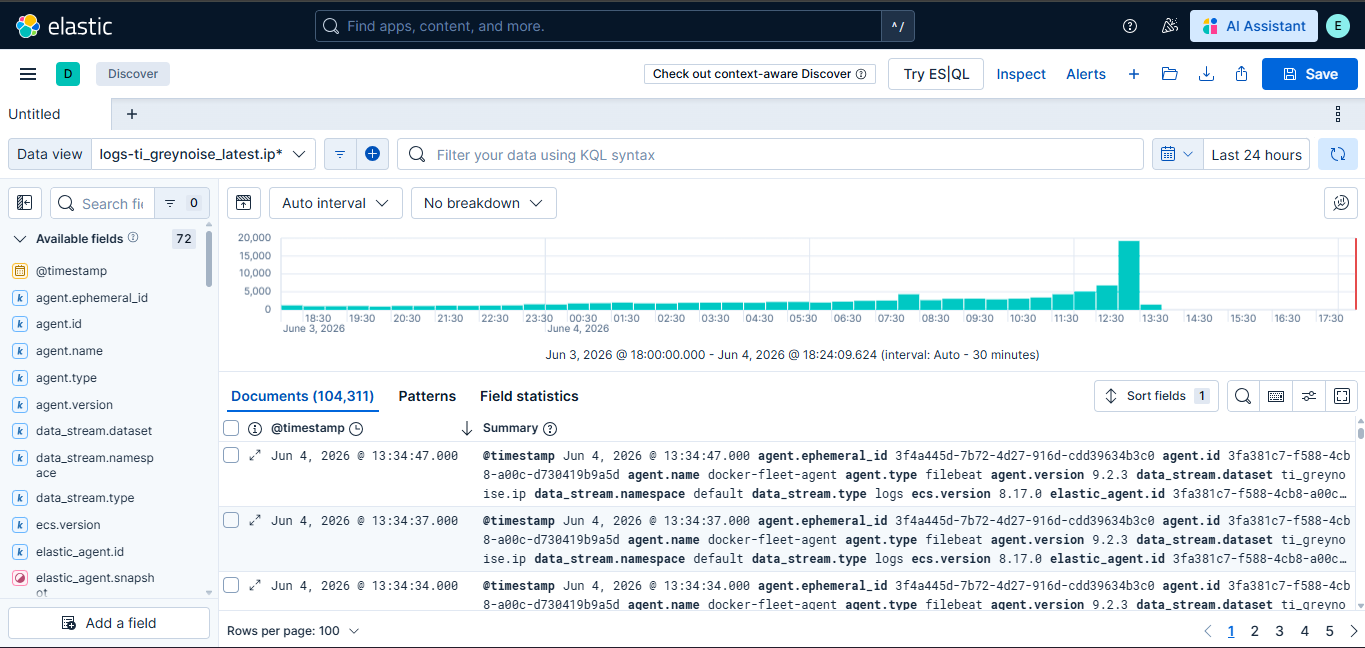
To verify successful GreyNoise data ingestion in Elasticsearch, check the logs-ti_greynoise_latest.ip* data stream in Kibana Discover.
Expected Result: You should see documents containing GreyNoise threat intelligence and enrichment data.
Step 2: Verify if Authentication/User Login Logs exist in the instance
Confirm that your authentication logs are present in Elasticsearch. In Kibana Discover, under your relevant data view, run the following KQL query:
event.category: "authentication"Expected Result: You should see firewall or network events populated in the results panel before proceeding. Validate that the returned events contain a populated source.ip field, as these IP fields are used for GreyNoise enrichment and correlation. Also, verify the event.outcome field is present in the result set.
Step 3: Create a Detection Rule for Successful Authentication Attempts
Create an Elastic Security detection rule in Elasticsearch that correlates successful authentication events with GreyNoise threat intelligence indicators. The rule should detect successful authentication attempts originating from IPs classified by GreyNoise as malicious or suspicious.
Steps to create a detection rule:
-
Navigate to Security > Rules > Detection Rules and click Create New Rule.
-
Select Indicator Match as the rule type and make the following changes.
-
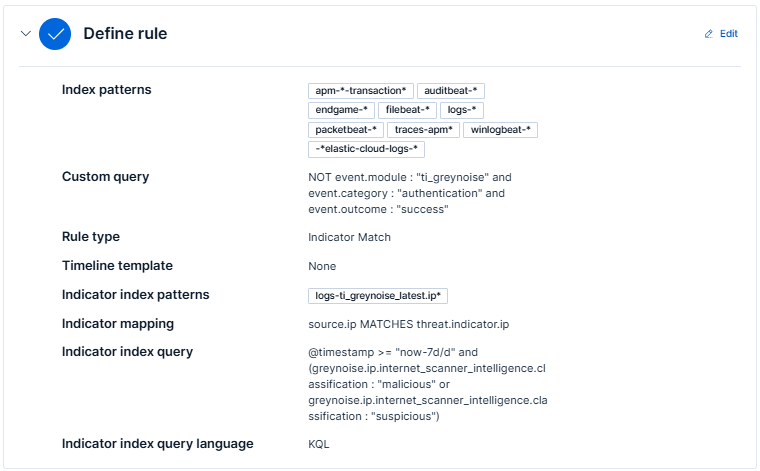
In the Define Rule section:
-
Index Pattern: Add the index pattern relevant to the data you want to monitor. For best results, use perimeter or network traffic data, such as firewall, IDS/IPS, VPN, proxy, or network flow logs (for example,
logs-panw.*,logs-cisco_asa.*, orlogs-suricata.*). Keep the pattern as specific as possible for better performance. -
Custom Query: The following KQL query filters successful authentication events while excluding GreyNoise integration logs. It identifies successful authentication attempts that are eligible for GreyNoise threat intelligence correlation.
NOT event.module : "ti_greynoise" and event.category : "authentication" and event.outcome : "success" -
Indicator index patterns: Use
logs-ti_greynoise_latest.ip*. -
Indicator index query: The following KQL query filters GreyNoise threat intelligence indicators collected within the last 3 days and retains only IPs classified as malicious or suspicious. These indicators are used to correlate against inbound network traffic events during detection.
@timestamp >= "now-3d/d" and (greynoise.ip.internet_scanner_intelligence.classification : "malicious" or greynoise.ip.internet_scanner_intelligence.classification : "suspicious") -
Indicator Mapping:
- Field: Map to the field in your Elastic environment containing IPs, e.g.,
source.ip. - Indicator Index Field:
threat.indicator.ip
- Field: Map to the field in your Elastic environment containing IPs, e.g.,
-
Required fields (Optional): Add
threat.indicator.ip. -
Related integrations (Optional): Add GreyNoise.
-
-
In the About Rule section:
-
Name: e.g
UC3 - Successful auth from Compromised Hosts (GreyNoise)
-
Description: e.g
Detects authentication attempts from IPs GreyNoise has classified as malicious or unknown. Successful logins from malicious IPs are treated as active compromise indicators.
-
Default Severity: e.g.,
critical. -
Default risk score: 100
-
Tags: Add
GreyNoise(used for filter Alerts generated by this rule by rule transforms),Authentication, Threat Intelligence,andIdentity Security. -
Max alerts per run: Default is 100; configurable up to 1000.
-
Indicator prefix override: Set to
greynoise.ipto enrich alerts with GreyNoise data.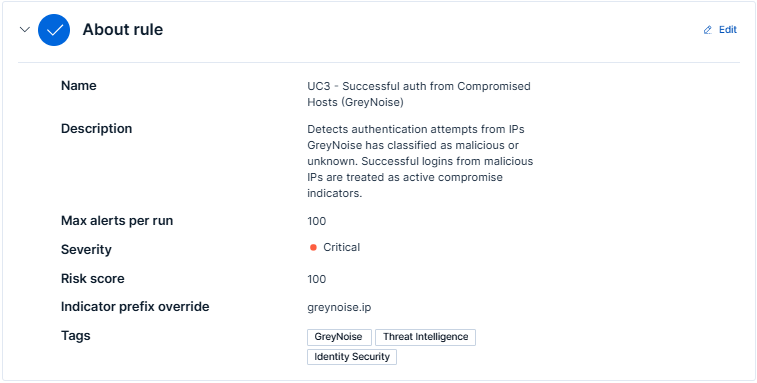
-
-
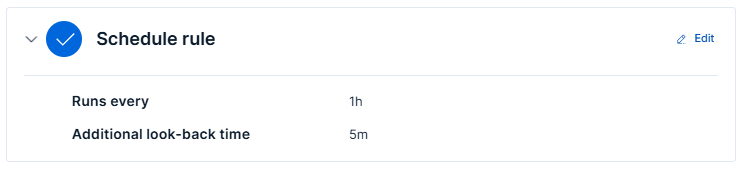
In the Schedule Rules section:
-
Set Runs Every - Defines how frequently the rule runs.
-
Additional Lookback Time - Specifies how far back to check for matches.
-
-
Under the Rule Actions section, configure automated response actions to execute whenever the detection rule generates an alert. (Optional)
-
Click on Create & enable rule.
Step 4: Create a Detection Rule for Failed Authentication Attempts
Create an Elastic Security detection rule in Elasticsearch that correlates failed authentication events with GreyNoise threat intelligence indicators. The rule should detect failed authentication attempts originating from IPs classified by GreyNoise as malicious or suspicious.
Steps to create a detection rule:
-
Navigate to Security > Rules > Detection Rules and click Create New Rule.
-
Select Indicator Match as the rule type and make the following changes.
-
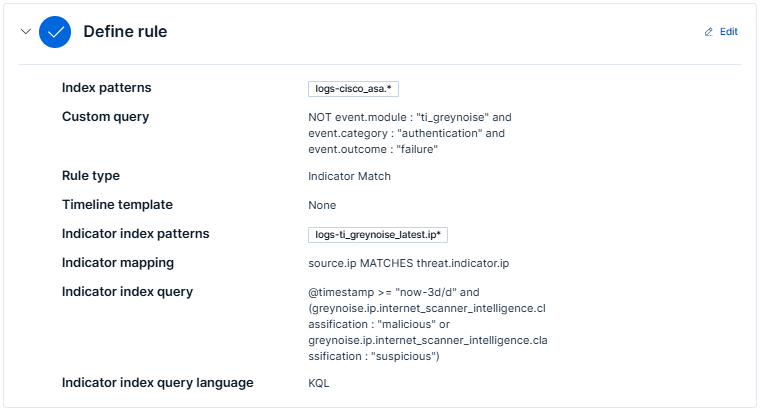
In the Define Rule section:
-
Index Pattern: Add the index pattern relevant to the data you want to monitor. For best results, use perimeter or network traffic data, such as firewall, IDS/IPS, VPN, proxy, or network flow logs (for example,
logs-panw.*,logs-cisco_asa.*, orlogs-suricata.*). Keep the pattern as specific as possible for better performance. -
Custom Query: The following KQL query filters failed authentication events while excluding GreyNoise integration logs. It identifies failed authentication attempts that are eligible for GreyNoise threat intelligence correlation.
NOT event.module : "ti_greynoise" and event.category : "authentication" and event.outcome : "failure" -
Indicator index patterns: Use
logs-ti_greynoise_latest.ip*. -
Indicator index query: The following KQL query filters GreyNoise threat intelligence indicators collected within the last 3 days and retains only IPs classified as malicious or suspicious. These indicators are used to correlate against inbound network traffic events during detection.
@timestamp >= "now-3d/d" and (greynoise.ip.internet_scanner_intelligence.classification : "malicious" or greynoise.ip.internet_scanner_intelligence.classification : "suspicious") -
Indicator Mapping:
- Field: Map to the field in your Elastic environment containing IPs, e.g.,
source.ip. - Indicator Index Field:
threat.indicator.ip
- Field: Map to the field in your Elastic environment containing IPs, e.g.,
-
Required fields (Optional): Add
threat.indicator.ip. -
Related integrations (Optional): Add GreyNoise.
-
-
In the About Rule section:
-
Name: e.g
UC3 - Failed auth from Compromised Hosts (GreyNoise)
-
Description: e.g
Detects failed authentication attempts originating from IPs classified by GreyNoise as malicious or suspicious.
-
Default Severity: e.g.,
High. -
Default risk score: 75
-
Tags: Add
GreyNoise(used for filter Alerts generated by this rule by rule transforms),Authentication, Threat Intelligence,andIdentity Security. -
Max alerts per run: Default is 100; configurable up to 1000.
-
Indicator prefix override: Set to
greynoise.ipto enrich alerts with GreyNoise data.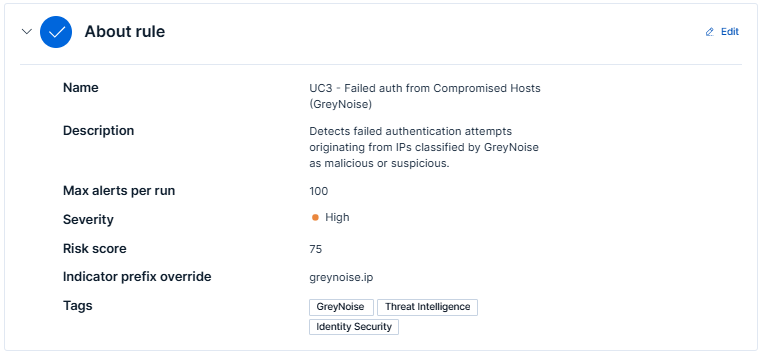
-
-
In the Schedule Rules section:
-
Set Runs Every - Defines how frequently the rule runs.
-
Additional Lookback Time - Specifies how far back to check for matches.
-
-
Under the Rule Actions section, configure automated response actions to execute whenever the detection rule generates an alert. (Optional)
-
Click on Create & enable rule.
Steps to view alerts
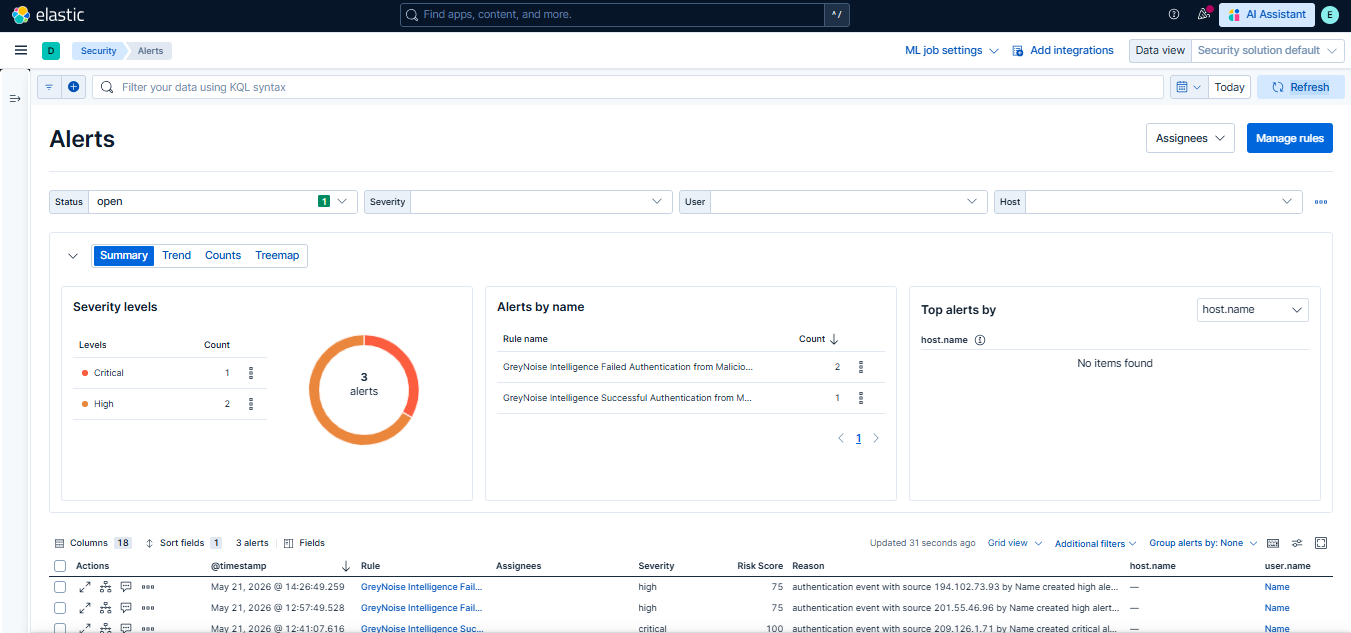
-
Once the rule is saved and enabled, alerts will appear in the Security > Alerts section when matches are detected.
-
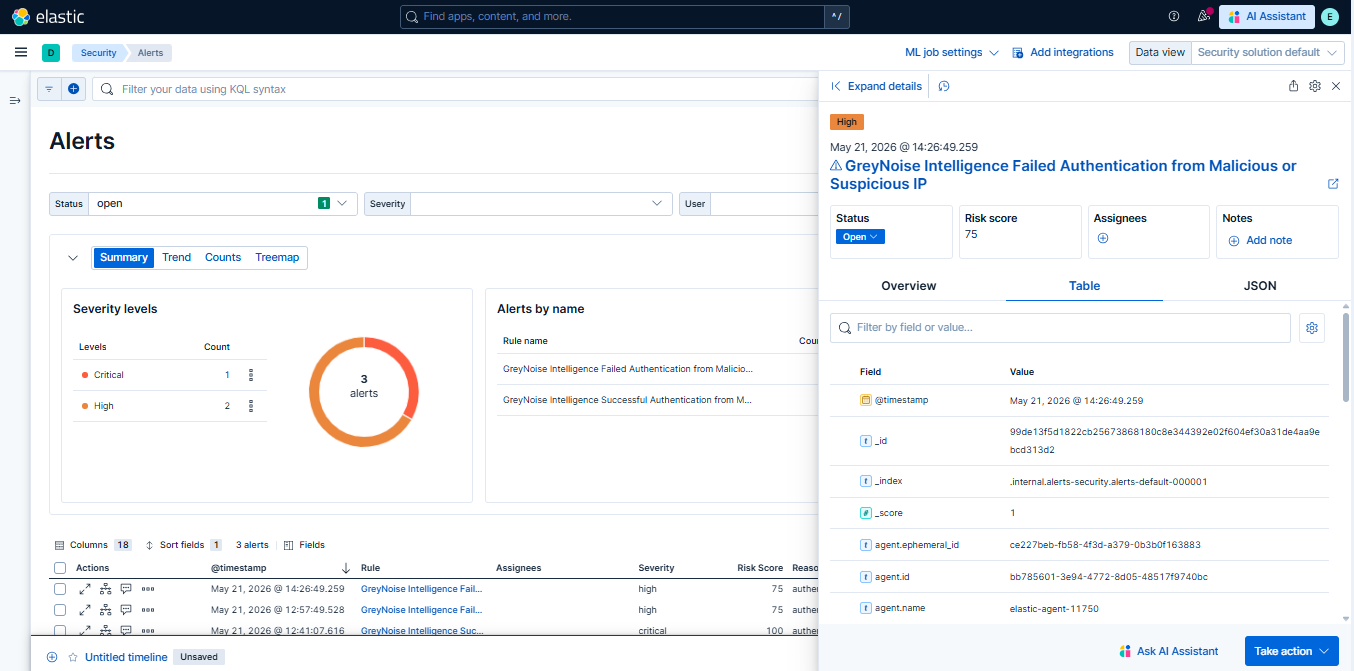
To view the details of the Alert, click on the

icon, then on the Alert viewer tab, and click on Table.
Understanding the Output
The Elastic Security detection rules correlate authentication events against GreyNoise threat intelligence and apply the following logic:
- Evaluates both successful and failed authentication attempts against GreyNoise
maliciousorsuspiciousclassifications. - Filters out routine authentication noise and surfaces only high-confidence authentication activity associated with known malicious infrastructure.
- Prioritizes authentication events based on the outcome of the login attempt and GreyNoise classification.
Every alert generated by these rules carries a severity level and risk score. The table below defines what each severity level means to the analyst:
| Severity Label | Risk Score | What It Means |
|---|---|---|
| Critical | 100 | A GreyNoise malicious or suspicious IP successfully authenticated into the environment. Treat this as a potential active compromise requiring immediate investigation, session validation, credential reset, and, if necessary, containment actions. |
| High | 75 | A GreyNoise malicious or suspicious IP attempted authentication, but the authentication failed. This may indicate credential stuffing, brute-force attacks, password spraying, or targeted reconnaissance of the environment. |
Result: Out of 113 raw authentication events, only 3 events were left for investigation. Hundreds of raw authentication events are reduced to a small set of high-priority alerts.
Benefits for the SOC Team
| Benefit | Detail |
|---|---|
| Distinguishes Targeted vs Opportunistic | Separates mass spray attacks from IPs specifically probing your organization's identity infrastructure. |
| Catches Compromises Standard Logs Miss | A successful login from a C2 IP looks normal in raw auth logs. GreyNoise context makes it immediately visible. |
| Clear Severity Triage | Critical-100 and High-75 verdicts tell analysts exactly what to work on first — no interpretation required. |
| Earlier Intervention | Failed auth attempts from flagged IPs are surfaced before a successful compromise occurs. |
Conclusion
Without GreyNoise, authentication attempts originating from malicious infrastructure may appear identical to routine login activity and pass through traditional monitoring unnoticed. With GreyNoise threat intelligence integrated into Elasticsearch detection logic, successful and failed authentication attempts from GreyNoise malicious or suspicious IPs are immediately surfaced as high-priority security alerts with enriched threat context for analyst investigation.
This enables SOC teams to move away from investigating large volumes of undifferentiated authentication noise and instead focus on a prioritized, intelligence-driven set of authentication threats. The result is faster detection, earlier response, improved analyst efficiency, and reduced exposure to credential-based attacks such as brute-force attempts, password spraying, and compromised credential abuse.
Updated 4 months ago