
C2 Intelligence
C2 Intelligence gives you a new lens into the attack chain: the downstream infrastructure that attackers control after a successful exploit. While GreyNoise's Internet Scanner Intelligence tracks IPs actively scanning and attacking the internet, C2 Intelligence surfaces the command-and-control servers delivering malware payloads, staging files, and potentially orchestrating broader campaigns — paired with Malware Hash data to help you identify the specific tools being deployed.
How It Works
When GreyNoise sensors receive exploit payloads, those payloads often contain references to external IP addresses — destinations that the compromised device is instructed to contact after infection. GreyNoise extracts these callback destinations from captured HTTP request payloads, attempts to download files from them, and enriches the results with threat intelligence.
This intelligence is payload-derived, meaning it comes from analysis of exploit traffic captured by the GreyNoise sensor network — not from direct scanning observation. A callback IP is not necessarily a scanner itself, and may not appear in Internet Scanner Intelligence at all.
ImportantBecause C2 Intelligence is derived from payload analysis rather than first-hand observation, a standard IP lookup may show "unknown" or "not observed" for a callback IP that has no direct scanning history.
Attack Stages
Each callback IP is classified into one of three stages based on the evidence available:
| Stage | Label | Description |
|---|---|---|
| 0 | Unconfirmed | This IP was observed in a scanner payload but has not yet been confirmed as a callback destination. No file was successfully downloaded. |
| 1 | File Downloaded | A file was successfully downloaded from this IP, confirming it as an active callback destination serving payloads. |
| 2 | C2 Suspected | Based on a weighted analysis of behavioral signals — including VirusTotal detections, sandbox network activity, and malware associations — this IP is suspected of being part of a C2 chain. |
Accessing C2 Intelligence
The Callback Tab
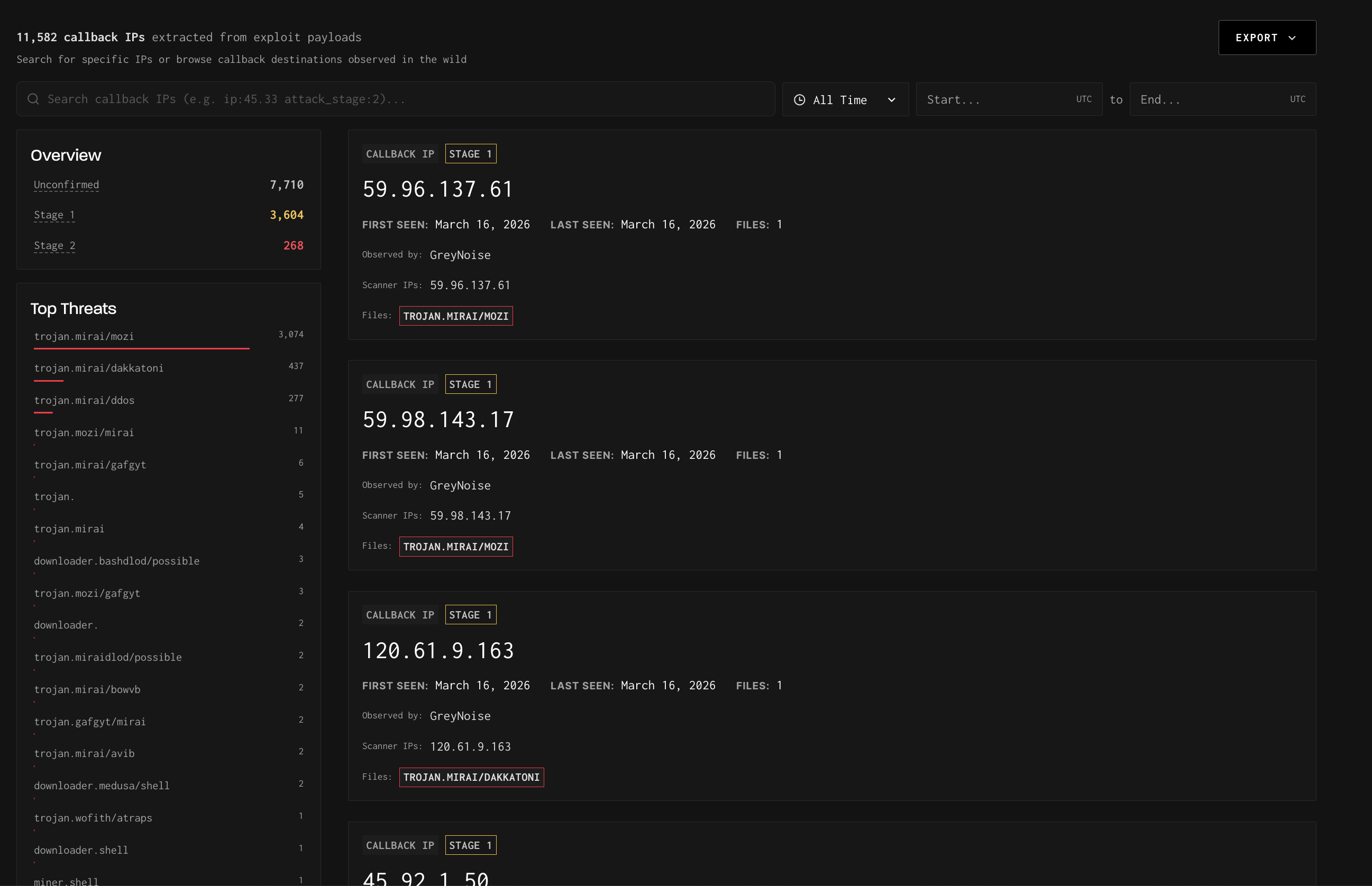
The dedicated Callback tab is accessible from the Query navigation menu. Everything in this view is scoped exclusively to callback IPs — you are not looking at scanner IPs here.
The Callback tab provides:
- A searchable, filterable list of all callback IPs observed by GreyNoise
- An Overview sidebar showing counts by attack stage (Unconfirmed, Stage 1, Stage 2)
- A Top Threats sidebar listing the most prevalent malware families linked to callback activity
- Time range filtering and Export functionality
Each result card shows the callback IP, its attack stage, when it was first and last seen, the number of associated files, and the malware families linked to that IP.
TipUse the time range filter to scope callback activity to a specific investigation window, or export the full list for integration into your threat intelligence workflow.
Callback IP Detail Pages
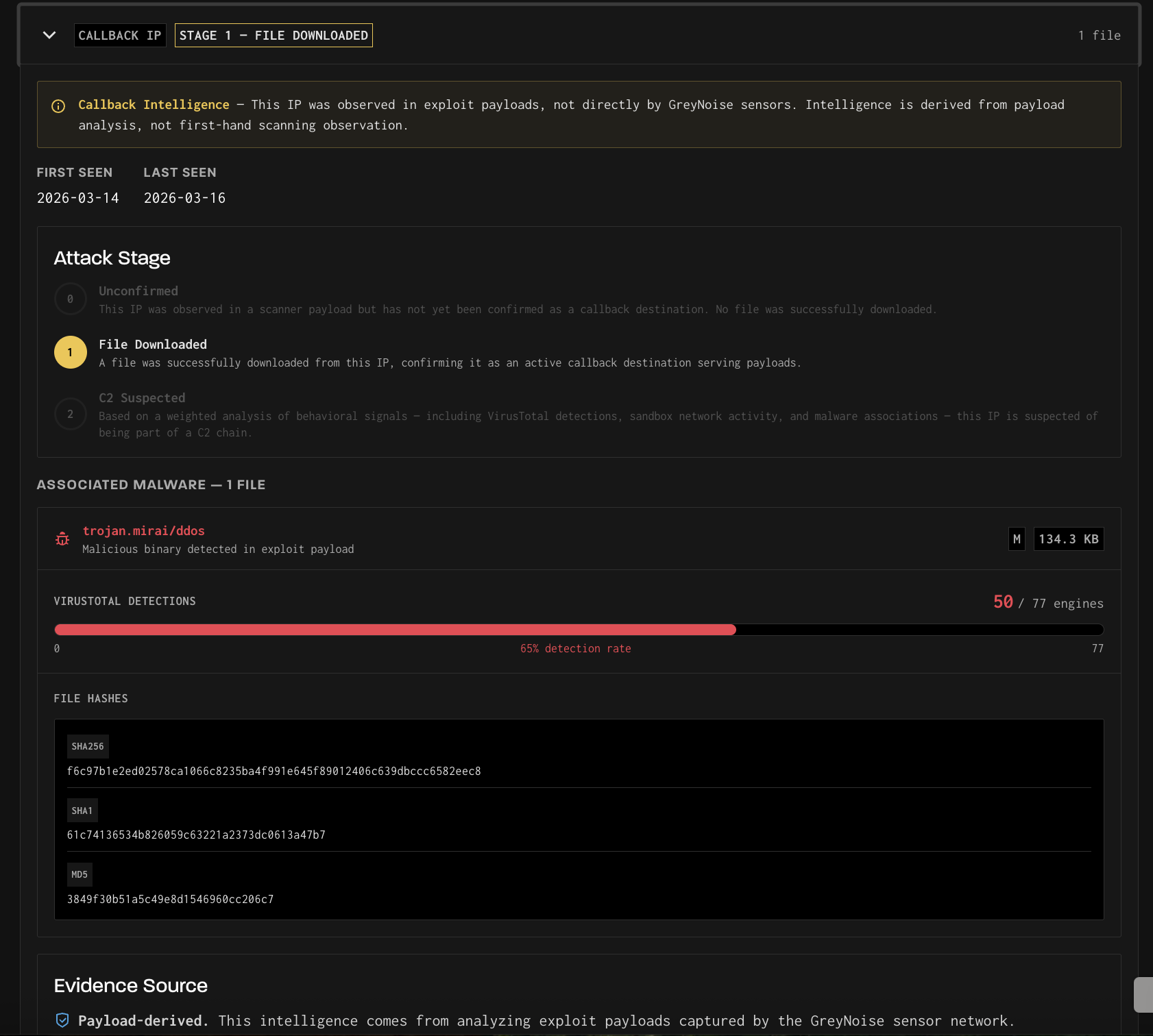
Clicking a callback IP opens a detail page. The layout depends on whether the IP has also been observed as an active internet scanner.
Callback-only IPs display a dedicated detail page that includes:
- The assigned attack stage, with a description of how each stage is determined
- Associated malware files, including file size, malware family label, VirusTotal detection counts, and file hashes (MD5, SHA1, SHA256)
- An Evidence Source panel explaining the provenance of the intelligence
- A Scanner IPs panel listing the source IPs whose exploit payloads reference this callback destination
IPs observed as both a scanner and a callback display a standard IP detail page with an expandable Callback IP banner at the top. The banner shows the attack stage and file count and can be expanded to reveal full callback intelligence details — associated files, evidence source, and scanner IP cross-references. The rest of the page displays that IP's direct scanning activity, as normal.
TipIf an IP appears in both your scanner intelligence and as a callback destination, this is a meaningful signal — it may indicate the same infrastructure is used for both reconnaissance and payload delivery.
Finding Scanner IPs by Callback Destination
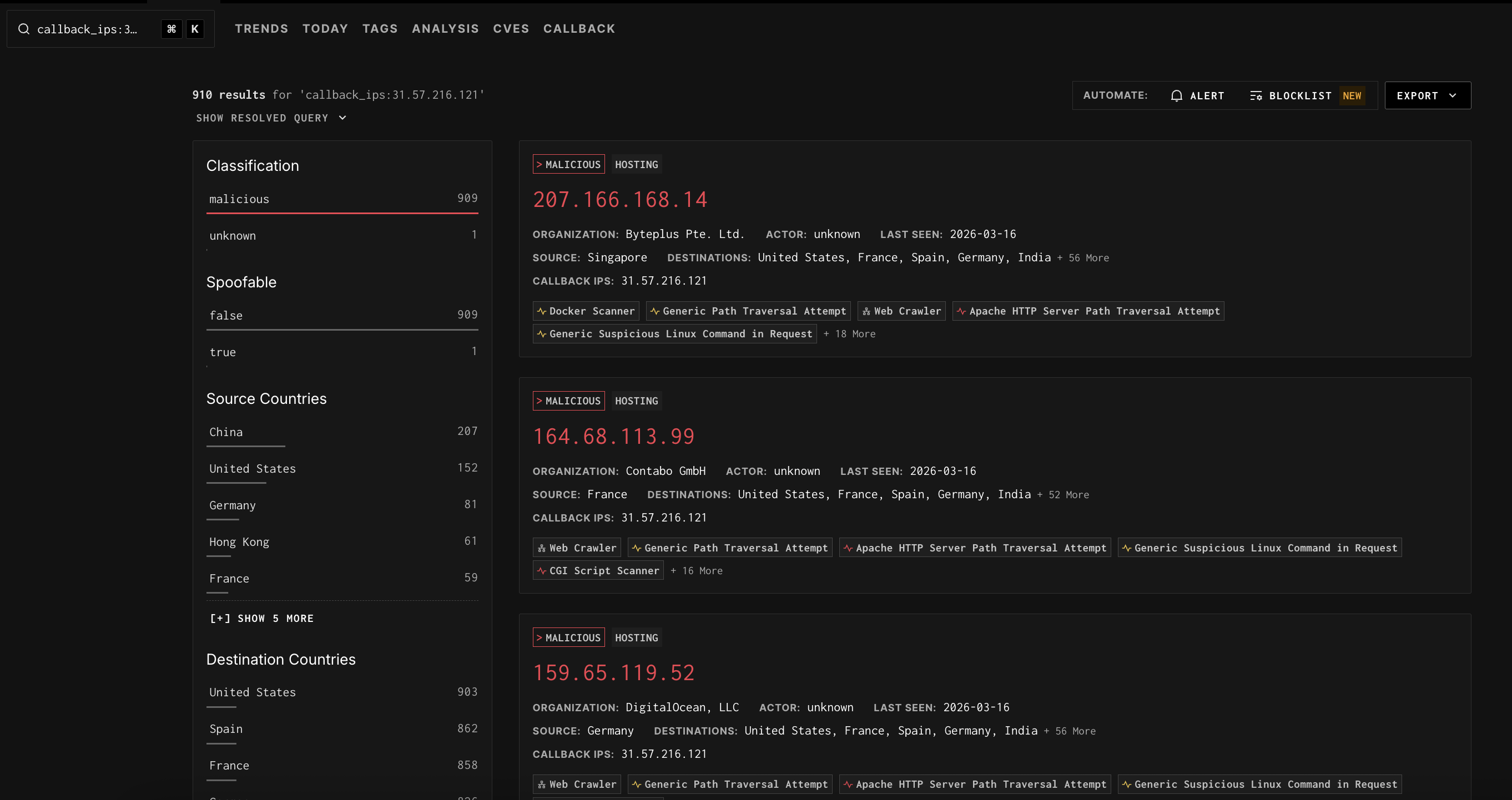
You can use GNQL to find which scanner IPs have referenced a specific callback IP in their exploit payloads. This is done with the callback_ips GNQL parameter.
callback_ips:175.107.3.226This query returns the scanner IPs whose payloads contain a reference to 175.107.3.226 as a callback destination — not the callback IP itself. The result set behaves like any other GNQL query: you can apply additional filters, view facets, create alerts, or add results to a blocklist.
This is conceptually similar to querying by source country — you are filtering the scanner IP population by a shared attribute, in this case, the callback destination embedded in their payloads.
ImportantThe
callback_ipsGNQL parameter returns scanner IPs that reference the specified address — not the callback IP record itself. To view the callback IP's own detail page, look up the IP directly or navigate to it from the Callback tab.
Callback IPs on the IP Detail Page
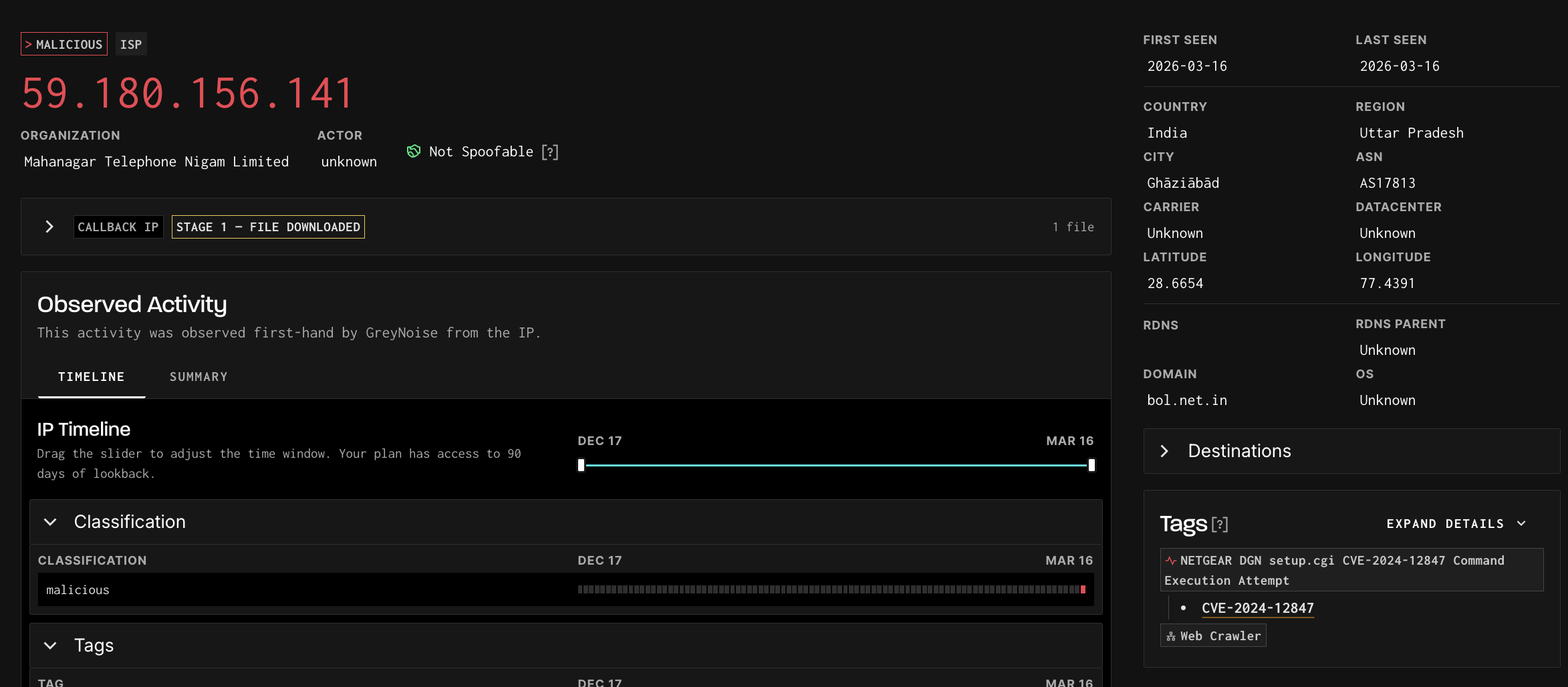
Callback IP data for an IP is also surfaced within its standard detail page. Under the Summary tab, a Callbacks section lists the callback IPs found in that scanner's exploit payloads, linking out to the corresponding callback IP detail pages.
This allows you to move naturally from a scanner IP to the downstream infrastructure it was pointing victims toward — without leaving the IP detail view.
Associated Malware Files
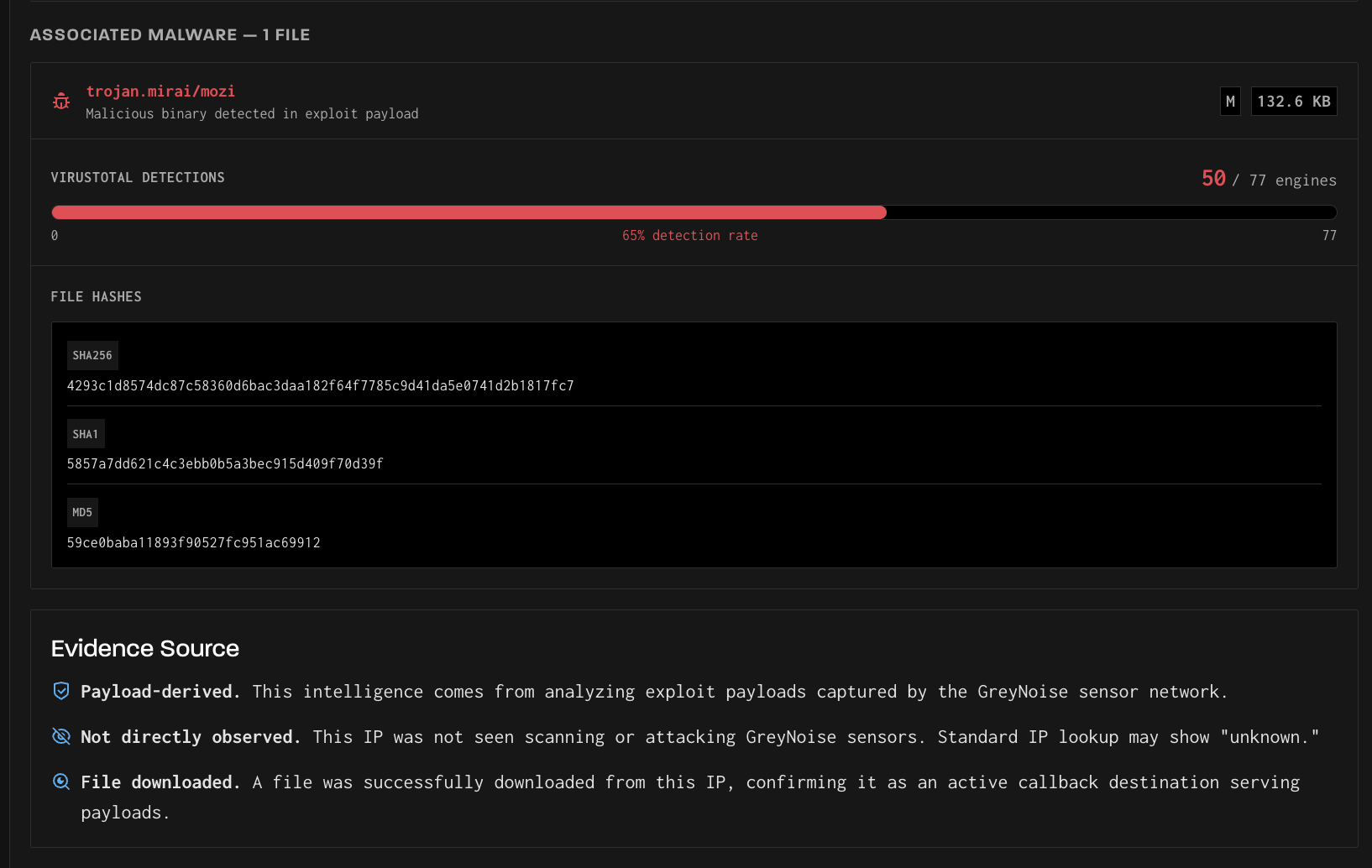
When GreyNoise successfully downloads a file from a callback IP (Stage 1 or above), that file is stored and analyzed. The associated file details are displayed on the callback IP detail page and include:
- Malware family label — The threat classification of the file (e.g.,
trojan.mirai/mozi) - File size — The size of the downloaded binary
- VirusTotal detection count — The number of antivirus engines that flagged the file, displayed as a ratio (e.g., 51 / 77 engines) with a detection rate percentage
- File hashes — SHA256, SHA1, and MD5 hashes for independent verification and cross-referencing with other threat intelligence sources
TipFile hashes can be used to search VirusTotal, your SIEM, or other threat intelligence platforms to find additional context, related samples, or prior detections of the same malware.
Multiple files may be associated with a single callback IP if it has served different payloads over time. Each file is listed separately with its own detection data.
API Access
Callback IP Intelligence is available via a dedicated API endpoint, allowing you to programmatically query callback IP details, retrieve associated file hashes, and integrate this data into your existing workflows and tooling. See the API Reference for full endpoint documentation.
Availability
Callback IP Intelligence is available as a dataset add-on to your GreyNoise subscription. If you are interested in access, reach out to your GreyNoise account team or contact us at [email protected].
Updated about 3 hours ago